SQLiteDatabase
Namespace: Syadeu.Database
public struct SQLiteDatabase : IValidationSQLiteTable, SQLiteColumn의 데이터베이스의 최상위 구조체
Inheritance: Object -> SQLiteDatabase
Implements: IValidation
- 편리하게 db 데이터를 제작할 수 있습니다.
- 원하는 형태로 데이터 테이블을 가공받아 사용할 수 있습니다.
데이터베이스를 불러올려면 Initialize(string, string, bool)으로 데이터베이스 구조체를 생성해야합니다. BackgroundJob을 반환하는 모든 작업은 호출된 순서에 의해 순차적으로 수행되며, 이 작업이 수행되는 동안 SearchTable(string, string, object)과 같이 데이터베이스에 직접 연결하여 불러오는 메소드들은 피해야됩니다. 이를 안전하게 사용하려면 IsConnectionOpened으로 먼저 체크 후 사용하세요.
LoadInMemory가 True일 경우, 모든 테이블들은 SQLiteTable의 형태로 Tables에 저장되며, 이를 그대로 TryGetTable(in string, out SQLiteTable)으로 불러서 사용하거나, SQLiteTableAttribute를 상속받은 구조체를 사용하여 TryGetTableValue<T>(in string, int, out T), 혹은 SQLiteTable.TryReadLine<T>(in int, out T)으로 가공된 데이터로 받아서 사용할 수 있습니다.
사용자 정의된 SQLiteTableAttribute 구조체로 가공된 데이터를 받아오면 쉽고 간편하게 데이터 재가공 및 읽기가 가능하다는 장점이 있지만, 시스템 비용이 크다는 단점이 존재합니다. 매우 많은 작업(예를 들어 for, 혹은 foreach와 같은 iteration 작업들)은 데이터를 가공하여 사용하는 대신, SQLiteTable.TryReadLine(in int, out IReadOnlyList<KeyValuePair<string, object>>), SQLiteTable.CompairLine<TKey>(TKey, in ISQLiteReadOnlyTable)과 같이 미가공 데이터를 사용하거나 반환하는 비용이 작은 메소드로 대체될 수 있습니다.
아래는 엔진내에서 db 파일을 Profiling 할 수 있는 툴 입니다.
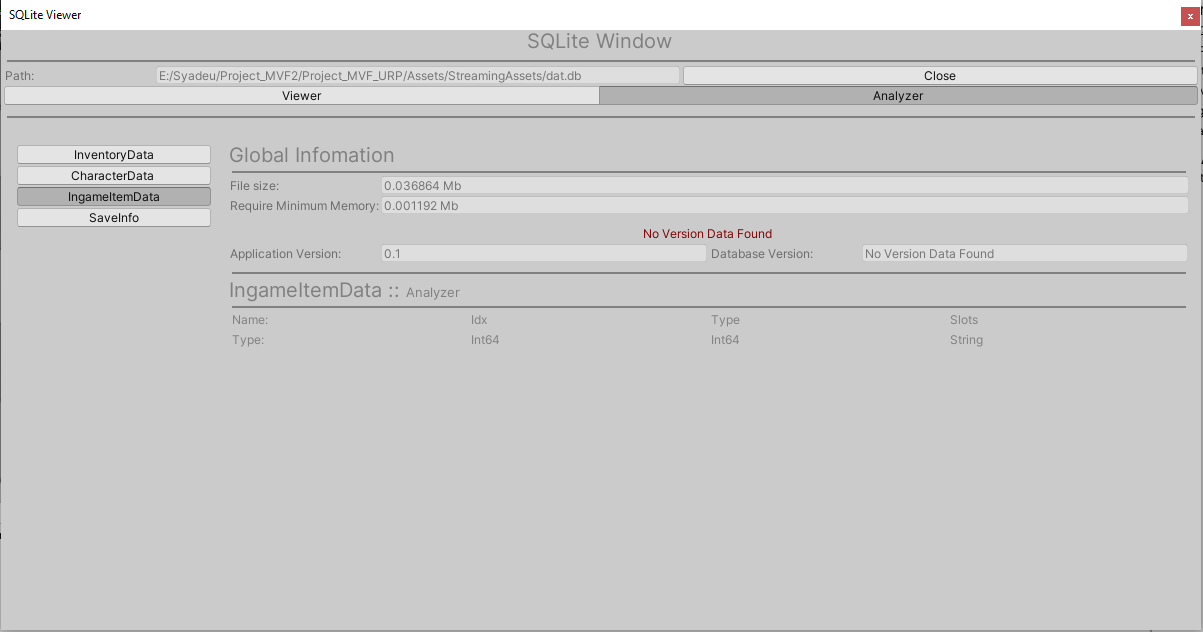
아래는 데이터베이스를 새로 만들거나 로드하는 방법에 대해 설명합니다.
public void InitializeDatabase()
{
    string _path = Path.Combine(Application.dataPath, "TestDBFolder");
    SQLiteDatabase db = SQLiteDatabase.Initialize(
        _path,
        // 해당 이름으로 .db파일을 로드합니다. 없으면 새로 만듭니다.
        name: "testDB",
        // 해당 db 내 모든 테이블을 로드하여 이 구조체 안 Tables에 저장할지를 결정합니다.
        loadInMemory: true);
}
새로운 db 구조를 생성하려면, 먼저 db를 구성할 테이블을 정의하여야합니다.
아래는 헷갈리는 string 형식의 쿼리문으로 테이블을 구성하는 방법이 아닌, 보다 익숙한 형태로 테이블을 정의하는 방법과 생성에 대해 설명합니다.
// SQLiteTable 임을 알리는 어트리뷰트를 선언하여야지 테이블 구조가 선언됩니다.
[SQLiteTable]
public struct SQLiteTestTableData
{
    // 구조체 내 값들은 Property 를 권장하지만, Member도 사용 할 수 있습니다.
    // Property로 값을 선언하면 사용자가 외부에서 해당 Property 내부의 값을 임으로 수정할 수 없게하는 안전장치가 됩니다.

    [SQLiteDatabase(IsPrimaryKey = true)] public int Idx { get; set; }
    [SQLiteDatabase] public string TestString { get; set; }
    [SQLiteDatabase] public float TestSingle { get; set; }
    [SQLiteDatabase] public double TestDouble { get; set; }

    [SQLiteDatabase] public byte[] TestBinary { get; set; }

    [SQLiteDatabase] public UnityEngine.Vector3 TestVector3 { get; set; }
    [SQLiteDatabase] public Unity.Mathematics.float3 TestFloat3 { get; set; }
}

public IEnumerator CreateNewTableWithStruct()
{
    // 먼저 db를 로드합니다.
    string _path = Path.Combine(Application.dataPath, "TestDBFolder");
    SQLiteDatabase db = SQLiteDatabase.Initialize(_path, "testDB", true);

    // 해당 구조체와 주어진 이름으로 db에 새로운 테이블을 작성합니다.
    // BackgroundJob 을 반환하는 모든 메소드들은 비동기 작업임을 유의하여야 합니다.
    BackgroundJob job = db.CreateTable<SQLiteTestTableData>("TestTable");

    // 해당 잡이 끝날때까지 기다립니다.
    yield return new WaitForBackgroundJob(job);

    Assert.IsTrue(db.HasTable("TestTable"), "TestTable Create Failed");
}

public IEnumerator CreateNewTableWithRawData()
{
    // 먼저 db를 로드합니다.
    string _path = Path.Combine(Application.dataPath, "TestDBFolder");
    SQLiteDatabase db = SQLiteDatabase.Initialize(_path, "testDB", true);

    List<KeyValuePair<System.Type, string>> _columns = new List<KeyValuePair<System.Type, string>>
    {
        new KeyValuePair<System.Type, string>(typeof(int), "Idx"),
        new KeyValuePair<System.Type, string>(typeof(string), "TestString")
    };

    // 해당 구조체와 주어진 이름으로 db에 새로운 테이블을 작성합니다.
    // BackgroundJob 을 반환하는 모든 메소드들은 비동기 작업임을 유의하여야 합니다.
    BackgroundJob job = db.CreateTable("TestTable", _columns);

    // 해당 잡이 끝날때까지 기다립니다.
    yield return new WaitForBackgroundJob(job);

    Assert.IsTrue(db.HasTable("TestTable"), "TestTable Create Failed");
}

public IEnumerator CreateNewTableWithStructList()
{
    // 먼저 db를 로드합니다.
    string _path = Path.Combine(Application.dataPath, "TestDBFolder");
    SQLiteDatabase db = SQLiteDatabase.Initialize(_path, "testDB", true);

    List<SQLiteTestTableData> rows = new List<SQLiteTestTableData>();
    for (int i = 1; i < 4; i++)
    {
        rows.Add(new SQLiteTestTableData());
    }
    SQLiteTable _table = rows.ToSQLiteTable("TestTable");

    // 해당 구조체와 주어진 이름으로 db에 새로운 테이블을 작성합니다.
    // BackgroundJob 을 반환하는 모든 메소드들은 비동기 작업임을 유의하여야 합니다.
    BackgroundJob job = db.CreateTable(_table);

    // 해당 잡이 끝날때까지 기다립니다.
    yield return new WaitForBackgroundJob(job);

    Assert.IsTrue(db.HasTable("TestTable"), "TestTable Create Failed");
    SQLiteTable _newTable = db.GetTable("TestTable");
    Assert.IsTrue(_newTable.Count == rows.Count, $"TestTable Data Count is not equal {_newTable.Count} : {rows.Count}");

    for (int i = 0; i < 3; i++)
    {
        Assert.IsTrue(_newTable.ReadLine<SQLiteTestTableData>(in i).Equals(rows[i]), "TestTable Data is not equal");
    }
}