GridManager
# Deleted at 2.0.0
Namespace: Syadeu.Mono
이 객체는 더 이상 사용되지 않습니다. Syadeu.Presentation.Map.GridSystem 으로 모든 기능이 이관되었습니다.
[obsolete]
public class GridManager : StaticManager<GridManager>
2D Plane 위에 그리드를 쉽게 데이터화하여 원하는 데이터를 넣거나 수정, 바이너리로 저장 및 불러올 수 있는 매니저 객체입니다.
Inheritance: StaticManager<T> -> GridManager
- 주어진 공간을 입력한 사이즈에 맞춰서 그리드를 데이터로 생성할 수 있습니다.
- 생성한 그리드를 바이너리로 저장하거나 불러올 수 있습니다.
- Unity NavMesh 와 연동하여, Obstacle이 존재하는 구간을 감지할 수 있습니다.
-
#define CORESYSTEM_UNSAFE를 통해, 포인터로 대규모 그리드 탐색을 할 수 있습니다.
GridManager는 쉽게 말해, 월드를 평면 좌표에 데이터만으로 재구성한 Grid 를 만들어주고, 관리하는 매니저 객체입니다.
Grid 와 각 GridCell 들은 사용자가 정의한 커스텀 데이터를 담을 수 있는 강력한 기능을 지원합니다. 단 해당 데이터는 반드시 struct 이어야되며, Serializable 어트리뷰트와 ITag 구현부를 상속하여야됩니다. 해당 데이터 내 managed 타입을 포함하지않으면 성능은 더더욱 개선됩니다.
이러한 조건들은 이후 더 강력한 기능인 바이너리 캐스트와 메모리 캐스팅을 위함입니다. C#에서의 managed 타입은 메모리 사이즈를 측정할 수 없어 불가피하게 Serializable 어트리뷰트를 선언받아 MemoryStream으로 바이너리 변환을 시도합니다. 탐색은 사용자 선언부에 따라, 인덱스가 아닌 포인터 탐색으로 조금 더 빠른 접근도 지원합니다.
Grid 를 바이너리 형태로 변환하려면 반드시 BinaryWrapper 로 변환되어야하며, 다시 바이너리를 Grid 를 가져올때도 바이너리에서 BinaryWrapper 로 먼저 변환되어야합니다.
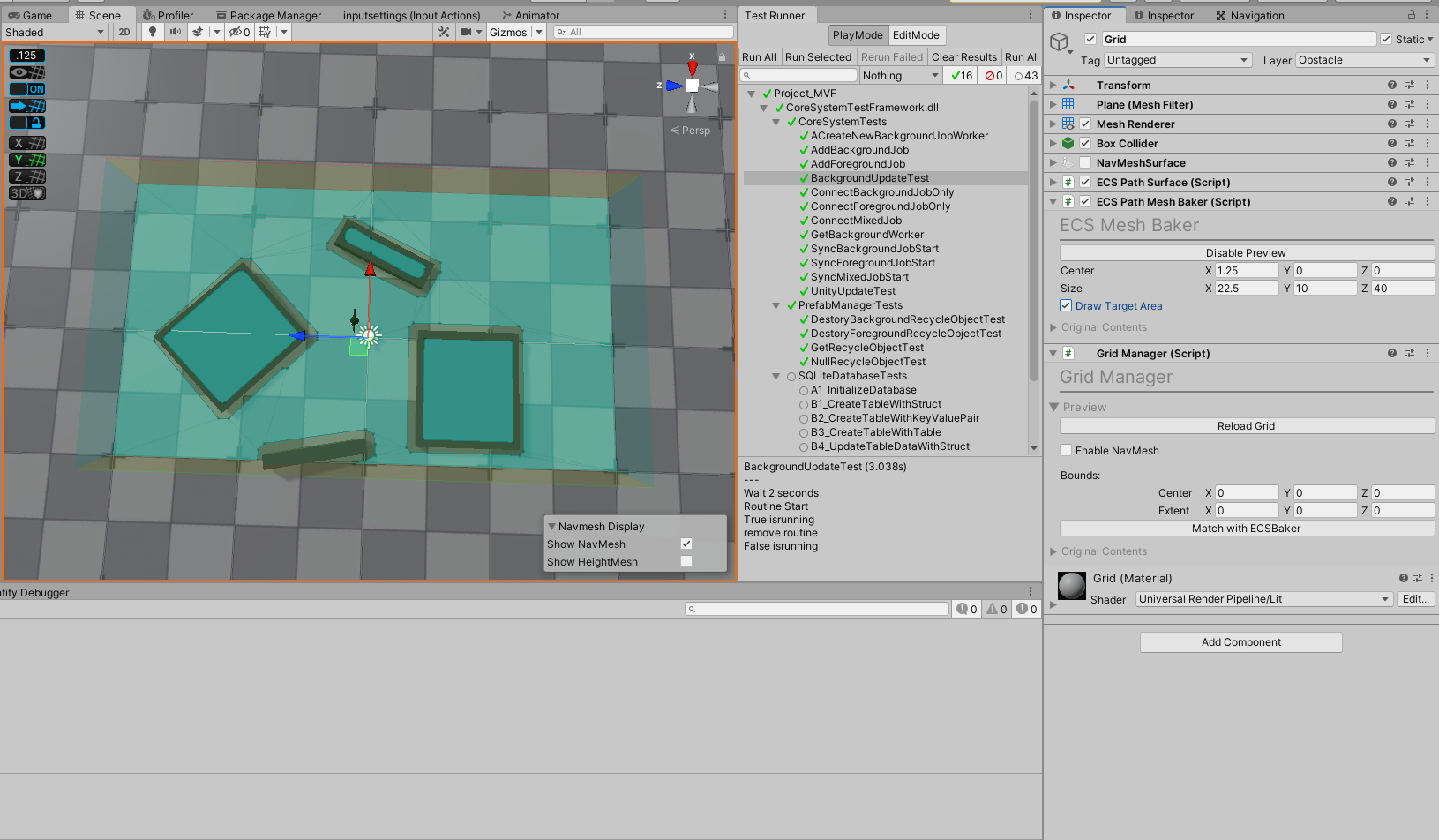
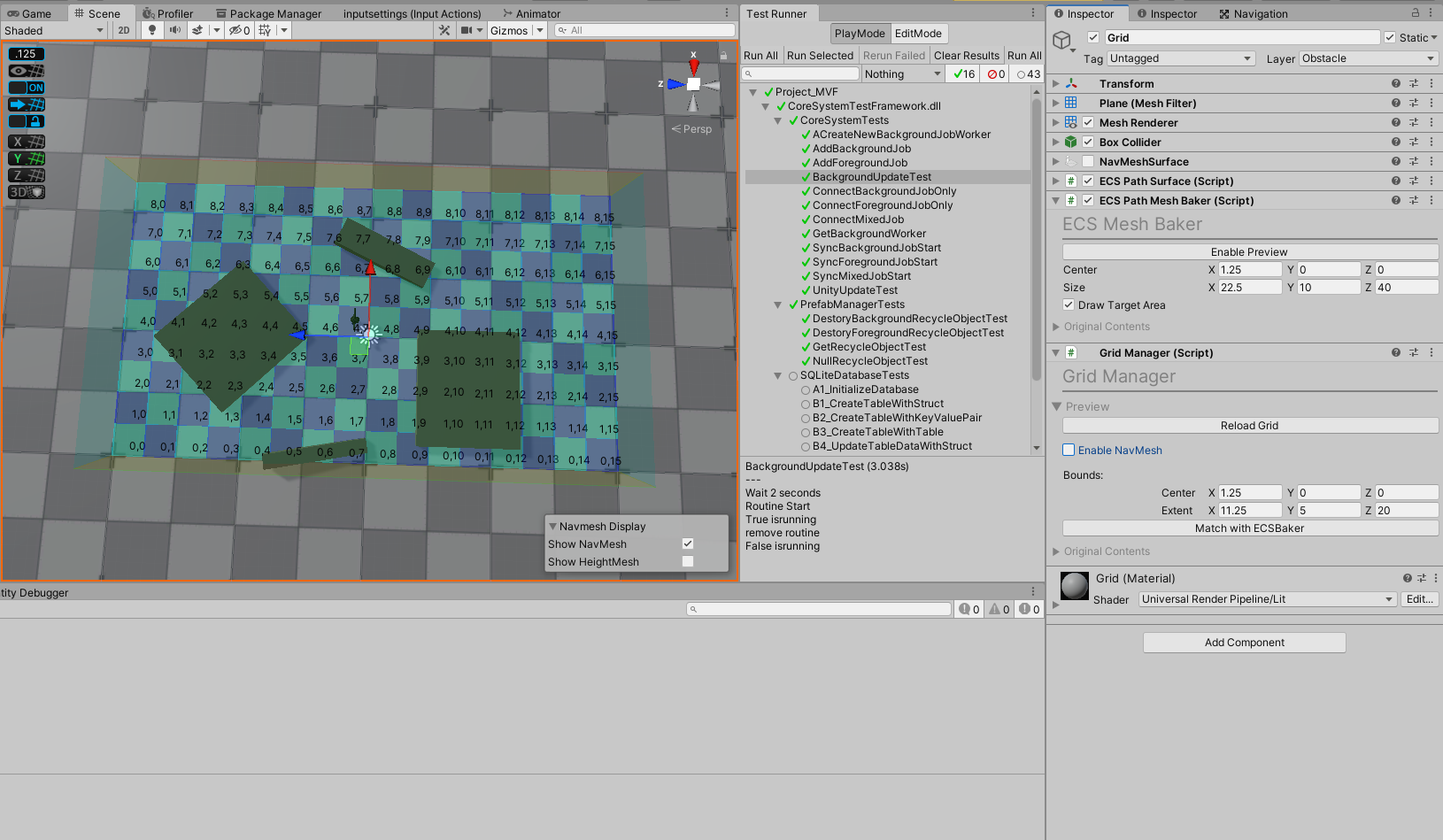
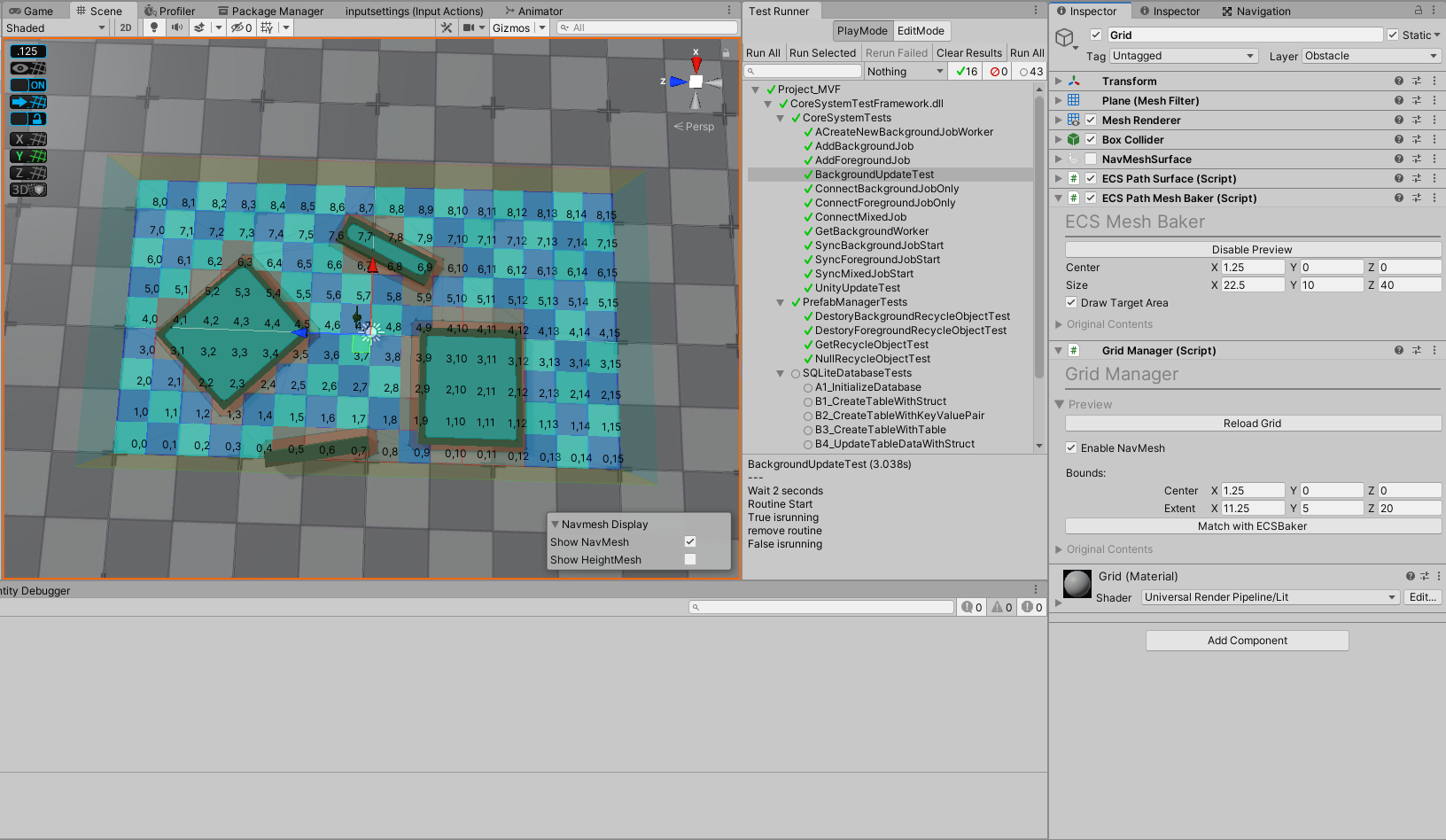
GridManager는 생성, 혹은 로드된 그리드가 없으면 작동하지않습니다.
아래는 간단하게 그리드를 만드는 방법에 대해 설명합니다.
using UnityEngine;

public void CreateTestGrid()
{
    int _gridIdx = GridManager.CreateGrid
        (
        	// 그리드의 총 크기를 넣습니다.
        	new Bounds(Vector3.zero, Vector3.one * 10),
        	// 그리드 셀의 크기를 결정합니다.
        	// 그리드 셀은 무조건 정사각형으로 생성되며,
        	// 입력한 값은 세로폭, 가로폭이 됩니다.
        	gridCellSize: 1,
        	// 이 그리드가 유니티 NavMesh 에 영향받는 그리드인지를 설정합니다.
        	enableNavMesh: false
	    );

    // 앞에서 생성한 그리드를 가져옵니다.
    ref GridManager.Grid _grid1 = ref GridManager.GetGrid(_gridIdx);
    // 그리드를 특정하지 않고, 입력한 월드 좌표값에 있는 그리드를 가져옵니다.
    ref GridManager.Grid _grid2 = ref GridManager.GetGrid(Vector3.zero);
    // 여기서 두 그리드는 같은 그리드입니다. _grid1 == _grid2

    GridManager.UpdateGrid
        (
        	_gridIdx,
        	new Bounds(Vector3.zero, Vector3.one * 10),
        	gridCellSize: 1,
        	enableNavMesh: true,

        	// 이 그리드를 GL로 화면에 그릴지를 결정합니다.
        	// GL의 기본 비용이 상당히 높으므로 사용에 유의해야됩니다.
        	drawGL: true,
        	// 디버그용,
        	// 유니티 씬뷰안에서 그리드셀의 인덱스값을 표시할지를 결정합니다.
        	drawIdx: true
		);

    int _clearedGridCount = GridManager.ClearGrids();
    Debug.Log($"Clear and Disposed grid count: {_clearedGridCount}");
}
GridManager를 통해 Grid 를 생성하면 생성된 Grid 의 고유 인덱스를 반환합니다. 해당 인덱스를 사용하여 GridManager에게 해당 인덱스의 Grid 를 가져오도록 명령할 수 있습니다.
아래는 Grid 를 생성한 후, 바이너리로 변환한 뒤, 다시 Grid 로 변환하는 방법에 대해 설명합니다.
using UnityEngine;

private Bounds m_Bounds = new Bounds(Vector3.zero, Vector3.one * 1000);

public void GridBinaryTest()
{
    int _gridIdx = GridManager.CreateGrid(m_Bounds, 1, false);
    ref GridManager.Grid _grid = ref GridManager.GetGrid(in _gridIdx);

    // 바이너리로 변환합니다.
    GridManager.BinaryWrapper _wrapper = _grid.ConvertToWrapper();
    byte[] _binary = wrapper.ToBinary();

    // 이제 바이너리로 변환된 그리드를 새로 넣을 것이므로, 기존 그리드들은 삭제합니다.
    GridManager.ClearGrids();

    // 그리드로 다시 변환합니다.
    GridManager.BinaryWrapper _converted = GridManager.BinaryWrapper.ToWrapper(_binary);
    GridManager.Grid _convertedGrid = _converted.ToGrid();

    // 다시 변환된 그리드를 로드합니다.
    GridManager.ImportGrids(_convertedGrid);

	bool check1 = GridManager.HasGrid(grid.Guid);
    bool check2 = GridManager.HasGrid(grid.Idx);
    bool check3 = GridManager.HasGrid(Vector3.zero);

    Debug.Log($"{check1} == {check2} == {check3}");

    // Expected Logs
    //
    // true == true == true
}
만들어진 그리드를 런타임에서 사용하기 위해, 월드 좌표값으로 Grid 를 가져올 수 있습니다. 아래는 해당 방법에 대해 설명합니다.
// User class 가 정의되있다는 전제하에, User의 transform 을 받아서
// 해당 position의 Grid 와 GridCell 을 가져옵니다.

private User m_User;
public void GetGridAndCell()
{
    // Grid 는 구조체이므로, 포인터로 넘겨받아야지 실제 Grid를 수정할 수 있습니다.
    // ref 를 명시하지않으면, 복사본을 반환합니다.
    // m_User의 transform.position 으로 해당 위치에 존재하는 Grid 를 가져옵니다.
    ref GridManager.Grid _grid = ref GridManager.GetGrid(m_User.transform.position);

    // m_User의 transform.position 으로 해당 위치의 GridCell 을 반환합니다.
    ref GridManager.GridCell _cell = ref _grid.GetCell(m_User.transform.position);

    /*
    	... Some Data Works ...
    */
}
Grid 와 GridCell 에는 CustomData 라는 사용자 데이터를 할당할 수 있습니다.
아래는 CustomData 구조체를 선언하고, 해당 데이터를 쓰고, 읽는 방법에 대해 설명합니다.
// 커스텀 데이터는 ITag interface 를 무조건 상속받아야되고, struct 타입이어야됩니다.
// struct 데이터 타입에 unmanaged 타입이 되면 binary serialize 성능이 소폭 개선됩니다.
public struct TestDataStruct : ITag
{
    public UserTagFlag UserTag { get; set; }
    public CustomTagFlag CustomTag { get; set; }

    // 의도치않은 데이터 수정을 미연에 방지하기 위해 Property 로 선언합니다.
    // field 이어도 상관없습니다.
    public int TestInteger { get; set; }
    public bool TestBoolen { get; set; }
}

public void GridCustomDataTest()
{
    // Grid가 이미 Vector3(0, 0, 0) 좌표에 존재한다는 가정하에 시작됩니다.
    ref GridManager.Grid _grid = ref GridManager.GetGrid(UnityEngine.Vector3.zero);

    // 커스텀 데이터는 최상위 구조체인 Grid 에도 할당될 수 있습니다.
    // 이 예제에서는 GridCell 에 데이터를 할당합니다.
    ref GridManager.GridCell _cell = ref _grid.GetCell(UnityEngine.Vector3.zero);

    // 할당할 데이터를 먼저 작성합니다.
    TestDataStruct data = new TestDataStruct
    {
        TestInteger = 1,
        TestBoolen = true
    };

    // 작성한 데이터를 할당합니다.
    _cell.SetCustomData(data);

    /*
    	... Some Data Works ...
    */

    // 데이터가 잘 들어가있는지 불러와 확인합니다.
    _cell.GetCustomData<TestDataStruct>(out TestDataStruct _customData);
    UnityEngine.Debug.Log($"{_customData.TestInteger}, {_customData.TestBoolen}");
}
상위 Grid 내, GridCell 의 값이 변경되었음을 알리는 GridCell.SetDirty() 메소드가 존재합니다.
이 메소드로 해당 GridCell 이 Dirty Marked 되면 상위 Grid 에서 실행할 delegate 를 지정할 수 있습니다.
Dirty Mark 는 사용자가 새로운 커스텀 데이터를 할당하거나 제거했을때도 작동하며, 루트 셀을 지정하여 의존성을 지닌 GridCell 이 되었을 때에도 자동으로 동작합니다.
아래는 Dirty Flag 에 대해 설명합니다.
public void GridDirtyFlagTest()
{
    // 먼저 그리드를 받아옵니다. 해당 예제에서는 Vector(0, 0, 0)에 그리드가 있다고 가정합니다.
    ref GridManager.Grid _grid = ref GridManager.GetGrid(Vector3.zero);

    // 유니티 스레드에서 작동할 delegate를 지정합니다.
    // _targetGrid 는 Dirty Marked 된 상위 Grid 이며, _targetCell 은 주체가 된 GridCell 입니다.
    _grid.OnDirtyMarked(
        (ref GridManager.Grid _targetGrid, ref GridManager.GridCell _targetCell) =>

        });

    // 백그라운드 스레드에서 비동기로 작동할 delegate를 지정합니다.
    // _targetGrid 는 Dirty Marked 된 상위 Grid 이며, _targetCell 은 주체가 된 GridCell 입니다.
    _grid.OnDirtyMarkedAsync(
        (ref GridManager.Grid _targetGrid, ref GridManager.GridCell _targetCell) =>

        });

    ref GridManager.GridCell _cell = ref _grid.GetCell(Vector3.zero);
    // 해당 셀을 Dirty Mark 함으로써, 위에서 지정한 delegate 가 실행되도록 합니다.
    _cell.SetDirty();
}| Name | Description |
|---|---|
| GridLambdaWriteAllDescription<T, TA>(ref T t, ref TA ta) | |
| GridLambdaRefRevDescription<T, TA>(ref T t, in TA ta) | |
| GridLambdaRefDescription<T, TA>(in T t, ref TA ta) | |
| GridLambdaDescription<T, TA>(in T t, in TA ta) |
| Name | Description |
|---|---|
| NormalColor | GridCell 의 기본 컬러 값 입니다. |
| HighlightColor | GridCell 의 강조 컬러 값 입니다. |
| DisableColor | GridCell 의 비활성 컬러 값 입니다. |
| Name | Description |
|---|---|
| ClearGrids | 모든 Grid 들을 Dispose 하고 메모리에서 방출합니다. |
| ClearEditorGrids | 모든 에디터 Grid 들을 Dispose 하고 메모리에서 방출합니다. Runtime 에서는 빌드되지 않는 메소드입니다. |
| HasGrid | 해당 Grid 가 있는지 반환합니다. |
| GetGrid | 해당 Grid 를 반환합니다. |
| CreateGrid | 지정한 값으로 새로운 Grid 를 작성하여 인덱스를 반환합니다. |
| UpdateGrid | 지정한 인덱스의 Grid 를 지정한 값으로 업데이트합니다. |
| ExportGrids | 모든 Grid 들을 바이너리로 변환하여 반환합니다. |
| ImportGrids | 입력한 Grid 들을 사용할 수 있게 GridManager에 등록합니다. |
| Name | Description |
|---|---|
| Initialized | 이 매니저가 생성되고, 초기화되었는지 반환합니다. |
| Instance | 싱글톤입니다. |
| MainThread | 유니티 메인 스레드를 반환합니다. |
| BackgroundThread | 백그라운드 스레드를 반환합니다. |
| Name | Description |
|---|---|
| System | CoreSystem 의 인스턴스 객체를 반환합니다. |
| Name | Description |
|---|---|
| DisplayName | Hierarchy에서 표기될 이름을 설정합니다. 빌드에서는 아무런 기능을 하지 않습니다. |
| DontDestroy | 씬이 전환되어도 파괴되지 않을 것인지를 설정합니다. |
| HideInHierarchy | Hierarchy에 표시될지를 설정합니다. 빌드에서는 아무런 기능을 하지 않습니다. |
| ManualInitialize | 사용자에 의해 수동으로 초기화 할지를 설정합니다. StaticManager를 상속받고 있으면 값은 무조건 false이며 override 될 수 없습니다. |
| Flag | 현재 시스템의 종류입니다. |
| Name | Description |
|---|---|
| IsMainthread | 이 메소드가 실행된 스레드가 유니티 메인스레드인지 반환합니다. |
| Name | Description |
|---|---|
| ThreadAwaiter | 해당 시간만큼 스레드를 sleep 합니다. |
| AwaitForNotNull |
| Name | Description |
|---|---|
| OnInitialize | 초기화 될 때 실행될 함수입니다. |
| OnStart | 초기화가 다 끝나고 실행될 함수입니다. |
| Initialize | 초기화 함수입니다. |
| StartUnityUpdate | 입력한 iterator를 유니티 메인 스레드에서 iteration 합니다. |
| StartBackgroundUpdate | 입력한 iterator를 백그라운드 스레드에서 iteration 합니다. |
| StopUnityUpdate | 입력한 CoreRoutine 을 정지합니다. |
| StopBackgroundUpdate | 입력한 CoreRoutine을 정지합니다. |