Angular 2 Architecture overview
Angular is a platform and framework for building client applications in HTML and TypeScript. Angular is itself written in TypeScript. It implements core and optional functionality as a set of TypeScript libraries that you import into your apps.
- Modules
- Components
- Templates
- Metadata
- Data binding
- Directives
- Pipes
- Services and dependency injection


D:\AngularProjects\Version2>ng new MyFirstApp --routingAngular apps are modular and Angular has its own modularity system called NgModules. Every Angular app has at least one NgModule class, the root module, which is conventionally named AppModule and resides in a file named app.module.ts. You launch your app by bootstrapping the root NgModule. An NgModule describes how the application parts fit together which are basic building blocks of an Angular application.
While a small application might have only one NgModule, most apps have many more feature modules. The root NgModule for an app is so named because it can include child NgModules in a hierarchy of any depth.
The NgModule system is different from and unrelated to the JavaScript (ES2015) module system for managing collections of JavaScript objects. These are two different and complementary module systems. You can use them both to write your apps.
In JavaScript each file is a module and all objects defined in the file belong to that module. The module declares some objects to be public by marking them with the export key word. Other JavaScript modules use import statements to access public objects from other modules.
An NgModule is defined as a class decorated with @NgModule. The @NgModule decorator is a function that takes a single metadata object, whose properties describe the module. The most important properties are as follows.
src/app/app.module.ts An app can have any No.Of @NgModule but Only in the root NgModule we should set bootstrap property.
import { NgModule }      from '@angular/core';
import { BrowserModule } from '@angular/platform-browser';
import { AppComponent }  from './app.component';
import { AppRoutingModule } from './app-routing.module';

@NgModule({
  imports:      [ BrowserModule, AppRoutingModule ], // NgModule
  providers:    [ Logger ],        // Services to access in all parts of the app
  declarations: [ AppComponent ],  // The components, directives, and pipes that belong to this NgModule.
  // exports:      [ AppRoutingModule ],
  bootstrap:    [ AppComponent ]   // bootstrapped entry component
  // The main application view, called the root component, which hosts all other app views.
})
export class AppModule { }
src/app/app-routing.module.ts
import { NgModule } from '@angular/core';
import { Routes, RouterModule } from '@angular/router';

const routes: Routes = [
  { path: 'customers', loadChildren: 'app/customers/customers.module#CustomersModule' },
  { path: 'orders',    loadChildren: 'app/orders/orders.module#OrdersModule' },
  { path: '', redirectTo: '', pathMatch: 'full' }
];

@NgModule({
  imports: [
    RouterModule.forRoot(routes)
  ],
  exports: [RouterModule], // routing details is maintained in other module and exported.
  providers: []
})
export class AppRoutingModule { }
NgModules provide a compilation context for their components. A root NgModule always has a root component that is created during bootstrap, but any NgModule can include any number of additional components, which can be loaded through the router or created through the template. The components that belong to an NgModule share a compilation context.
An entry component is any component that Angular loads imperatively. (An imperative sentence gives a command or make a polite request. eg: Please be quiet the baby is sleeping, Go to work!)
There are two main kinds of entry components:
- The bootstrapped root component.
Angular loads a rootAppComponentdynamically because it's listed by type in@NgModule.bootstrap. ( Dynamic loading is a mechanism by which a computer program can, at run time, load a library into memory)@NgModule({ bootstrap: [AppComponent] // bootstrapped entry component });
- A component you specify in a route definition.
All router components must be entry components. Because this would require you to add the component in two places (router and entryComponents) the Compiler is smart enough to recognize that this is a router definition and automatically add the router component into entryComponents.
const routes: Routes = [
  {
    path: '',
    component: CustomerListComponent
  }
];

Angular ships as a collection of JavaScript modules. You can think of them as library modules. Each Angular library name begins with the @angular prefix. Install them with the npm package manager and import parts of them with JavaScript import statements.
For example, import Angular's Component decorator from the @angular/core library like this:
import { Component } from '@angular/core';You also import NgModules from Angular libraries using JavaScript import statement add it to the @NgModule metadata imports
import { BrowserModule } from '@angular/platform-browser';
@NgModule({
  imports:      [ BrowserModule ],
}| Class | Metadata | Template |
|---|---|---|
 |
 |
 |
Angular v2 Archive « Angular applications are made up of components. A component is the combination of an HTML template and a component class that controls a portion of the screen.
src/app/app.component.ts
import { Component } from '@angular/core';

@Component({
  selector: 'my-app',
  template: `<h1>Hello {{name}}</h1>`
})
export class AppComponent { name = 'Angular'; }
Every component begins with an @Component decorator function that takes a metadata object. The metadata object describes how the HTML template and component class work together.
The selector property tells Angular to display the component inside a custom tag in the index.html.
index.html (inside <body>)
  <body>
    <my-app>Loading AppComponent content here ...</my-app>
  </body>
Feature modules are NgModules for the purpose of organizing code.
D:\AngularProjects\Version2\MyFirstApp>ng generate module users
installing module
  create src\app\users\users.module.ts
  WARNING Module is generated but not provided, it must be provided to be used

D:\AngularProjects\Version2\MyFirstApp>ng generate component users/users
installing component
  create src\app\users\users\users.component.css
  create src\app\users\users\users.component.html
  create src\app\users\users\users.component.spec.ts
  create src\app\users\users\users.component.ts
  update src\app\users\users.module.ts

D:\AngularProjects\Version2\MyFirstApp>ng generate component users/user
installing component
  create src\app\users\user\user.component.css
  create src\app\users\user\user.component.html
  create src\app\users\user\user.component.spec.ts
  create src\app\users\user\user.component.ts
update src\app\users\users.module.tsD:\AngularProjects\Version2\MyFirstApp>ng generate module customers --routing
installing module
create src\app\customers\customers-routing.module.ts
create src\app\customers\customers.module.ts
WARNING Module is generated but not provided, it must be provided to be used
D:\AngularProjects\Version2\MyFirstApp>ng generate component customers/customer-list
installing component
create src\app\customers\customer-list\customer-list.component.css
create src\app\customers\customer-list\customer-list.component.html
create src\app\customers\customer-list\customer-list.component.spec.ts
create src\app\customers\customer-list\customer-list.component.ts
update src\app\customers\customers.module.tsMy Observations
- Feature Modules are created with out any routing, from the
*.module.tsexport the components. So, that it can accessed in other Modules if it import that*.module. - Lazy Loading Feature Modules are created with routing, these are routed as loadChildren as modeule.
app/LazyFeatur_Modules/moduleName.module#ModuleClassName
const routes: Routes = [
  {
    path: 'users',
    children: [
      { path: '', component: UsersComponent },
      { path: ':id', component: UserComponent, outlet: 'user-id' }
    ]
  },
  { path: 'customers', loadChildren: 'app/customers/customers.module#CustomersModule' },
  { path: '', redirectTo: '', pathMatch: 'full' }
];
src/app/app.component.html
<h1>
  {{title}}
</h1>

<div>
  <button routerLink="">Home</button>
  <button routerLink="/customers">Customers</button>
  <button routerLink="/users">Users</button>
  <button routerLink="/users/:id">User</button>
  <div>
    <router-outlet></router-outlet>
  </div>
</div>
Last complication : if you lazy-load a module, which is now easy with Angular CLI.
const routes: Routes = [
  { path: 'admin', loadChildren: './admin/admin.module#AdminModule' }
];
As it will be a different bundle and module, loaded only on demand by default, it’s not included in the global scope your app.
For components, it doesn’t change anything: you need to import again the CommonModule and other modules of components, like in any submodule.
For services, there is a difference:
- you’ll still have access to services already provided in the app (like HttpClient and your own services),
- but the services provided in your lazy-loaded module will only be available in this lazy-loaded module, not everywhere in your app.
ng new customer-app --routing

// Navigate into the project
cd customer-app

// Create a feature module with routinglink, add a component.
ng generate module customers --routing
ng generate component customers/customer-list

ng generate module orders --routing
ng generate component orders/order-list

// Serve the application
ng serveimport { Component } from '@angular/core';
@Component({
selector: 'app-root', // This content render in <app-root> element of src/index.html
templateUrl: './app.component.html',
styleUrls: ['./app.component.css']
})
export class AppComponent {
title = 'Lazy loading feature modules';
}src/app/app.component.html see above for this file content.
src/index.html
<body>
  <app-root>Loading...</app-root>
</body>
A component and its template together define a view. A component can contain a view hierarchy, which allows you to define arbitrarily complex areas of the screen that can be created, modified, and destroyed as a unit. A view hierarchy can mix views defined in components that belong to different NgModules. This is often the case, especially for UI libraries.
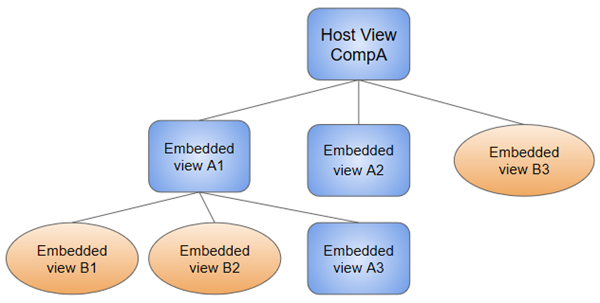
When you create a component, it is associated directly with a single view, called the host view. The host view can be the root of a view hierarchy, which can contain embedded views, which are in turn the host views of other components. Those components can be in the same NgModule, or can be imported from other NgModules. Views in the tree can be nested to any depth.
The hierarchical structure of views is a key factor in the way Angular detects and responds to changes in the DOM and app data.
Exception Plunker tsconfig.json « TypeScript [Warning] transpiling to CommonJS, consider setting module: "system" in typescriptOptions to transpile directly to System.register format, Its solution over Stack.
Introduction to services and dependency injection
| Service | Dependency injection | services and dependency injection |
|---|---|---|
 |
 |
 |
QuickStart « The Angular CLI is a command line interface tool that can create a project, add files, and perform a variety of ongoing development tasks such as testing, bundling, and deployment.