Fast – Precise – Open for many 8-/16-bit systems like C64, C128, Amigas, Atari 800XL, 1040ST and others, Apple IIe, Spectrum and many more
A fast, open-source DIY DRAM tester for vintage RAM chips used in C64, Amiga, Atari, and other retro computers. Built around an ATmega328P on a custom PCB, it tests memory thoroughly in seconds and supports a wide range of chip types with optional OLED feedback.
.jpeg)
As featured on:
- Hackaday (Dec 2025): "Cheap and Aggressive DRAM Chip Tester"
- Elektor Magazine (Dec 2025): "Ram-Tester Is an Open-Source DIY Solution for Retro Computer RAM"
Most Arduino-based DRAM testers need up to 2 mins or even more for a single 41256 RAM and check only basic functions. This project completes a full memory, address, data-line and retention time test in 15 s or less (or even 2.5 s faster without the display). It is probably the fastest Arduino solution which also covers static-column DRAMs, cell retention time and 20-pin ZIP packages.
| Feature | Benefit |
|---|---|
| Most tests are ≤ 10 s | Rapid diagnosis on the workbench or at retro repair events |
| Retention-time measurement | Detects weak chips by checking they meet the minimum retention times |
| Static-column support | Reliable testing of 44258, 514402 static-column functions |
| Nibble Mode support | Testing 41257 RAM with nibble mode access |
| 20-pin ZIP socket | Direct test of 20-pin ZIP DRAMs without an adapter |
| Optional OLED display or LED blink codes | Full text feedback or minimal hardware setup |
| Open hardware and firmware | KiCad, Gerber files and Arduino source under an open licence |
| Self-test mode | Check the hardware for defects like short circuits, broken solder joints, etc. |
| Automatic detection | Automatically identifies the chip type and checks for reusability of broken parts |
| Capacity | DIP | 20-pin ZIP | Static Column | Nibble Mode | Retention Time | Test Time |
|---|---|---|---|---|---|---|
| 4 K × 1 | 4027 1) | – | – | – | 2 ms | 1.3 s |
| 16 K × 1 | 4816 | – | – | – | 2 ms | 1.6 s |
| 16 K × 1 | 4116 1) | – | – | – | 2 ms | 1.6 s |
| 16 K × 4 | 4416 | – | – | – | 4 ms | 4.2 s |
| 32 K × 1 | 3732 2) | – | – | – | 2/4 ms | 2.8 s |
| 32 K × 1 | 4532 2) | – | – | – | 2/4 ms | 2.8 s |
| 64 K × 1 | 4164 | – | – | – | 2/4 ms | 2.8 s |
| 64 K × 4 | 4464 | – | – | – | 4 ms | 6.4 s |
| 256 K × 1 | 41256 | – | – | 41257 | 4 ms | 7.4 s |
| 256 K × 4 | 44256 | both | 44258 | – | 8 ms | 4.1 s |
| 1 M × 1 | 411000 | !NO! | – | – | 8 ms | 25.9 s |
| 1 M × 4 | 514400 | both | 514402 | – | 16 ms | 12.8 s |
1) Requires the 4116 adapter board.
2) Half-good 4164 chips sold as 32K × 1 (OKI MSM3732 / TI TMS4532). Enabled by default since firmware 4.2.3. See 32K documentation for details.
Static Column means the RAM allows column changes while CAS is held low — faster than standard page mode. Nibble Mode delivers four consecutive bits from one column address.
Note: Above test times include the OLED display. Without display, test durations are approx. 1 s shorter.
- Insert the device (16, 18 or 20 pins, DIP or ZIP).
- Set the DIP switch to match the pin count of your RAM. See the operation manual for the switch settings.
- Connect USB power supply (or press RESET if already powered).
- Read the result
- OLED version: plain-text report on the display
- LED-only version: green = pass, red = fail
There is a short YouTube video demonstrating the tester in action.
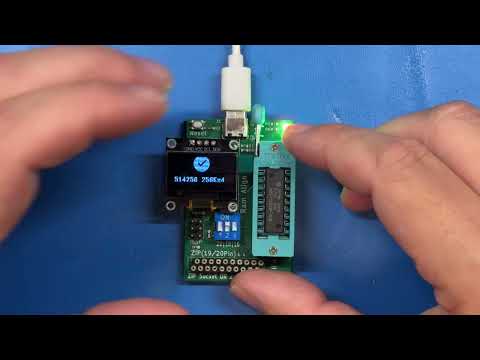
- GND shorts — checks if any pin is shorted to ground
- Power supply shorts — a resettable fuse protects the board
- Address-line and decoder faults
- Stuck cells or crosstalk using various patterns
- Random patterns combined with retention time checks
- CAS-before-RAS refresh timer function
- All of the above use the appropriate access mode for the chip type: Fast Page Mode, Static Column, or Nibble Mode
Here is the analytics of this algorithm vs. March-B
| Aspect | Actual Code | MARCH-B |
|---|---|---|
| Pattern Coverage | ✅ 0x00, 0xFF, 0xAA, 0x55 | ✅ |
| 0, 1Transition Tests | ✅ Thru Pattern-Sequence | ✅ Thru R0W1, R1W0 |
| Address Sequence | ✅ Asc-/Descending | |
| Coupling Detection | ✅ By Retention-Delay | ✅ Systematically |
| Real Retention | ✅ 2–16 ms Tests | ❌ Only µs-Range |
Compared with many other open source projects:
- They usually don't test for address line faults. Tests will pass even if you bend one address pin up.
- They usually don't check multiple rows at a time, since they use slow Arduino read and write commands.
- Many use simple all-0 and all-1 tests, no patterns or random data tests.
- No retention tests possible since writing and reading one row alone with Arduino I/O takes more than one second — usual retention times are within a few milliseconds.
- No checks for broken chips (i.e. shorts to GND).
- No protection against short circuits on supply lines. Some use off-the-shelf DC-DC converters which supply high currents in short circuit situations.
- No tests of refresh or static column functionality.
- Very often limited to 1-bit or 4-bit circuits and no ZIP sockets.
- They are usually MUCH slower.
Buy ready-made: Amibay · Tindie · eBay
Build it yourself (DIY): Available as a beginner-friendly through-hole (THT) version or a compact SMD version. Order PCBs at PCBWay (THT) or use the provided Gerber files from the Schematic folder.
- Operation manual – test procedure, error codes, self-test and troubleshooting
- Software / Firmware – firmware variants, flashing instructions
- Schematic – KiCad project and Gerber files (THT and SMD)
- Changelog – firmware version history
- Compatibility – manufacturer cross-reference and system DRAM usage
Pull requests, issues and forks are welcome. Questions: GitHub Discussions or contact tops4u on AmiBay.
Open-source hardware under GPL v3 – use at your own risk.
