





 SocNetV - Social Network Visualizer
Social Network Visualizer (SocNetV) is a cross-platform, user-friendly free software application for social network analysis and visualization.
With SocNetV you can:
-
Draw social networks with a few clicks on a virtual canvas, load your field data from a file in a supported format (GraphML, GraphViz, EdgeList, GML, Adjacency, Edgelist, Pajek, UCINET, etc.), automatically recreate famous data sets or crawl the internet to create a social network of connected webpages.
-
Edit actors and ties through point-and-click, analyse graph and social network properties, produce beautiful HTML reports and embed visualization layouts to the network.
-
Standard graph-theoretic and network cohesion metrics, such as density, diameter, geodesics and distances, connectedness, eccentricity, clustering coefficient, walks, reciprocity etc.
-
Matrix routines: Adjacency plot, Laplacian matrix, Degree matrix, Cocitation, etc.
-
Advanced structural measures for social network analysis such as centrality and prestige indices (i.e. eigenvector and closeness centrality, betweenness centrality, information centrality, power centrality, proximity and pagerank prestige).
-
Vertex filtering by centrality: hide nodes above or below a centrality threshold to focus your analysis on the most (or least) prominent actors in the network.
-
Community detection algorithms such as triad census, clique census, etc.
-
Structural equivalence analysis, using hierarchical clustering, actor similarities and tie profile dissimilarities, pearson coefficients, etc.
-
Random network creation, i.e. Erdos-Renyi, Watts-Strogatz, scale-free, lattice, etc.
-
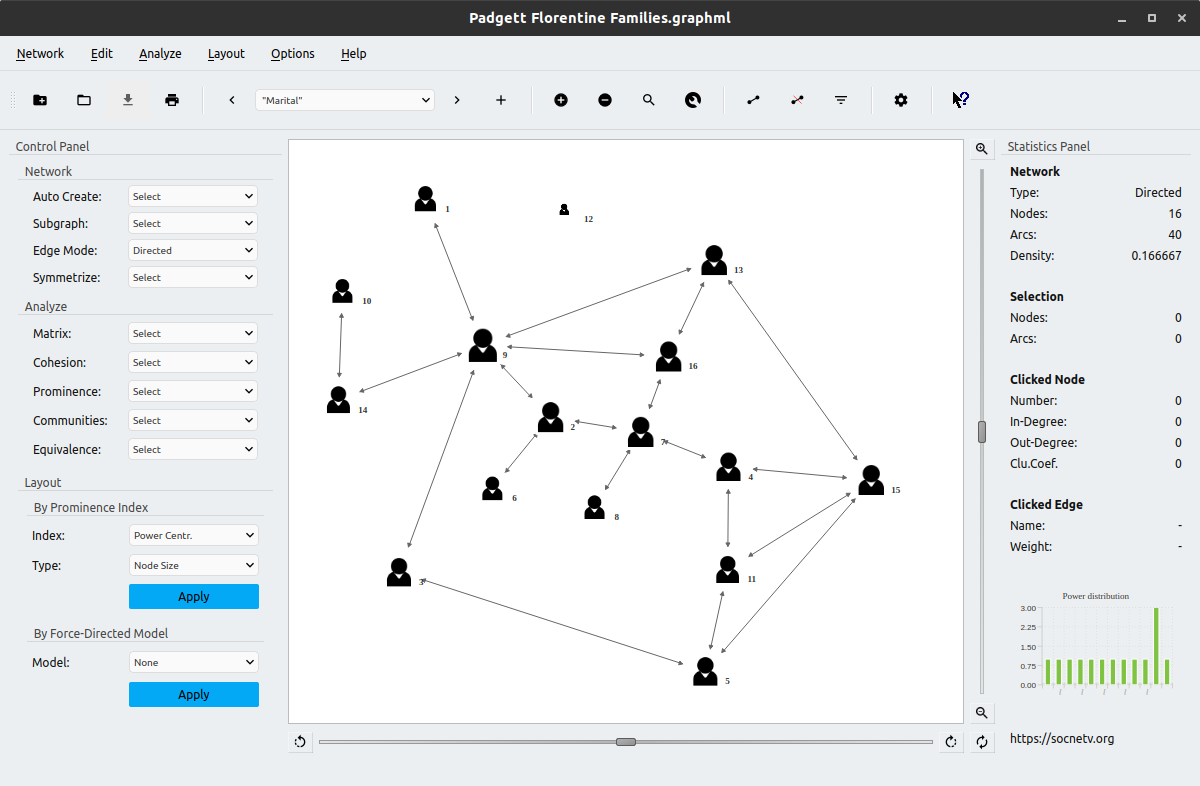
One-click recreation of well-known social network datasets such as Padgett's Florentine families.
-
Layout algorithms based on either prominence indices (i.e. circular, level and nodal sizes by centrality score) or force-directed models (i.e. Kamada-Kawai, Fruchterman-Reingold, etc) for meaningful visualizations of your social network data.
-
Multirelational loading and editing. You can load a network consisting of multiple relations or create a network on your own and add multiple relations to it.
-
Built-in web crawler allowing you to automatically create networks from links found in a given initial URL.
-
Comprehensive documentation both online and while running the application explaining each feature and algorithm of SocNetV in detail.
-
Binary packages and installers for Windows, Linux and macOS.
Official Website: https://socnetv.org
Email: info@socnetv.org
Author: Dimitris B. Kalamaras
Blog: https://dimitris.apeiro.gr
SocNetV is a cross-platform application developed in C++ and Qt, an open source software development platform published under the GPL.
This means you can compile and run SocNetV on any Operating System supported by Qt. See available packages and installation instructions below.
SocNetV is Free Software, distributed under the General Public Licence Version 3 (see the COPYING file for details). The documentation is also Free, licensed under the Free Documentation License (FDL).
The application is not a "finished" product. Therefore, there is no warranty of efficiency, correctness or usability.
Nevertheless, we are looking forward to help you if you experience any problems with SocNetV! See bug reporting below.
SocNetV is multi-platform, which means that it can be installed and run in every Operating System supported by the Qt toolkit.
The project offers binaries and installers for the three major Operating Systems: Windows, macOS and Linux.
If there is no binary package for your OS, please download and compile the source code, as explained further below.
You can download an installer or a binary package for your Operating System from the project's Downloads page: https://socnetv.org/downloads
Follow the instructions below to install it in your system.
To install SocNetV in Windows, download the latest SocNetV Windows installer from the Downloads page, and double-click on the executable to start the installation.
Note: You might see a Windows pop up about unknown software origin/publisher. Please ignore it and proceed, as we do not sign our Windows packages with a commercial code signing certificate.
Click Next and Accept the License (GPL) to install the program.
The program will be installed in the usual Windows Program Files directory and a new Start Menu shortcut will be created.
Afterwards you can run the application from your Start menu.
To install SocNetV in macOS, download the latest SocNetV macOS package from the Downloads page. Then right-click on it and select Open.
If the package is an installer, the installation will start immediately and the application will be installed automatically in your Applications.
Otherwise, if the package is just a macOS disk image (a file with a .dmg extension), then double-click on it to open it. You will see a new window with the SocNetV executable icon inside. Right-click on it and select Open to run the application.
Note: On some macOS versions, the system may warn you that it cannot verify the software publisher the first time you open it. If that happens, press Cancel (not Move to Bin!), then right-click the SocNetV app again and select Open to proceed normally.
After that, to permanently install SocNetV, simply drag the SocNetV icon into your Applications folder.
Alternatively, there is a SocNetV port in MacPorts (thanks to Szabolcs Horvát!). It can be installed with port install socnetv.
To run the latest and greatest version of SocNetV in Linux, download the latest Linux AppImage from the project's Downloads page.
Then, make the .AppImage file executable and double-click on it to run SocNetV. That's it!
Note: Your system needs to have libfuse2 installed for AppImages to work:
- On Ubuntu 24.04+:
sudo apt install libfuse2t64 - On Ubuntu 22.04 and earlier:
sudo apt install libfuse2
SocNetV is also available in the repositories of most Linux distributions. However, that is not always the most recent version. We urge you to use the AppImage of the latest version available from our website instead.
Alternatively, users of openSUSE, Fedora and Ubuntu/Debian can install SocNetV from our own repositories.
For Debian and Ubuntu, use the following commands to add our repository and install SocNetV:
sudo add-apt-repository ppa:dimitris-kalamaras/ppa
sudo apt-get update
sudo apt-get install socnetv
In Fedora and openSUSE, choose and add the correct repository for your distro version from here: https://software.opensuse.org/download.html?project=home%3Aoxy86&package=socnetv
Once you add the repo, install SocNetV using the command (Fedora):
sudo yum install socnetvor (openSUSE):
sudo zypper in socnetvTo compile and install SocNetV from source you need the Qt toolkit development libraries, version 6.2 or later (tested with Qt 6.8).
Qt is an open source C++ toolkit, for Windows, Linux and macOS.
Windows and macOS users should download and install Qt6 from https://www.qt.io/developers
Linux users need to install the following packages:
openSUSE: libqt6-qtbase, libqt6-qtbase-devel, libQt6Charts6-devel, qt6-tools
Fedora: qt6-qtbase, qt6-qtbase-devel, qt6-qtcharts-devel, qt6-linguist, qt6-qt5compat
Debian/Ubuntu: qt6-base-dev, qt6-base-dev-tools, qt6-charts-dev, qt6-svg-dev, qt6-5compat-dev, libqt6opengl6-dev
Once you have Qt installed, you are ready to compile SocNetV from source.
Download the archive with the source code of the latest version from
https://github.com/socnetv/app/releases/latest. You will get a compressed file like app-3.3.tar.gz.
CMake is the recommended build system for SocNetV 3.3. Replace 3.X with the version you downloaded.
tar zxfv app-3.X.tar.gz
cd app-3.X
cmake -S . -B build -DCMAKE_PREFIX_PATH=/path/to/Qt/6.x/gcc_64/lib/cmake
cmake --build build
The executable socnetv will be placed inside the build folder. To install system-wide:
sudo cmake --install buildIf you prefer qmake, ensure the qmake (or qmake6) command is in your PATH:
tar zxfv app-3.X.tar.gz
cd app-3.X
qmake
make
sudo make install  # or: su -c 'make install'
When you finish compiling and installing, run the application by typing:
socnetvor go to Start Menu > Mathematics > SocNetV.
SocNetV is primarily a GUI program. Nevertheless, some command line options are available:
Options:
  -h, --help           Displays this help.
  -v, --version        Displays version information.
  -p, --progress       Force showing progress dialogs/bars during computations.
  --nm, --notmaximized Do not show the app maximized.
  -f, --fullscreen     Show in full screen mode.
  -d, --debug <level>  Print debug messages to stdout/console. Available
                       verbosity <level>s: 'none', 'min' or 'full'. Default:
                       'min'.

Arguments:
  file                 Network file to load on startup. You can load a network
                       from a file using `socnetv file.net` where
                       file.net/csv/dot/graphml must be of valid format. See
                       README.
For example, type:
./socnetv net.graphmlto start SocNetV and immediately load network file named 'net.graphml' (in current folder).
Starting with version 3.3, SocNetV also ships a headless command-line tool, socnetv_cli, for batch network analysis without a graphical interface. It supports multiple analysis kernels (distances, reachability, walks, prominence centralities) and produces deterministic JSON output suitable for scripting and regression testing.
socnetv_cli --helpThis tool is intended for power users, automated pipelines, and developers running regression test suites.
To help you work with the application, there are tooltips and What's This help messages inside the application, when running SocNetV.
To see the full documentation, press F1. It will open a browser window with the SocNetV Manual, which is available online at the project's website: https://socnetv.org/documentation/
For a full list of changes, see our CHANGELOG.md
If you have a bug report or a feature request, please file it in our GitHub issue tracker: https://github.com/socnetv/app/issues
To contact us directly, send an email to: info@socnetv.org