The missing task layer for Roam
Turn native TODOs into scheduled and recurring tasks with inline pills, a powerful dashboard, and optional Today widget/badge — all stored as plain Roam blocks.
✅ Roam-native storage (child blocks) • ✅ Recurring + one-off scheduled tasks • ✅ Subtasks & dependencies • ✅ Actively maintained
**Support / bugs:** Please message me in the Roam Slack (include repro steps + any console output if relevant): https://app.slack.com/client/TNEAEL9QW/
If you use TODOs in Roam, Better Tasks gives you:
- Recurring tasks that spawn the next occurrence when completed
- Start / Defer / Due dates for scheduled one-off tasks
- Inline pills for fast editing, snoozing, and jumping to DNPs
- A dashboard for review & triage, saved views, and weekly review presets
- Bulk operations to complete, snooze, or update metadata across multiple tasks
- Optional Today widget (on today's DNP) and Today badge (left sidebar)
- Subtasks with progress indicators, structural nesting or explicit cross-graph linking
- Optional metadata: Project, Context, Waiting-for, GTD, Priority, Energy, Dependencies
- Clean exit / deconvert: remove Better Tasks metadata from individual tasks or all tasks at once via Command Palette. Your
{{[[TODO]]}}blocks remain as plain Roam — just the BT child blocks and RT props are removed. Fully reversible (re-convert anytime). - Data export: export all tasks via Command Palette — JSON (full data), CSV (spreadsheet-ready), or ICS (calendar import). All use ISO dates and include every attribute. Also available programmatically via
bt_exportin the Extension Tools API. - Quick rescheduling: the date picker now includes a natural language text input — type "friday", "in 3 days", "+7", or "end of month" with live green/red parse feedback and Enter to save. Quick-select buttons expanded: Today, Tomorrow, +3d, Next Mon, +1w, +1m. Works in all date editing contexts (dashboard ⋯ menu, pill edit, snooze pick).
- Local-first NLP capture: the dashboard quick-add input now parses natural language locally — no API key needed. Type
buy milk due:friday !high @errandsorcall dentist tomorrow every weekand the task is created with all metadata extracted. Supportsdue:/start:/defer:date prefixes,!priority,~energy,p:project,@context, repeat rules, and implicit trailing dates. Runs synchronously before AI; works offline. - Graph Analytics panel: slide-in analytics panel accessible from the dashboard header or
Shift+G. Summary cards (open/completed/overdue/rate), completion-over-time bar chart, time-to-completion distribution, overdue frequency stats, project breakdown by open count and velocity, recurring task adherence (top/bottom performers), and a 365-day busiest-days heatmap with intensity legend. Period selector (7d/30d/90d/all time). Respects first-day-of-week setting. Lazy computation with 30s cache — no background cost. - Keyboard navigation: vim-style dashboard shortcuts — j/k to navigate, Enter to open, c to complete, s/S to snooze (+1d/+7d), e to expand subtasks, . to open the task menu (with arrow/j/k navigation), x to select, / to search, f for full-page, r to refresh, ? for shortcut legend. Bindings are customisable via JSON in Advanced Dashboard settings. All actions are bulk-aware when tasks are selected.
- Rich dashboard titles: markdown links (
[text](url)) render as clickable links;[[page refs]]render as clickable tags that navigate to the page (Shift+Click for sidebar). - Recurring Series View: open the full history of a recurring task from the dashboard's ⋯ menu. Timeline shows past completions with on-time/late badges, current occurrence, and future projections (5/10/20). Streak banner tracks current streak, best streak, and on-time rate. Skip individual future dates or add exception dates (e.g. holidays) — exceptions carry forward when the task completes.
- Expanded Reviews: Daily, Weekly, and Monthly review flows with a split-button review menu. Daily cycles Due Today → Completed Yesterday → Overdue. Monthly cycles Completed 30d → Stalled → Someday → Overdue. Project Sweep reviews a single project's tasks. Stalled task detection flags tasks not edited in N days (configurable, default 14). Each review type has independent step toggles. 4 new preset views: Due Today, Completed Yesterday, Stalled Tasks, Completed (Last 30 Days).
- Subtasks: nest BT tasks under a parent for automatic subtask detection with 📋 progress indicators (e.g. 1/3 done). Dashboard shows expand/collapse trees. Explicit
BT_attrParent:: ((uid))links subtasks across the graph, overriding structural nesting. Progress tracks completion in real time. Extension Tools API includesis_subtask,parent_task_uid,subtask_uids,subtask_progress. - Task dependencies: block tasks on other tasks with
BT_attrDepends:: ((uid)). Blocked tasks show a 🔒 indicator in pills, dashboard, and Today widget. Circular dependency detection (self, mutual, transitive). Dependency picker in the ⋯ pill menu. Blocked/Actionable filter in dashboard. Auto-unblock on completion; stale dependencies auto-cleaned. - "Project Page" destination: recurring tasks with a project attribute can now route their next occurrence to the project's page instead of the Daily Notes Page. Falls back to DNP gracefully when no project is set.
- Rich metadata carry-forward: spawned recurring tasks now inherit all metadata (project, context, priority, energy, GTD, waiting-for) from the completed occurrence — not just scheduling attributes.
- Auto-inherit project from page: creating a Better Task on a known project page automatically tags it with that project. Skips Daily Notes Pages and non-project pages.
- Bulk operations: multi-select tasks in the dashboard for batch complete, snooze, and metadata updates
- Faster and safer rendering: pill throttling, block caching, and picklist refresh optimisations
- More resilient storage: filter versioning, cache TTLs, and attribute alias fallbacks
- Better UX: improved focus styles, ARIA labels, and toast announcements
- Reliability improvements: OpenAI retry/backoff and stronger view IDs
-
Convert an existing TODO
Cursor on a TODO → Command Palette → Convert TODO to Better Task -
Or create one from scratch
Command Palette → Create a Better Task -
Add scheduling / recurrence
Add a repeat rule (e.g.every Friday) and/or start / defer / due dates.
Better Tasks stores canonical data in child blocks (attribute names configurable; defaults shown).
{{[[TODO]]}} Write weekly newsletter
  - BT_attrRepeat:: every Friday
  - BT_attrDue:: [[2025-11-07]]
When completed:
{{[[DONE]]}} Write weekly newsletter
  - BT_attrRepeat:: every Friday
  - BT_attrDue:: [[2025-11-07]]
  - BT_attrCompleted:: [[2025-10-31]]
Optional attributes:
BT_attrStart::— when the task becomes availableBT_attrDefer::— when it should resurfaceBT_attrCompleted::— written on completionBT_attrDepends::— task dependencies (one or more((uid))refs, comma-separated)BT_attrParent::— explicit subtask link to a parent task (((uid)))
✅ Disable Better Tasks anytime — your tasks remain plain Roam blocks.
Leave the repeat field blank while setting any combination of start::, defer::, or due::.
- Same pills, snooze controls, and dashboard support
- No follow-up task is spawned
- Completion writes
completed:: [[<today>]]and hides the pill
- BT_attrProject:: [[Website Refresh]]
- BT_attrGTD:: Next Action
- BT_attrWaitingFor:: [[Finance Team]]
- BT_attrContext:: @computer, #office
- BT_attrPriority:: high
- BT_attrEnergy:: medium
- BT_attrDepends:: ((uid1)), ((uid2))
- BT_attrParent:: ((uid))
Metadata appears both inline (pill) and in the dashboard.
Add BT_attrDepends:: ((task-uid)) as a child block to create a dependency. The blocked task shows a 🔒 indicator and is dimmed in the dashboard and Today widget.
- Multiple dependencies: comma-separate UIDs — all must complete to unblock
- Circular detection: self-referential, mutual, and transitive cycles are detected and ignored
- Auto-unblock: completing a dependency (one-off or recurring) unblocks dependents; deleting a dependency from the graph auto-cleans the attribute
- Dependency picker: use the ⋯ pill menu to add, edit, or remove dependencies with a searchable task picker
- Dashboard filters: Blocked / Actionable chips filter the task list; "Blocked Tasks" preset view available
- Recurring tasks: dependencies are not carried forward to the next occurrence
Nest a Better Task under another Better Task to create a subtask relationship automatically. The parent shows a 📋 progress indicator (e.g. 1/3) inline and in the dashboard.
- Structural detection: any
{{[[TODO]]}}or{{[[DONE]]}}block with BT attributes nested directly under another BT task is detected as a subtask - Explicit linking: add
BT_attrParent:: ((parent-uid))to link a subtask to a parent anywhere in the graph — overrides structural nesting - Progress indicators: parent tasks show
📋 done/totalin inline pills and dashboard - Dashboard expand/collapse: parent tasks show a ▸ caret; click to expand and see subtasks nested below
- Per-level counting: each parent counts its direct children only (not recursive grandchildren)
- Drag-in/out: moving a block in or out of a parent updates the relationship in real time
- Project inheritance: subtasks without their own project automatically inherit the parent's project (read-only — nothing written to the graph). Explicit project on a subtask takes precedence.
- Recurring parents: subtask relationships are not carried forward to spawned occurrences
Interactions:
- Click → open page
- Shift+Click → open in right sidebar
- Cmd/Ctrl+Click → edit value
GTD cycles: Next → Delegated → Deferred → Someday → cleared
Priority / Energy cycles: low → medium → high → none

- Pills hide when the task is expanded; reappear when collapsed
- Completed tasks stay visually quiet until the next recurrence
- Non-recurring tasks still show date pills
Common actions:
- ↻ Repeat — click to edit; Alt+Click to copy
- ⏱ Start / ⏳ Defer / 📅 Due — click to open DNP
Shift+Click opens in sidebar - Alt/Ctrl/Meta+Click opens date picker
- ⋯ Menu opens the full task menu
| Action | Description |
|---|---|
| Snooze +1 day | Shift all existing dates (start/defer/due) forward 1 day |
| Snooze +3 days | Shift all existing dates (start/defer/due) forward 3 days |
| Snooze to next Monday | Shift all existing dates to align with next Monday |
| Snooze (pick date) | Shift all existing dates to align with the picked date |
| Skip this occurrence | Jump to next repeat |
| Generate next now | Create next task immediately |
| End recurrence | Stop repeating |
| Add / Edit dependency | Open dependency picker to search and select blocking tasks |
| Remove all dependencies | Clear all dependencies from the task |
| View series | Open the recurring series timeline (recurring tasks only) |
All actions support Undo.
Snooze logic details:
- If a task has any of
start::,defer::, ordue::, snooze shifts only the dates that exist and preserves spacing between them. - If a task has no dates, snooze creates
defer::at today + N. - To avoid “still overdue” results, each shifted date is clamped to at least today + N.
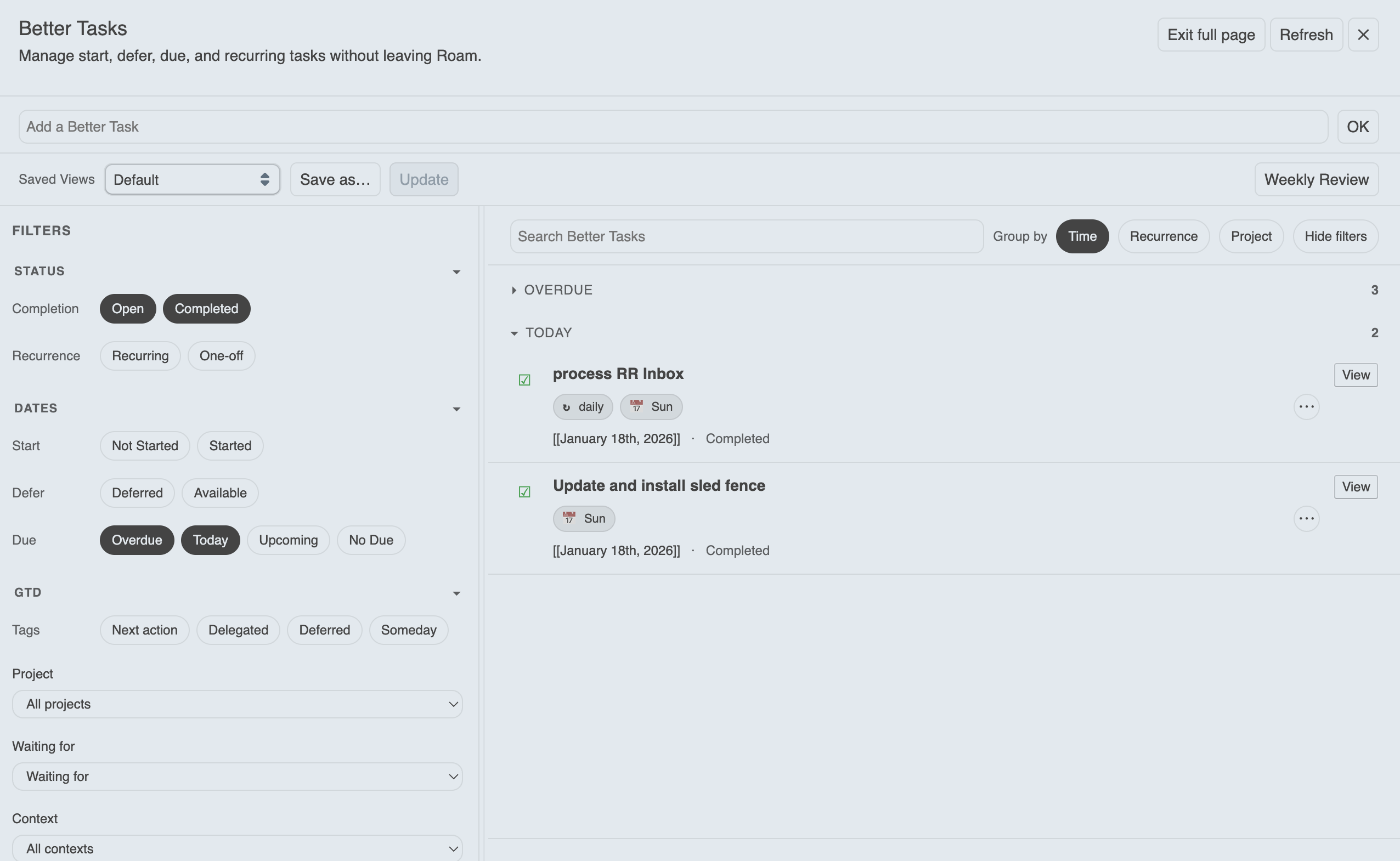
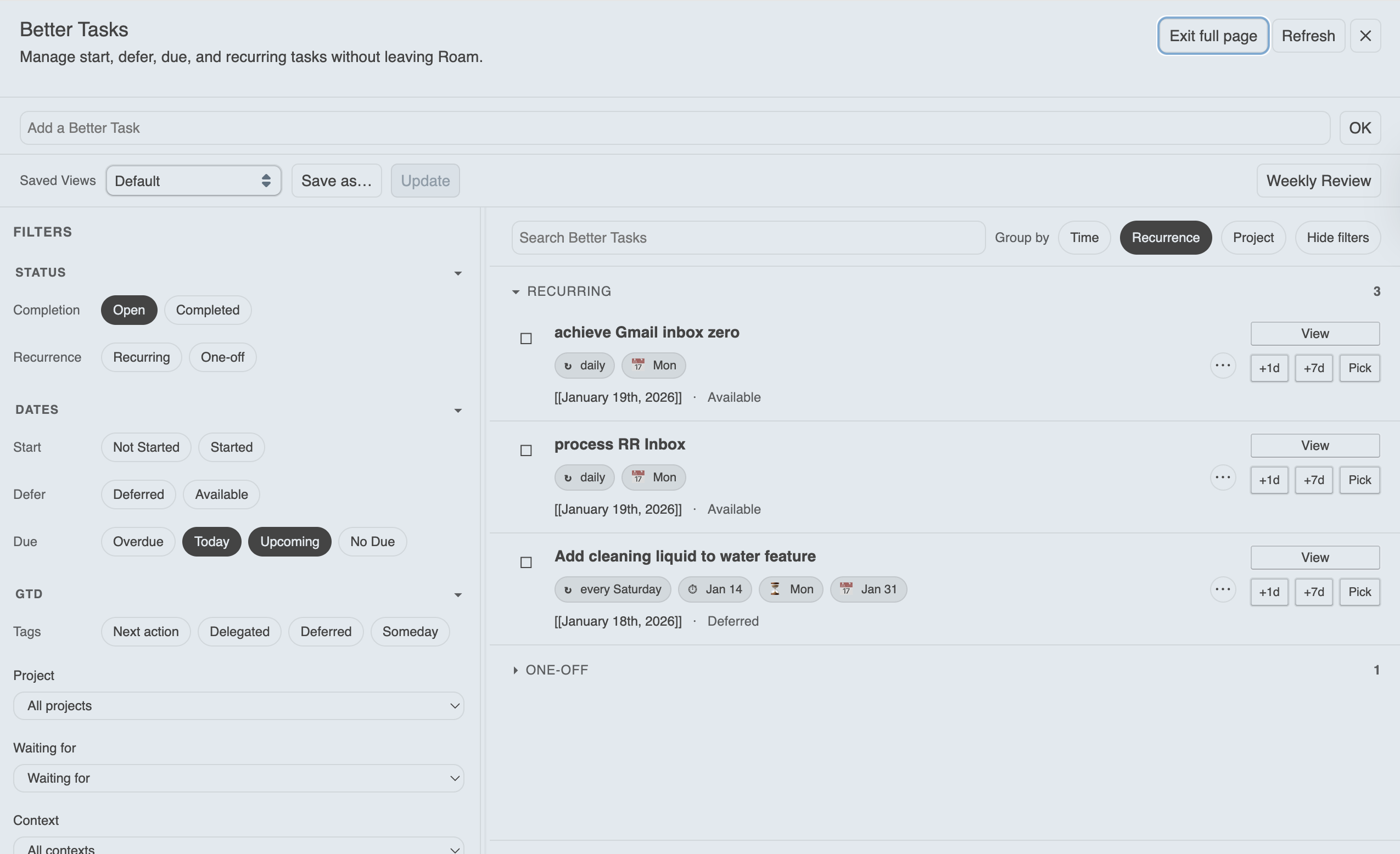
Open via Command Palette → Toggle Better Tasks Dashboard or the top-bar icon 
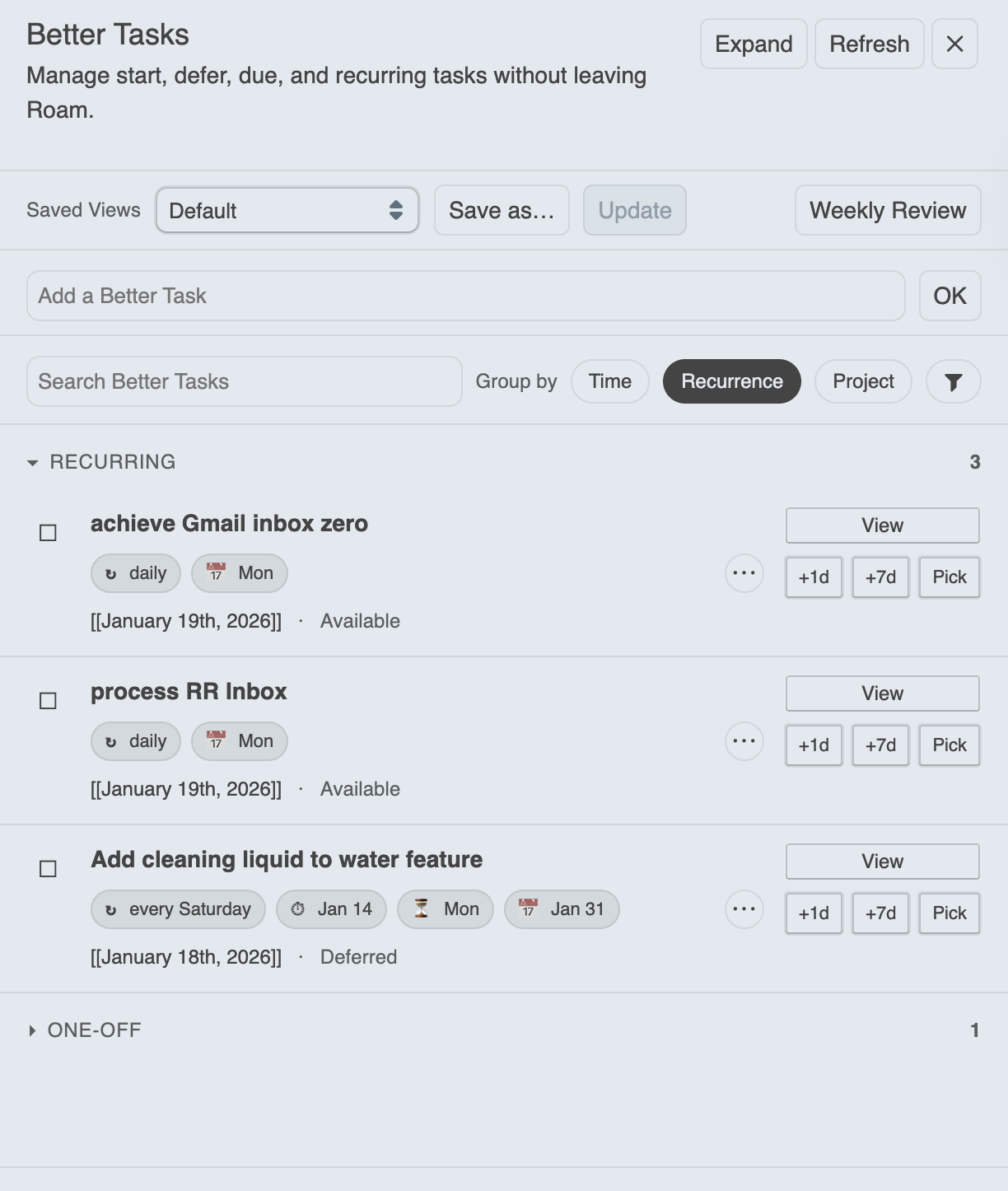
Features:
- Filters: recurrence, availability, due buckets, completion, blocked/actionable
- Quick snooze / complete actions
- Jump back to original blocks
- Draggable floating panel (position remembered)
- Optional full-page mode with persistent filter sidebar
- Metadata chips + filtering
- Quick-add input (uses AI parsing if enabled)
- Recurring series view (past completions, future projections, streak tracking, exceptions)
- Mobile-friendly layout (full-page with slide-in filters and sticky quick-add)
- Graph Analytics — slide-in panel with completion trends, time-to-completion, overdue frequency, project breakdown, recurring adherence, and busiest-days heatmap (press
Shift+Gor click Analytics in the header) - Keyboard navigation (press
?in the dashboard for the full legend):
| Key | Action |
|---|---|
j / k |
Move focus down / up |
Enter |
Open focused task |
c |
Complete / undo |
s / Shift+S |
Snooze +1d / +7d |
e |
Expand / collapse subtasks |
. |
Open task menu (navigate with j/k/arrows, Enter to select) |
x |
Toggle selection |
Shift+A |
Select all visible |
/ |
Focus search |
f |
Toggle full-page mode |
r |
Refresh |
? |
Show / hide shortcut legend |
Escape |
Close help → clear selection → clear focus |
Customise bindings via JSON in Settings → Advanced Dashboard → Keyboard bindings.
Preset views (seeded, in order):
- Next Actions
- Waiting For
- Completed (Last 7 Days)
- Upcoming (Next 7 Days)
- Overdue
- Someday / Maybe
- Blocked Tasks
- All Open Tasks
- Due Today
- Completed Yesterday
- Stalled Tasks
- Completed (Last 30 Days)
The review menu (split button in the toolbar) offers four review types:
| Review | Steps |
|---|---|
| Daily | Due Today → Completed Yesterday → Overdue |
| Weekly | Next Actions → Waiting For → Completed 7d → Upcoming 7d → Overdue → Someday |
| Monthly | Completed 30d → Stalled → Someday → Overdue |
| Project Sweep | Select a project → Open → Overdue → Stalled → Completed 30d |
Each step can be independently enabled/disabled per review type in Settings → Advanced Dashboard.
Stalled tasks: open tasks whose block hasn't been edited in N days (configurable, default 14). Available as a filter chip (Stalled/Active) in the sidebar and as a preset view.
Mobile note:
- On small screens, the dashboard uses full-page layout by default
- Filters live in a slide-in drawer (tap Filters to open)
- Quick-add sticks to the bottom for easier reach
Apply changes to multiple tasks at once from the dashboard.
Entering bulk mode:
- Click the Bulk button in the toolbar to enter selection mode
- Individual task action buttons hide to provide a focused selection experience
- In floating mode, grouping controls temporarily hide to save toolbar space
Selecting tasks:
- Click checkboxes to select individual tasks
- Shift+Click to select a range (click one task, then Shift+Click another to select all between)
- Use the group header checkbox to select or clear all tasks in that group
- Use Select All to select all visible tasks, or Clear to deselect
Available actions:
| Action | Description |
|---|---|
| Complete | Mark all selected tasks as done |
| Reopen | Revert completed tasks to open |
| Snooze +1d | Defer task 1 day |
| Snooze +7d | Defer task 7 days |
| Project | Set project from picklist |
| Waiting For | Set waiting-for from picklist |
| Context | Set context from picklist |
| Priority | Set to low / medium / high / clear |
| Energy | Set to low / medium / high / clear |
| GTD | Set to Next Action / Delegated / Deferred / Someday / clear |
All bulk actions support Undo via the toast notification.
Tip: Set up your view first (filters, grouping) before entering bulk mode — this lets you target exactly the tasks you want to update.
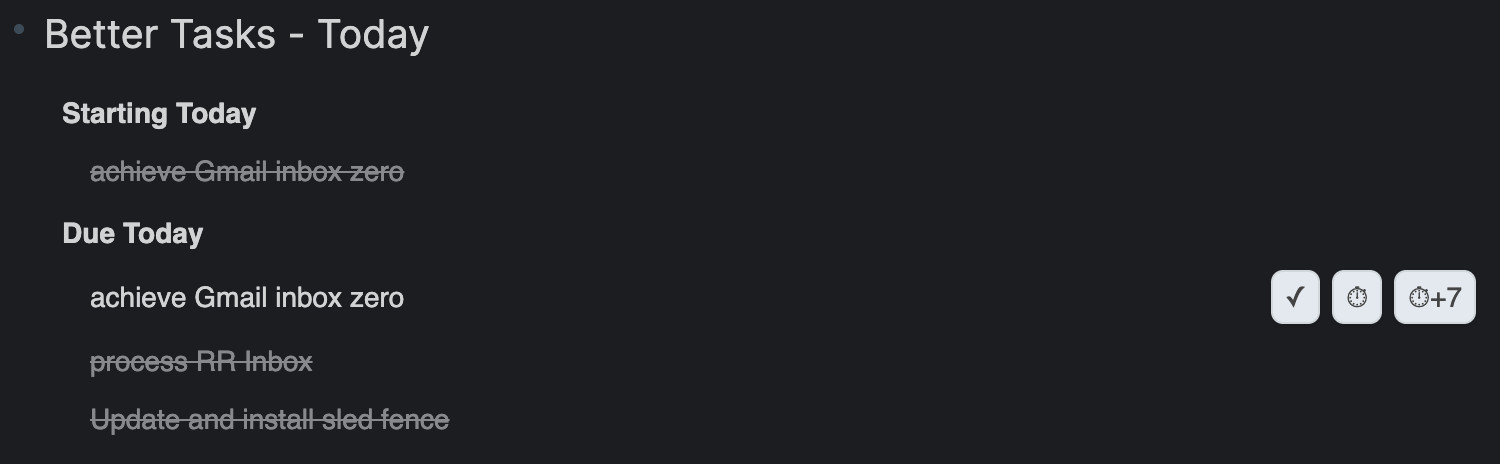
Shows tasks starting, deferred until, due, and (optionally) overdue today. Each task row has configurable action buttons:
| Button | Default | Description |
|---|---|---|
| ✓ Complete | On | Mark the task as done |
| ⏱ Snooze +1d | On | Snooze all dates forward 1 day |
| ⏱+7 Snooze +7d | On | Snooze all dates forward 7 days |
| (()) Copy Ref | Off | Copy the block reference ((uid)) to the clipboard |
| ⧉ Open Sidebar | Off | Open the task in the right sidebar |
Toggle each button on or off in the Today Widget settings. Clicking a task title navigates to the block; Shift+Click opens it in the sidebar.

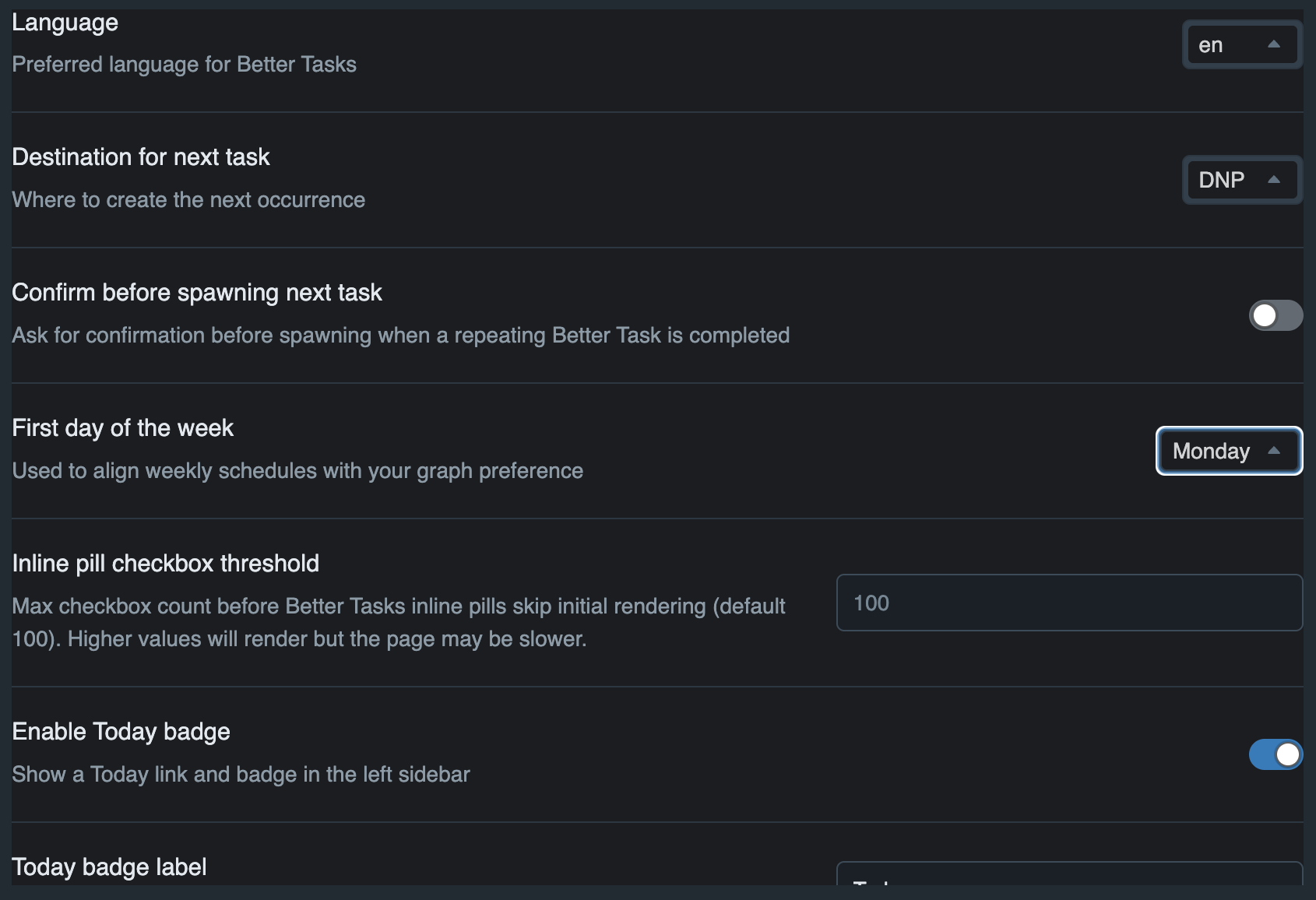
Core settings:
- Language
- Destination for next task (DNP, Same Page, DNP under heading, or Project Page)
- Confirm before spawning
- First day of week
- Inline pill checkbox threshold (performance guard)
Additional sections appear only when enabled.
- Today Badge — sidebar badge label, overdue inclusion, background and text colours.
- Today Widget — layout (panel or Roam-style inline), placement (top/bottom), heading level, overdue/completed inclusion, and per-button toggles (complete, snooze +1d, snooze +7d, copy ref, open sidebar).
- Advanced Dashboard options unlock the Weekly Review step toggles (on/off per step; order is fixed).
- Advanced Project/Context/Waiting options let you exclude specific pages from picklists.
- Customise attribute names (advanced) exposes settings to rename Better Tasks attribute labels/keys.
The quick-add input parses natural language locally using rule-based extraction. No network, no API key, works offline.
Syntax:
| Marker | Example | Writes attribute |
|---|---|---|
due: |
due:friday, due:next week |
BT_attrDue |
start: |
start:monday, start:in 3 days |
BT_attrStart |
defer: |
defer:next month, defer:end of week |
BT_attrDefer |
! |
!high, !medium, !low |
BT_attrPriority |
~ |
~high, ~medium, ~low |
BT_attrEnergy |
p: |
p:ProjectName |
BT_attrProject |
@ |
@office, @errands |
BT_attrContext |
| Repeat keywords | every friday, daily, weekly |
BT_attrRepeat |
| Trailing date | buy milk tomorrow |
BT_attrDue (implicit) |
Supported date phrases (for due:, start:, defer:, or trailing):
- Named days:
monday,next tuesday,this friday - Relative:
today,tomorrow,next week,next month - Offsets:
in 3 days,in 2 weeks,5 days from now - Boundaries:
end of week,end of month,end of year - Fuzzy:
early next week,mid january,late this month - Roam dates:
[[April 15th, 2026]],2026-04-15
Examples:
buy milk due:friday→ title "buy milk", due Fridaycall dentist tomorrow !high→ title "call dentist", due tomorrow, priority highreview PR every week p:Engineering @office→ recurring task with project and contextsubmit report end of month→ title "submit report", due last day of monthplan conference start:monday defer:next month→ start Monday, defer next monthsend invoice in 3 days→ title "send invoice", due in 3 days
- Optional BYO OpenAI key (client-side only)
- Handles more ambiguous natural language than rule-based parsing
- Falls back safely if parsing fails
- No backend, no graph data sent
- Note: OpenAI keys are stored in Roam graph settings and may be included in some exports.
- Convert TODO to Better Task
- Create a Better Task
- Toggle Better Tasks Dashboard
- Toggle Dashboard (Full page)
- Switch / Save views
- Reinstall preset views
- Daily Review
- Weekly Review
- Monthly Review
- Export Better Tasks (JSON)
- Export Better Tasks (CSV)
- Export Better Tasks (ICS Calendar)
- Deconvert Better Task to plain TODO
- Batch Deconvert All Better Tasks
The repeat:: attribute accepts natural-language patterns. Parsing is case-insensitive, tolerates extra whitespace, and supports separators like commas, /, &, and the word "and".
Abbreviations and ranges are supported (e.g., Mon, Tue, Thu, MWF, TTh, Mon-Fri).
Anchor date: the next occurrence is calculated from due:: (preferred). If no due:: is present, the current date is used as the anchor.
Week start: ranges and some weekly rules respect your First day of the week setting in the extension.
| Example | Meaning |
|---|---|
every day | daily |
once per day |
every 2 days | every other day | every second day |
every 2 days |
every three days |
every 3 days |
every 5 days |
every 5 days |
every weekday | business days | workdays |
Monday-Friday |
every 2 weekdays |
every 2 business days (Mon-Fri cadence) |
| Example | Meaning |
|---|---|
every monday |
every week on Monday |
every mon | EVERY MON | every MOnDaY |
variants accepted |
| Example | Meaning |
|---|---|
weekly | every week |
once per week (no fixed day) |
every other week | every second week | biweekly | fortnightly | every fortnight |
every 2 weeks |
every 3 weeks |
every third week (no fixed day) |
| Example | Meaning |
|---|---|
weekly on tue, thu |
Tuesday and Thursday |
weekly on tue thu |
same (spaces only) |
weekly on tue & thu |
same (& supported) |
weekly on tue/thu | Tu/Th | t/th |
slash shorthand |
every mon, wed, fri | MWF |
Monday, Wednesday, Friday |
TTh |
Tuesday and Thursday |
weekly on tue, thu and sat & sun |
mixed separators supported |
| Example | Meaning |
|---|---|
every mon-fri |
Monday through Friday |
every fri-sun |
Friday to Sunday range |
every su-tu |
Sunday to Tuesday (wrap) |
| Example | Meaning |
|---|---|
every 2 weeks on monday |
every 2nd Monday |
every 3 weeks on fri |
every 3rd Friday |
every 4 weeks on tue, thu |
every 4th week on Tue & Thu |
| Example | Meaning |
|---|---|
monthly |
same calendar day each month (uses due:: day) |
every month on day 15 |
15th of each month |
the 1st day of each month |
1st day every month |
day 31 of each month |
clamps to end of shorter months |
last day of the month | last day of each month | last day of every month | EOM |
last calendar day each month |
on the 1st and 15th of each month |
1st and 15th |
on the 15th and last day of each month |
15th + EOM |
on the 5th, 12th, 20th of each month | on the 5th/12th/20th of each month | on the 5th & 12th & 20th of each month |
multiple specific dates |
first monday of each month2nd wed every monthlast friday of each month1st and 3rd monday of each monthpenultimate friday of each month/second last friday ...first weekday of each monthlast weekday of each monthevery month on the second tuesday2nd Tue each monththe last thu each month
every 2 months on the 10thevery 3 months on the 2nd tuesdayquarterlysemiannual/semi-annually/twice a year
every March 10,on 10 March every yearannually,yearly(fixed-date anchor)first Monday of May every year
| Example | Meaning |
|---|---|
every weekend | weekends |
Saturday & Sunday |
Notes:
- Abbreviations and aliases:
Mon/Mon./Monday,Thu/Thurs/Thursday,MWF,TThare accepted. - Ranges:
Mon-Friexpands to all included days. - Clamping: day numbers beyond a month’s end clamp to the last valid date (e.g.,
31st-> Feb 28/29). - "Every N weekdays" counts business days (Mon-Fri) only.
- Pluralisation is flexible:
monday/mondays,week/weeks, etc.
Recent versions include memory and render optimisations.
If Roam feels slow:
- Disable Today Widget
- Disable Today Badge
- Message me in Slack with task count + details
Supported:
- English (en)
- Simplified Chinese (zh)
- Traditional Chinese (zhHant)
- Spanish (es)
- German (de)
- French (fr)
- Japanese (ja)
- Russian (ru)
- Korean (ko)
- Portuguese, Portugal (pt-PT)
- Portuguese, Brazil (pt-BR)
- Arabic (ar)
- Italian (it)
UI is fully locale-aware.
Natural-language recurrence parsing is intentionally English-only for now.
Better Tasks registers tools on window.RoamExtensionTools["better-tasks"] so other extensions (e.g. Chief of Staff) can query and manage tasks programmatically.
| Tool | Description |
|---|---|
bt_get_projects |
List projects with derived status and optional task counts |
bt_get_waiting_for |
List waiting-for values with optional counts |
bt_get_context |
List context values with optional counts |
bt_get_attributes |
Get configured attribute schema — all 13 attributes with names, types, aliases, and allowed values |
bt_search |
Search tasks by status, due, project, assignee, blocked state, or free text. Results include is_subtask, parent_task_uid, subtask_uids, subtask_progress. |
bt_create |
Create a new task (defaults to today's daily page). Supports all attributes including parent and depends. |
bt_modify |
Update an existing task's status, text, or attributes |
bt_bulk_modify |
Modify multiple tasks in a single operation (max 50) |
bt_bulk_snooze |
Snooze multiple tasks by shifting defer/start/due dates forward |
bt_get_analytics |
Task analytics: overdue count, completion rate, velocity by project and time period |
bt_get_analytics_detailed |
Full analytics: summary, completion over time, time-to-completion distribution, overdue frequency, project breakdown, recurring adherence, busiest-days heatmap |
bt_get_task_by_uid |
Fetch a single task by its block UID with full details |
bt_export |
Export tasks as JSON, CSV, or ICS with optional status/project filters (returns data, no browser download) |
| Value | Meaning |
|---|---|
blocked |
Only tasks blocked by incomplete dependencies |
actionable |
Only tasks not blocked (no deps or all deps complete) |
| Value | Meaning |
|---|---|
overdue |
TODO tasks past their due date |
today |
Tasks due today |
this-week |
Tasks due after today through 7 days from now (use today for today's tasks) |
upcoming |
Tasks due in the future (not overdue or today) |
none |
Tasks with no due date |
ISO date (e.g. 2026-02-20) |
Tasks due on that specific date |
bt_get_projects derives status from task counts rather than a stored field:
- active — has at least one TODO task, or has no tasks at all
- completed — has tasks and all are DONE
Enjoy Better Task management directly inside Roam Research!