
A fast, secure launcher CLI tool that lets you switch between different AI coding assistants using fuzzy search. Built with TypeScript and Bun for optimal performance.
Installation • Usage • Configuration
- 🔍 Fuzzy Search: Interactive terminal UI with real-time filtering and keyboard navigation
- 🔧 Auto-Detection: Automatically finds installed AI CLIs (claude, opencode, amp, codex, kilo, ollama, ccs)
- ⚡ Direct Invocation: Skip the menu with
ai <toolname>or fuzzy matching - 🏷️ Aliases: Define short aliases for frequently used tools (e.g.,
ai cfor claude) - 📋 Templates: Create command shortcuts with
$@argument/stdin placeholders - 👤 CCS Profiles: Automatically detects CCS profiles via
ccs api list - 📊 Git Diff Analysis: Analyze staged or commit diffs with AI assistants
- 🔒 Security: Built-in command validation and injection prevention
- 🌍 Cross-Platform: Works on macOS, Linux, and Windows
- ⚙️ Configuration: User-defined tools override auto-detection
curl -fsSL https://raw.githubusercontent.com/jellydn/ai-launcher/main/install.sh | shSafer alternative (inspect before running)
curl -fsSL -o install.sh https://raw.githubusercontent.com/jellydn/ai-launcher/main/install.sh
less install.sh  # inspect the script
sh install.shbrew install jellydn/tap/aiDownload the latest ai-windows-x64.exe from Releases and add to your PATH.
Requires Bun:
git clone https://github.com/jellydn/ai-launcher
cd ai-launcher
bun install
bun run build
This produces a standalone executable at dist/ai.
# Option 1: Symlink to /usr/local/bin (requires sudo)
sudo ln -sf "$(pwd)/dist/ai" /usr/local/bin/ai

# Option 2: Symlink to ~/.local/bin (no sudo required)
mkdir -p ~/.local/bin
ln -sf "$(pwd)/dist/ai" ~/.local/bin/ai
# Ensure ~/.local/bin is in your PATH
Verify installation:
ai --help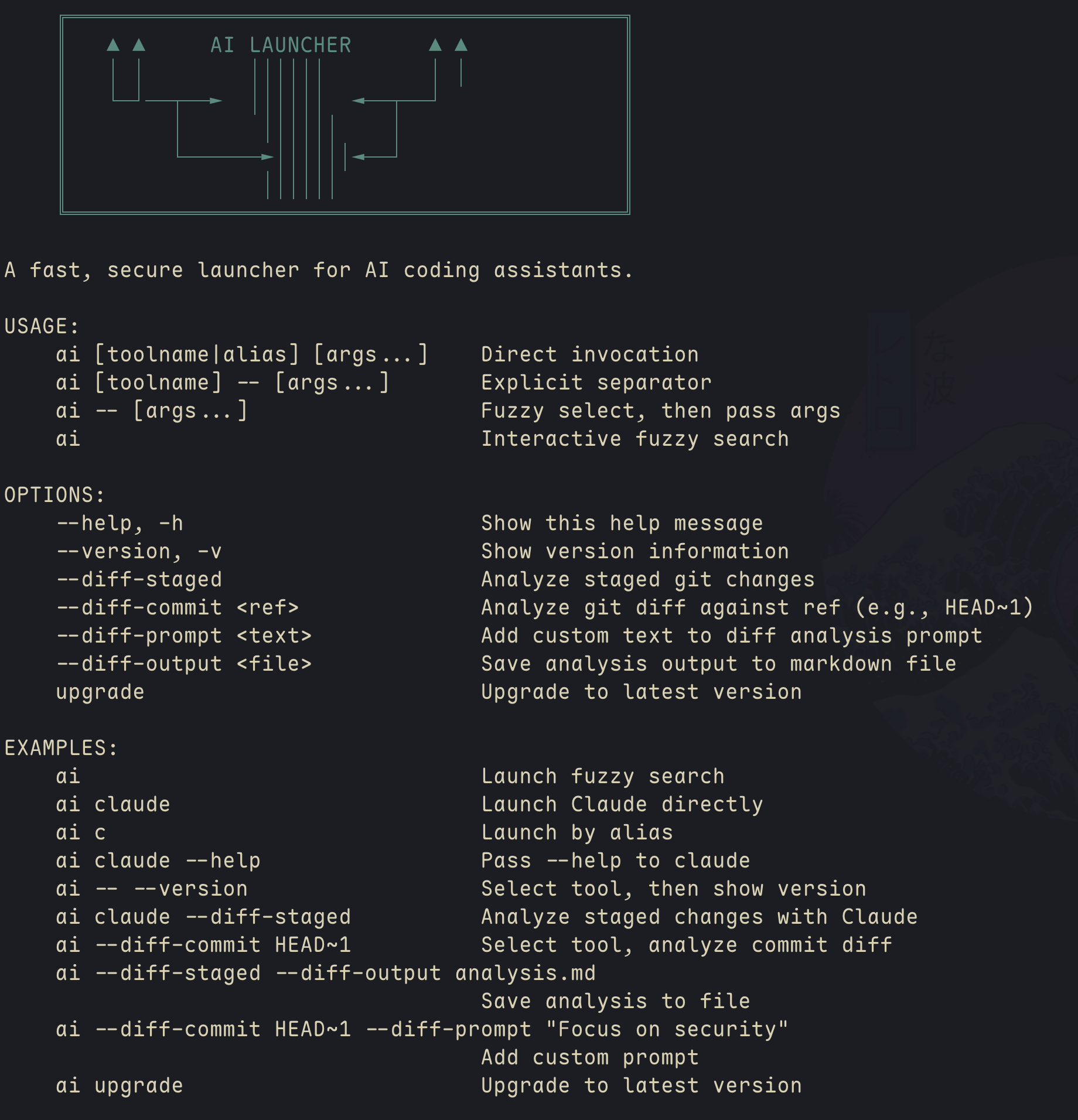
Run without arguments to open fuzzy search:
aiControls:
| Key | Action |
|---|---|
| Type | Filter tools and templates |
↑ / Ctrl+P / Shift+Tab |
Move up |
↓ / Ctrl+N / Tab |
Move down |
Enter |
Select and launch |
Esc / Ctrl+C |
Cancel |
Note: Tab/Shift+Tab navigate the list (not shell completion) since the UI runs in raw mode.
- Templates show
[T]indicator - Compact mode for narrow terminals (< 60 chars)
- Real-time fuzzy matching on names, descriptions, and aliases
Launch a tool directly by name or alias:
ai claude        # Launch Claude
ai amp           # Launch Amp
ai ccs:glm       # Launch CCS with glm profile
ai c             # Uses alias for claude (if configured)
Fuzzy matching works when no exact match is found:
ai cl            # Matches "claude"
ai op            # Matches "opencode"
ai cc            # Matches "ccs" or "claude" (will ask if ambiguous)
CCS Profile Detection: Automatically detects CCS profiles and creates tools like:
ccs:glm- GPT model profileccs:kimi- Kimi model profileccs:custom- Custom profile name
Pass arguments to the selected tool:
ai claude --help              # Direct: passes --help to claude
ai -- --help                  # Fuzzy: select tool, then pass --help
ai claude -- --version        # Explicit separator
Templates can use $@ as a placeholder for arguments or piped stdin:
# Pass arguments directly
ai summarize main.ts          # Expands template with arguments

# Pipe content via stdin
cat main.ts | ai summarize    # Pipe file content to template
git diff | ai review          # Pipe git diff for code review
echo "Hello world" | ai summarize
Both methods substitute content into the $@ placeholder. If no input is provided for a template requiring $@, an error is shown.
Templates without $@ run immediately when selected - perfect for common commands with embedded prompts:
# In config.json - no prompt needed, runs directly
ai gemini-arch                # Runs immediately: ccs gemini 'Explain...'
ai                           # Or select from interactive menu
These templates have fixed commands and execute instantly on selection.
Analyze your git changes with AI assistants for code review, risk assessment, and improvement suggestions:
# Analyze staged changes
ai claude --diff-staged           # Analyze staged changes with Claude
ai --diff-staged                  # Select tool, then analyze staged changes

# Analyze commit diffs
ai claude --diff-commit HEAD~1    # Compare current state with previous commit
ai --diff-commit main             # Compare current branch with main
ai amp --diff-commit origin/main  # Compare with remote branch
ai --diff-commit HEAD~3           # Analyze last 3 commits

# Custom prompt - add specific instructions
ai --diff-staged --diff-prompt "Focus on security vulnerabilities"
ai --diff-commit HEAD~1 --diff-prompt "Check for breaking changes"

# Save output to markdown file
ai --diff-staged --diff-output analysis.md
ai --diff-commit main --diff-output review.md

# Combine all options
ai claude --diff-commit HEAD~1 --diff-prompt "Review performance" --diff-output report.md

# Combine with tool selection
ai c --diff-staged                # Use alias
ai --diff-commit HEAD~1           # Interactive tool selection
What the AI analyzes:
- Summary: Overview of what changed
- Potential Risks: Security issues, breaking changes, edge cases
- Best Practices: Code quality, patterns, conventions
- Improvements: Suggestions for better implementation
Use Cases:
# Pre-commit review with custom focus
git add -A && ai claude --diff-staged --diff-prompt "Check for SQL injection risks"

# Save analysis for documentation
ai --diff-commit origin/main --diff-output deployment-review.md

# Review before push with specific concerns
ai --diff-commit origin/main --diff-prompt "Verify backward compatibility"

# Quick sanity check and save
git add . && ai c --diff-staged --diff-output quick-review.md
The feature automatically constructs a prompt with the diff and sends it to your chosen AI assistant for analysis. Use --diff-prompt to add custom instructions and --diff-output to save the analysis to a markdown file.
Config file location: ~/.config/ai-launcher/config.json
A default config is created on first run. Example:
{
  "tools": [],
  "templates": [
    {
      "name": "review",
      "command": "opencode run --model opencode/big-pickle --agent plan 'Review the following changes and provide feedback: $@'",
      "description": "Code review with OpenCode",
      "aliases": ["rev", "code-review"]
    },
    {
      "name": "commit-zen",
      "command": "opencode run --model opencode/big-pickle --agent plan 'Review the following changes on git and generate a concise git commit message, group by logical changes with commitizen convention, do atomic commit message'",
      "description": "Generate commit message with OpenCode",
      "aliases": ["zen", "logical-commit"]
    },
    {
      "name": "architecture-explanation",
      "command": "ccs gemini 'Explain this codebase architecture'",
      "description": "Explain architecture with Gemini",
      "aliases": ["arch", "arch-explanation"]
    },
    {
      "name": "draft-pull-request",
      "command": "ccs glm --permission-mode acceptEdits -p 'Create draft pr with what why how by gh cli'",
      "description": "Create draft pull request with GLM",
      "aliases": ["pr", "draft-pr"]
    },
    {
      "name": "types",
      "command": "ccs mm --permission-mode acceptEdits -p 'Improve TypeScript types: Remove any, add proper type guards, ensure strict mode compliance for: $@'",
      "description": "Enhance type safety",
      "aliases": ["typescript"]
    },
    {
      "name": "test",
      "command": "ccs mm --permission-mode acceptEdits -p 'Write tests using Arrange-Act-Assert pattern. Focus on behavior, not implementation details for: $@'",
      "description": "Generate tests",
      "aliases": ["spec", "tests"]
    },
    {
      "name": "docs",
      "command": "ccs mm --permission-mode acceptEdits -p 'Add JSDoc comments with @param and @returns. Include usage examples for: $@'",
      "description": "Add documentation",
      "aliases": ["document"]
    },
    {
      "name": "explain",
      "command": "ccs mm --permission-mode plan -p 'Explain this code in detail: 1) What it does 2) How it works 3) Design decisions: $@'",
      "description": "Code explanation",
      "aliases": ["explain-code"]
    }
  ]
}tools: Array of AI tools
| Field | Required | Description |
|---|---|---|
name |
✅ | Display name and primary lookup key |
command |
✅ | The CLI command to execute |
description |
❌ | Shown in fuzzy search list |
aliases |
❌ | Array of short aliases (e.g., ["c", "cl"]) |
promptCommand |
❌ | Alternative command for --diff-* prompts |
promptUseStdin |
❌ | If true, pipe prompt via stdin instead of argument |
templates: Array of command templates
| Field | Required | Description |
|---|---|---|
name |
✅ | Template name (shown with [T] indicator) |
command |
✅ | Command string, use $@ for argument substitution |
description |
✅ | Template description |
aliases |
❌ | Array of short aliases |
Different AI CLIs accept prompts in different ways. The promptCommand and promptUseStdin fields configure how --diff-staged and --diff-commit send prompts:
| Tool | Prompt Command | Why |
|---|---|---|
claude |
claude --permission-mode plan -p 'prompt' |
Uses plan mode for read-only analysis |
ccs |
ccs <profile> --permission-mode plan -p 'prompt' |
Uses plan mode for read-only analysis |
opencode |
echo 'prompt' | opencode run |
First arg is treated as project path, needs stdin |
amp |
echo 'prompt' | amp -x |
Execute mode works best with stdin |
Example configuration:
{
  "name": "opencode",
  "command": "opencode",
  "promptCommand": "opencode run",
  "promptUseStdin": true
}
This tells ai-launcher: when running ai opencode --diff-staged, pipe the diff prompt to opencode run via stdin instead of passing it as an argument.
The following CLIs are auto-detected if installed and available in PATH:
claude- Anthropic Claude CLIopencode- OpenCode AI assistantamp- Sourcegraph Amp CLIcodex- OpenAI Codex CLIkilo- Kilo Code CLIccs- Claude Code Switch (with profile detection viaccs api list)
Precedence Rules:
- User-defined tools in config.json (highest priority)
- Auto-detected tools (fallback)
- Tools with same name or command are de-duplicated
CCS Profile Auto-Detection:
Runs ccs api list to detect active profiles. Each profile with [OK] status becomes available as ccs:<profile-name>.
Based on a real-world config using claude, opencode, amp, and CCS profiles.
These are the templates from your active config:
{
  "templates": [
    {
      "name": "review",
      "command": "opencode run --model opencode/big-pickle --agent plan 'Review the following changes and provide feedback: $@'",
      "description": "Code review with OpenCode",
      "aliases": ["rev", "code-review"]
    },
    {
      "name": "commit-zen",
      "command": "opencode run --model opencode/big-pickle --agent plan 'Review the following changes and generate a concise git commit message: $@'",
      "description": "Generate commit message with OpenCode",
      "aliases": ["commit", "commit-message"]
    },
    {
      "name": "commit-atomic",
      "command": "opencode run --model opencode/big-pickle --agent build 'Run git diff --staged then do atomic commit message for the change with commitizen convention. Write clear, informative commit messages that explain the what and why behind changes, not just the how.'",
      "description": "Atomic commit message with OpenCode",
      "aliases": ["ac", "auto-commit"]
    },
    {
      "name": "architecture-explanation",
      "command": "ccs gemini 'Explain this codebase architecture'",
      "description": "Explain architecture with Gemini",
      "aliases": ["arch", "arch-explanation"]
    },
    {
      "name": "draft-pull-request",
      "command": "ccs glm 'Create draft pr with what why how by gh cli'",
      "description": "Create draft pull request with GLM",
      "aliases": ["pr", "draft-pr"]
    }
  ]
}Expand your toolkit with these templates that work with your existing tools:
{
  "templates": [
    {
      "name": "types",
      "command": "claude -p 'Improve TypeScript types: Remove any, add proper type guards, ensure strict mode compliance for: $@'",
      "description": "Enhance type safety",
      "aliases": ["typescript"]
    },
    {
      "name": "test",
      "command": "claude -p 'Write Bun tests using Arrange-Act-Assert pattern. Focus on behavior, not implementation details for: $@'",
      "description": "Generate tests",
      "aliases": ["spec", "tests"]
    },
    {
      "name": "docs",
      "command": "claude -p 'Add JSDoc comments with @param and @returns. Include usage examples for: $@'",
      "description": "Add documentation",
      "aliases": ["document"]
    },
    {
      "name": "explain",
      "command": "claude -p 'Explain this code in detail: 1) What it does 2) How it works 3) Design decisions: $@'",
      "description": "Code explanation",
      "aliases": ["explain-code"]
    }
  ]
}{
"templates": [
{
"name": "review-security",
"command": "claude -p 'Security review: Check for injection vulnerabilities, input validation, auth issues, and sensitive data handling in: $@'",
"description": "Security-focused review",
"aliases": ["sec", "security"]
},
{
"name": "review-refactor",
"command": "claude -p 'Refactor suggestion: Improve readability, eliminate complexity, and apply clean code principles to: $@'",
"description": "Refactoring recommendations",
"aliases": ["refactor"]
},
{
"name": "review-performance",
"command": "claude -p 'Analyze performance: Identify bottlenecks, suggest optimizations with measurable impact for: $@'",
"description": "Performance review",
"aliases": ["perf", "optimize"]
}
]
}{
"templates": [
{
"name": "pr-title",
"command": "claude -p 'Write a clear PR title (max 72 chars) using Conventional Commits: Type(scope): description'",
"description": "Generate PR title only"
},
{
"name": "release-notes",
"command": "git diff HEAD~1 | opencode run --model opencode/big-pickle --agent plan 'Generate user-friendly release notes from this diff, focusing on user-facing changes'",
"description": "Generate release notes from last commit"
}
]
}{
"templates": [
{
"name": "design-review",
"command": "claude -p 'Review this design for: maintainability, extensibility, and separation of concerns: $@'",
"description": "Design pattern review",
"aliases": ["design"]
},
{
"name": "api-design",
"command": "claude -p 'Review this API design for: REST principles, error handling, versioning, and documentation: $@'",
"description": "API design review"
},
{
"name": "profiler-guidance",
"command": "claude -p 'Suggest profiling strategy: What to measure, tools to use, and how to interpret results for: $@'",
"description": "Profiling guidance"
}
]
}{
"templates": [
{
"name": "fix-lint",
"command": "opencode run 'Fix all linting errors in current file'",
"description": "Auto-fix lint issues"
},
{
"name": "format-imports",
"command": "claude -p 'Organize and sort imports, remove unused imports, add type imports where needed'",
"description": "Clean up imports",
"aliases": ["imports"]
},
{
"name": "add-error-handling",
"command": "claude -p 'Add proper error handling with try-catch and meaningful error messages'",
"description": "Add error handling"
}
]
}{
"templates": [
{
"name": "remove-ai-slop",
"command": "claude -p \"You're reviewing code cleanup. Remove: 1) Excessive comments that break existing documentation style 2) Defensive checks that don't match the codebase's trust model 3) Type escape hatches (any casts, assertions) 4) Generic patterns that feel imported rather than native. Match the file's existing voice and conventions. Report what you removed in 1-3 sentences: $@\"",
"description": "Remove AI-generated code patterns",
"aliases": ["slop", "clean-ai"]
},
{
"name": "tidy-first",
"command": "claude -p 'Apply Tidy First principles: 1) Use guard clauses 2) Extract helper variables for complex expressions 3) Remove dead code 4) Normalize symmetries. Focus on making the code easier to understand: $@'",
"description": "Tidy code before making changes",
"aliases": ["tidy"]
},
{
"name": "simplify",
"command": "claude -p \"Simplify this code: Remove unnecessary complexity, eliminate over-engineering, reduce coupling. Keep solutions simple and focused on what's actually needed: $@\"",
"description": "Simplify over-engineered code",
"aliases": ["simple"]
}
]
}# Your current templates
git diff | ai review # Review with OpenCode big-pickle
git diff --staged | ai commit-zen # Generate commit message
ai ac # Atomic commit (runs git diff internally)
ai arch # Explain architecture with Gemini
ai pr # Create draft PR with GLM
# Additional templates to add
cat src/lookup.ts | ai explain # Explain a file
ai test src/config.test.ts # Generate tests
ai types src/lookup.ts # Improve types
git diff HEAD~1 | ai release-notes # Generate release notes
# Security & performance reviews
git diff | ai review-security # Security-focused review
cat main.ts | ai review-performance # Performance analysis
# Quick fixes (no arguments needed)
ai format-imports # Clean up imports immediately
ai fix-lint # Auto-fix linting errors
# Code cleanup & refactoring
cat src/file.ts | ai remove-ai-slop # Clean up AI-generated patterns
git diff | ai tidy-first # Apply Tidy First principles
cat src/complex.ts | ai simplify # Simplify over-engineered code-
Your current aliases: Use short aliases you've configured
ai rev→review(OpenCode code review)ai ac→commit-atomic(atomic commits)ai arch→architecture-explanation(Gemini architecture)
-
Model selection: Choose the right AI for the task
- OpenCode big-pickle: Great for code review and commits (your current choice)
- Claude: Best for TypeScript, testing, and explanations
- CCS Gemini: Excellent for architecture explanations
- CCS GLM: Good for PR creation and structured outputs
- Amp: Lightweight alternative for quick tasks
-
Chain operations: Use shell pipes to create workflows
git diff | ai review                  # Review staged changes
cat file.ts | ai test > file.test.ts  # Generate test file
git diff main..feature | ai pr        # Create draft PR from branch diff
-
Fuzzy match power: Type minimal characters to find templates
ai com→ matchescommit-zenorcommit-atomic(will ask)ai arc→ matchesarchitecture-explanationai rev-se→ matchesreview-security(if added)
-
CCS profiles: Extend with more models as needed
{ "name": "review-gpt4", "command": "ccs:gpt4 'Review this code: $@'", "description": "Review with GPT-4 via CCS" } -
Template naming: Use descriptive prefixes for organization
commit-*for Git commitsreview-*for different review typespr-*for pull request workflows- Quick aliases for frequent tasks:
ai slopfor cleanup,ai tidyfor tidying
# Install dependencies
bun install

# Run in development mode
bun run dev

# Type checking (no compilation errors ✅)
bun run typecheck

# Build standalone executable
bun run build

# Test with specific tools
bun run src/index.ts claude --version- Modular Design: Clean separation of concerns (config, detection, UI, lookup)
- Type Safety: Full TypeScript coverage with strict mode
- Security: Command validation and injection prevention
- Performance: Bun runtime for fast startup and minimal dependencies
- Extensibility: Plugin-ready architecture for custom tool detectors
- Input Validation: All commands and arguments validated before execution
- Command Injection Prevention: Regex-based sanitization of unsafe characters
- Template Safety: Validated placeholder substitution (
$@syntax only) - Path Protection: Commands validated against allowlist patterns
# Run unit tests
bun test

# Test auto-detection
bun run src/index.ts

# Test direct invocation
bun run src/index.ts claude --version
bun run src/index.ts opencode --help

# Test error handling
bun run src/index.ts nonexistent-tool

# Test alias support (if configured)
bun run src/index.ts c  # Should match claude alias

# Test template with arguments
bun run src/index.ts summarize file.txt

# Test template with stdin
cat file.txt | bun run src/index.ts summarize
git diff | bun run src/index.ts review

# Test git diff analysis
bun run src/index.ts claude --diff-staged
bun run src/index.ts --diff-commit HEAD~1- macOS: Full functionality including interactive fuzzy search
- Linux: Full functionality including interactive fuzzy search
- Windows: Basic functionality, interactive mode may have limitations
- Full ANSI color support
- Interactive terminal UI works in most terminals
- Recommended: iTerm2, Terminal.app, VS Code integrated terminal
- Works best in Windows Terminal
- Command Prompt may have limited ANSI support
- PowerShell recommended over cmd.exe
- Some interactive features may be limited
- TTY support for interactive mode
- ANSI color support (optional, enhances experience)
- UTF-8 encoding recommended
- Fork and clone
- Create feature branch
- Run
bun run typecheck(no errors allowed) - Test on your platform
- Submit PR with description
👤 Huynh Duc Dung
- Website: https://productsway.com/
- Twitter: @jellydn
- GitHub: @jellydn
If this project has been helpful, please give it a ⭐️.





