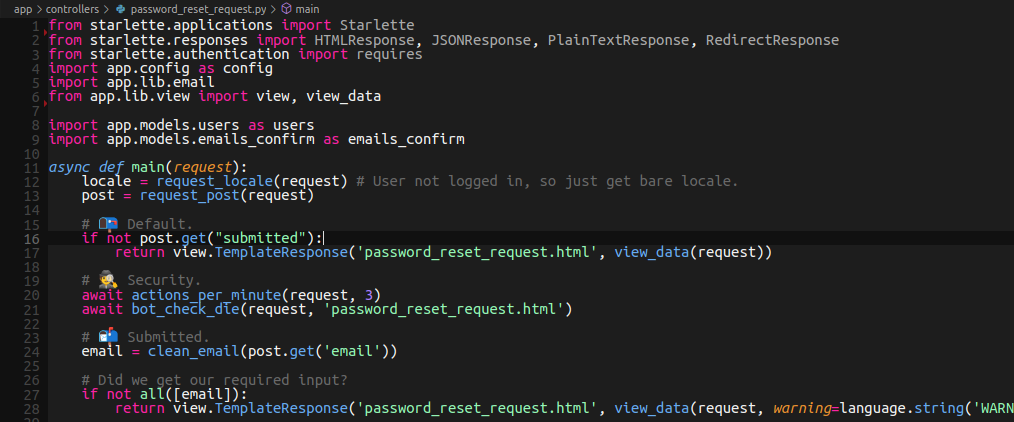
Repository files navigation Ghostbusters 👻 Dark Color Theme for VSCode / VSCodium
Based on Monokai, with less yellows, more minty greens 🎄
Similar to: Dracula, SynthWave 84, One Monokai, 80s
🚨 Install Instructions (VSCodium)
Download as zip (under the code button) or clone.
Add vscode-ghostbusters-main folder to:
~/.vscode-oss/extensions/ (Linux 🐧 / Mac 🍏)
Flatpak? Use ~/.var/app/com.vscodium.codium/data/codium/extensions/
%USERPROFILE%.vscode-oss\extensions (Windows 🖥️)
Restart VS Codium.
File ➡️ Preferences ➡️ Color Theme ➡️ Ghostbusters
🚨 Install Instructions (VSCode)
Download as zip (under the code button) or clone.
Add vscode-ghostbusters-main folder to:
~/.vscode/extensions/ (Linux 🐧 / Mac 🍏)%USERPROFILE%.vscode\extensions (Windows 🖥️)
Restart VS Code.
File ➡️ Preferences ➡️ Color Theme ➡️ Ghostbusters
Font in screenshot is Ubuntu Mono.
About
👻 Dark Color Theme for VSCode / VSCodium
Topics
Resources
License
Stars
Watchers
Forks
You can’t perform that action at this time.