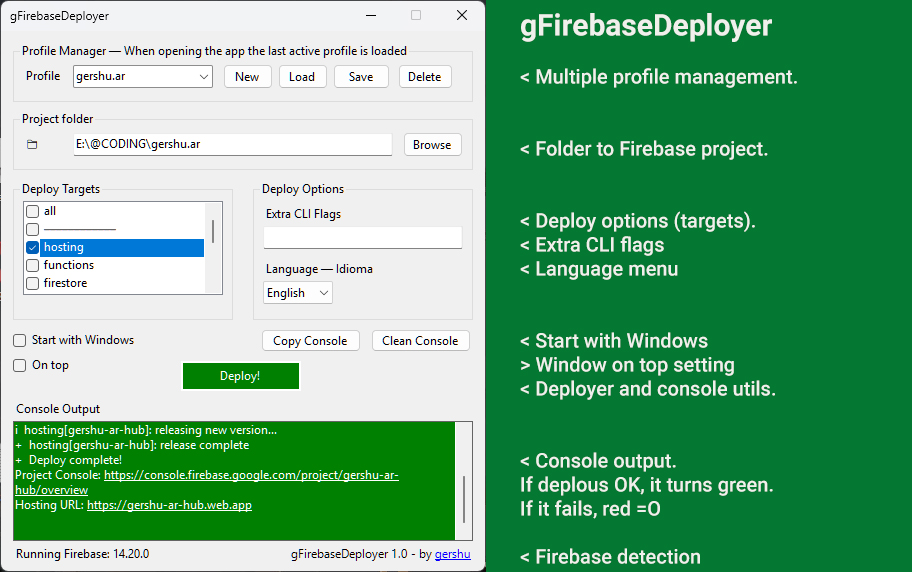

- Intro
- About & Features
- Requirements
- Download (Windows 10/11)
- Bug Reporting & Feedback
- Introducción
- Acerca de & Funcionalidades
- Requisitos
- Descargar (Windows 10/11)
- Reporte de bugs & Feedback
A lightweight, bilingual GUI for Firebase deploys — because you deserve better than command lines.
- 👨💻 About & Features
- 🛠️ Requirements
- 📦 Download (Windows 10/11)
- 🐞 Bug Reporting & Feedback
gFirebaseDeployer is an open‑source, single‑file Windows desktop app that simplifies the Firebase deployment workflow for developers who are tired of juggling terminal commands, .bat scripts, and copy‑pasted flags. Whether you're managing one project or ten, this tool gives you a clean, intuitive interface to launch deploys with confidence — and zero friction.
Coded in C#, built with .NET 9.0 using WinForms for a native Windows experience.
-
🔥 One‑click deploys, no terminal required
Skip the CLI ceremony. Just pick your project, tweak your flags, and deploy. -
📁 Multiple profiles for multiple Firebase projects
Manage all your Firebase projects from a single dropdown/text field:- If you type a new name, a brand‑new profile can be created and then saved.
- If you select an existing one, it loads the active profile with its saved folder, flags, and targets.
- Each profile is stored per‑user in
%AppData%\gFirebaseDeployer, so your settings are safe and isolated.
-
🎯 Flexible deploy targets
Choose exactly what to deploy:all(everything)hostingfunctionsfirestorestoragedatabaseextensionsremoteconfigemulators
If you pick all, it overrides the others. Otherwise, you can target specific services.
-
🧳 Portable single‑file executable
- No installer required. Just drop the small 700k-sized
.exeanywhere and run. - Optionally, you can download and use the installer version. Check below.
- No installer required. Just drop the small 700k-sized
-
🌍 Bilingual & Smart UI
- Switch languages (English & Español) on the fly — the UI updates instantly, no restart needed.
- The interface also adapts intelligently to your workflow: dropdowns auto‑resize to fit content, deploy buttons animate while working, and validations prevent invalid actions. Combined with logic checks (like detecting if Firebase CLI is installed), this ensures a robust and safe experience.
-
🛡️ Privacy & Security by design
- The app NEVER reads or requests Firebase credentials, nor does it send or receive data over the internet. All commands are executed locally through a silent Windows terminal, exactly as if you typed them yourself.
- For extra peace of mind, the app can even be manually blocked by a firewall without affecting its functionality.
-
🪟 Optional startup launch
Enable auto‑start with Windows for those who live and breathe Firebase. -
📌 “Always on top” mode
Keep the app visible while juggling other windows — perfect for multitaskers. -
🖥️ Built‑in console output
See your deploy logs in real time. You can even copy the full output with one click. -
⚙️ Extra CLI flags support
Need--debugor any new mystical Firebase command? Just type them in — no hacks required. -
📥 Minimizes to system tray
Keeps your taskbar clean. Double‑click to restore, right‑click to exit.
- Windows 10 or later
- .NET 9 Desktop Runtime
🧩 Latest release: v1.0.0
📅 Release date: 2025-10-25
WITH INSTALLER (recommended)
The installer will look for .NET Desktop Runtimes 9.0 on your computer: if not found, installer will download and deploy runtimes from Microsoft over the internet; all process is automatic.
📁 File size: 815 KB
🔗 Download from Google Drive
PORTABLE
Requires .NET 9 Desktop Runtime to be installed.
📁 File size: 114 KB
🔗 Download from Google Drive
Found a bug, have a feature request, or just want to share feedback?
👉 Submit here
Coded with ❤️ in 🇦🇷 Argentina
www.gershu.ar
gFirebaseDeployer's source codes and compiled Windows executables are provided "as is".
No license, no copyright.
Una GUI liviana y bilingüe para deploys de Firebase — porque te merecés mejor que líneas de comandos.
- 👨💻 Acerca de & Funcionalidades
- 🛠️ Requisitos
- 📦 Descarga (Windows 10/11)
- 🐞 Reporte de bugs & Feedback
gFirebaseDeployer es una app de escritorio para Windows, open source y portable (un solo archivo .exe), que simplifica el flujo de deploys en Firebase para quienes ya están cansados de lidiar con comandos de terminal, scripts .bat y flags copiados de memoria.
Tengas un proyecto o diez, esta herramienta te da una interfaz limpia e intuitiva para lanzar deploys con confianza y practicidad.
Programada en C#, construida con .NET 9.0 usando WinForms para una experiencia nativa en Windows.
-
🔥 Deploys con un click, sin terminal
Olvidate de la ceremonia del CLI. Elegí tu proyecto, ajustá flags y desplegá. -
📁 Múltiples perfiles para múltiples proyectos Firebase
Administrá todos tus proyectos desde un único campo desplegable/de texto:- Si escribís un nombre nuevo, se crea un perfil automáticamente.
- Si elegís uno existente, se carga el perfil activo con su carpeta, flags y targets guardados.
Cada perfil se guarda por usuario en%AppData%\gFirebaseDeployer, así que tus configuraciones quedan seguras y aisladas.
-
🎯 Targets de deploy flexibles
Elegí exactamente qué querés desplegar:all(todo)hostingfunctionsfirestorestoragedatabaseextensionsremoteconfigemulators
Si seleccionás all, pisa a los demás. Si no, podés apuntar a servicios específicos.
-
🧳 Ejecutable portable en un solo archivo
- No necesitás instalador. Copiá el
.exedonde quieras y corrélo. - Versión con instalador disponible.
- No necesitás instalador. Copiá el
-
🌍 Interfaz bilingüe & UI inteligente
- Cambiá de idioma (Inglés o Español) al vuelo — la interfaz se actualiza al instante, sin reiniciar.
- Además, la UI se adapta a tu forma de laburar: los dropdowns se ajustan al contenido, los botones de deploy animan mientras trabajan y las validaciones evitan acciones inválidas. Sumado a chequeos lógicos (como detectar si el CLI de Firebase está instalado), la experiencia es robusta y segura.
-
🛡️ Privacidad & Seguridad por diseño
- La app NO lee ni pide credenciales de Firebase, ni manda ni recibe datos por internet. Todos los comandos se ejecutan localmente a través de una terminal de Windows en silencio, igual que si los escribieras vos.
- Para más tranquilidad, incluso podés bloquear la app con el firewall y va a seguir funcionando.
-
🪟 Inicio automático opcional
Activá el auto‑start con Windows si vivís desplegando Firebase. -
📌 Modo “Siempre visible”
Mantené la app arriba de todo mientras hacés multitasking. -
🖥️ Consola integrada
Mirá los logs de deploy en tiempo real. Podés copiarlos completos con un click. -
⚙️ Soporte para flags extra del CLI
¿Necesitás--debugo algún comando nuevo y raro de Firebase? Escribilo directo, sin hacks. -
📥 Minimiza al área de notificación (tray)
Liberá la barra de tareas. Doble click para restaurar, click derecho para salir.
- Windows 10 o superior
- .NET 9 Desktop Runtime
🧩 Última versión: v1.0.0
📅 Fecha de release: 2025-10-25
CON INSTALADOR (recomendado)
El instalador buscará .NET Desktop Runtimes instalado en tu PC. Si no lo encuentra, activará la descarga desde el sitio de Microsoft; todo el proceso es automático.
📁 Tamaño del archivo: 828 KB
🔗 Descargar de Google Drive
PORTABLE
Requiere tener .NET 9 Desktop Runtime instalado.
📁 Tamaño del archivo: 114 KB
🔗 Descargar desde Google Drive
¿Encontraste un bug, tenés una idea nueva o querés dejar feedback?
👉 Mandalo acá
Codeado con ❤️ en 🇦🇷 Argentina
www.gershu.ar
Nota: El código fuente y los archivos ejecutables de gFirebaseDeployer se proveen "tal cual".
No license, no copyright.