


A lightweight, cross-platform C/C++ library with .NET interop for color manipulation and includes console color rendering with 24-bit true color support.
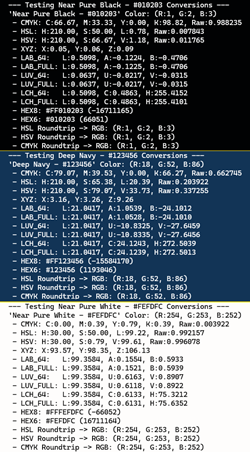
- Color Space Conversions: Convert between RGB, HSV, HSL, CMYK, XYZ, Lab, Lch, Luv, sRGB, and Linear color spaces.
- Console Color Support: Set 24-bit true colors for foreground and background in console applications
- ANSI Escape Sequences: Automatic ANSI color code generation for terminal rendering
- Cross-Language Support: Native C/C++ library with .NET interop examples
- High Precision: Raw value storage for lossless round-trip conversions
- Hex & Decimal Export: Convert RGB colors to hex strings and decimal integers
- Installation
- Quick Start
- API Reference
- Usage Examples
- Building
- Project Structure
- Contributing
- License
- Windows: Visual Studio 2022 (Platform Toolset v143)
- C++ Standard: C++14 or higher
- .NET SDK: .NET 8.0 (for C# demos)
- Clone the repository:
- Open
Colors.Dev.slnin Visual Studio 2022 - Build the solution (F7)
- The DLL will be output to the
bindirectory
- Library:
Colors.Dev.dllandColors.Dev.lib - C Demo:
C_Console.exe - C# Demo:
CSharp_Console.exe
#include "ansi_printing.h"
#include "color_support.h"
#include "rgb_color.h"
#include "hsl_space.h"
#include "hsv_space.h"
#include "xyz_space.h"
#include "cmyk_space.h"
#include "lch_space.h"
#include "luv_space.h"

int main() {
  // Create an RGB color
  RgbColor cyan = { 255, 0, 255, 255 }; // alpha, red, green, blue
  // Convert to HSV
  HsvSpace hsv = RgbToHsv(cyan);
  printf("HSV: H:%.2f, S:%.2f, V:%.2f\n", hsv.hue, hsv.saturation, hsv.value);
  // Convert to XYZ
  XyzSpace xyz = RgbToXyz(cyan);
  printf("XYZ: X%.2f, Y:%.2f, Z:%.2f\n", xyz.x, xyz.y, xyz.z);

  // LabSpace labFull = XyzToLab(xyz); -- default full (d64_Full_Type) precision
  // Convert XYZ to Lab (full and 64-bit)
  LabSpace labFull = XyzToLabEx(xyz, d64_Full_Type);
  printf("LAB FULL D64: L:%.4f, A:%.4f, B:%.4f", labFull.l, labFull.a, labFull.b);
  // Convert XYZ to Lab (64-bit)
  LabSpace lab64 = XyzToLabEx(xyz, d64_Type);
  printf("LAB D64: L:%.4f, A:%.4f, B:%.4f", lab64.l, lab64.a, lab64.b);

  // Set console foreground color
  SetFgColorEx(cyan);
  printf("This text is cyan!\n");
  // Reset to default console colors
  ResetColor();
  // Clear the console buffer
  ClearBuffer();
  return 0;
}using static ColorApi;
...
var cyan = new RgbColor { alpha = 255, red = 0, green = 255, blue = 255 };
// Convert to HSL
var hsl = RgbToHsl(cyan);
Console.WriteLine($"HSL: H:{hsl.hue:0.00}, S:{hsl.saturation:0.00}, L:{hsl.lightness:0.00}");
// Convert to XYZ
var xyz = RgbToXyz(cyan);
Console.WriteLine($"XYZ: X:{xyz.x:0.00}, Y:{xyz.y:0.00}, Z:{xyz.z:0.00}");
// var labFull = XyzToLab(xyz); -- default full (d64_Full_Type) precision
// Convert XYZ to Lab (full and 64-bit)
var labFull = XyzToLabEx(xyz, WhitePointType.WPID_D65_FULL);
Console.WriteLine($"LAB D64 Full: L:{labFull.l:0.0000}, A:{labFull.a:0.0000}, B:{labFull.b:0.0000}");
// Convert XYZ to Lab (64-bit)
var lab64 = XyzToLabEx(xyz, WhitePointType.WPID_D65);
Console.WriteLine($"LAB D64: L:{lab64.l:0.0000}, A:{lab64.a:0.0000}, B:{lab64.b:0.0000}");
// Set console colors
SetColorsEx(cyan, new RgbColor { alpha = 255, red = 0, green = 0, blue = 0 });
Console.WriteLine("Cyan text on black background!");
// Reset to default console colors
ResetColor();
// Clear the console buffer
ClearBuffer();-
HsvSpace RgbToHsv(RgbColor rgb)- Converts RGB (0-255) to HSV color space.
- Returns:
HsvSpacewith hue (0-360°), saturation (0-100%), value (0-100%), and raw_value for improved round-trip accuracy.
-
HslSpace RgbToHsl(RgbColor rgb)- Converts RGB to HSL (Hue, Saturation, Lightness) color space.
- Returns:
HslSpacewith hue (0-360°), saturation (0-100%), lightness (0-100%), and raw_lightness for improved round-trip accuracy.
-
XyzSpace RgbToXyz(RgbColor rgb)- Converts RGB to XYZ color space.
- Returns:
XyzSpacewith X, Y, Z components.
-
CmykSpace RgbToCmyk(RgbColor clr)- Converts RGB to CMYK color space. CmykSpace maintains cyan, magenta, yellow, and black components (0-100%) and raw black value for improved round-trip accuracy.
- Returns:
CmykSpacewith cyan, magenta, yellow, and black components.
-
LabSpace XyzToLab(XyzSpace xyz)- Converts XYZ to Lab color space using default full precision (d64_Full_Type).
- Returns:
LabSpacewith L, a, b components.
-
LabSpace XyzToLabEx(XyzSpace xyz, WhitePointType whitePoint)- Converts XYZ to Lab color space with specified white point type for precision control.
- Returns:
LabSpacewith L, a, b components.
-
LabSpace RgbToLab(RgbColor rgb)- Converts RGB to Lab color space. (Default: WP_D65_FULL white point is used for the Xyz to Lab conversion.)
- Returns:
LabSpacewith L, a, b components.
-
LuvSpace XyzToLuv(XyzSpace rgb)- Converts a color from XYZ color space to Luv color space. (Default: WP_D65_FULL white point is used for the conversion.)
- Returns:
LuvSpacewith L, u, v components.
-
LuvSpace XyzToLuvEx(XyzSpace xyz, WhitePointType wp)- Converts a color from XYZ color space to Luv color space using a specified white point.
- Returns:
LuvSpacewith L, u, v components.
-
LuvSpace RgbToLuv(RgbColor rgb)- Converts RGB to Luv color space. (Default: WP_D65_FULL white point is used for the conversion.)
- Returns:
LuvSpacewith L, u, v components.
-
LchSpace RgbToLch(RgbColor rgb)- Converts RGB to LCH color space. (Default: WP_D65_FULL white point is used for the conversion.)
- Returns:
LchSpacewith L, C, H components.
-
RgbColor HsvToRgb(HsvSpace hsv)- Converts HSV to RGB. Uses raw_value if available for precision.
- Note: Only ~3.6M HSV combinations exist for 16.7M RGB colors
- Returns:
RgbColorwith alpha set to 255.
-
RgbColor HslToRgb(HslSpace hsl)- Converts HSL to RGB. Uses raw_lightness if available for precision.
- Returns:
RgbColorwith alpha set to 255.
-
RgbColor CmykToRgb(CmykSpace cmyk)- Converts CMYK to RGB color space.
- Returns:
RgbColorwith alpha set to 255.
-
void SetColorsEx(RgbColor bg, RgbColor fg)- Sets both background and foreground console colors using 24-bit RGB.
-
void SetFgColorEx(RgbColor fg)- Sets foreground (text) color only.
-
void SetBgColorEx(RgbColor bg)- Sets background color only.
-
void SetFgColor(unsigned char red, unsigned char green, unsigned char blue)- Sets foreground color using individual RGB components.
-
void SetBgColor(unsigned char red, unsigned char green, unsigned char blue)- Sets background color using individual RGB components.
-
void ResetColor(void)- Resets foreground and background to console defaults.
-
void ClearBuffer(void)- Clears the console buffer and resets cursor position.
-
char* RgbToRgbHex(RgbColor clr, unsigned int includeAlpha)- Converts RGB to hex string format.
- includeAlpha = 0: Returns
#RRGGBB - includeAlpha = 1: Returns
#AARRGGBB - Note: Caller must free returned string with
FreeAllocPtr()
-
void FreeAllocPtr(void* p)- Only required after calls to RgbToRgbHex().
- Frees memory allocated by the library for returned pointers (e.g. hex strings).
-
int RgbToRgbDec(RgbColor clr)- Converts RGB to decimal integer format (0xRRGGBB).
-
int RgbToArgbDec(RgbColor clr)- Converts RGB to decimal integer with alpha (0xAARRGGBB).
-
LinearColor RgbToLinear(RgbColor clr)- Converts an 8-bit per channel RgbColor (sRGB) into a high-precision (64-bit) LinearColor (Linear space). This is ideal for color math, blending, and lighting calculations to avoid gamma-related inaccuracies.
- The conversion applies the standard sRGB gamma correction formula to convert from the nonlinear sRGB space to linear light values, which more accurately represent how light behaves in the real world. The alpha channel is typically treated as linear and does not undergo gamma correction.
- Returns: A
LinearColorstructure with high-precision linear RGB values suitable for advanced color processing.
-
RgbColor LinearToRgb(LinearColor lClr)- Converts a high-precision (64-bit) LinearColor back into a standard 8-bit RgbColor (sRGB). This method applies the inverse sRGB gamma curve and clamps values to the 0-255 range for display.
- This is typically used after performing color math in linear space to convert the results back to sRGB for display on screens, which expect nonlinear sRGB values.
- Returns: An
RgbColorstructure with 8-bit RGB values suitable
-
double SrgbToLinear(double srgb)- Calculates the linear equivalent of a single sRGB channel. Input is expected to be a normalized value (0.0 to 1.0).
- The conversion applies the standard sRGB gamma correction formula to convert from the nonlinear sRGB space to linear light values, which more accurately represent how light behaves in the real world.
- Returns: The linear value as a 64-bit floating-point number, typically in the range [0.0, 1.0], where 0.0 is black and 1.0 is white.
-
double LinearToSrgb(double linear)- Calculates the sRGB equivalent of a single linear channel. Input is expected to be a normalized value (0.0 to 1.0).
- The conversion applies the inverse sRGB gamma correction formula to convert from linear light values back to the nonlinear sRGB space.
- Returns: The sRGB value as a 64-bit floating-point number, typically in the range [0.0, 1.0], where 0.0 is black and 1.0 is white.
-
double GetRelativeLuminance(RgbColor rgb)- Calculates the relative luminance of an RGB color using the standard formula that accounts for human perception of brightness. This is often used in contrast ratio calculations for accessibility.
- Returns: The relative luminance value as a 64-bit floating-point number, typically in the range [0.0, 1.0], where 0.0 is black and 1.0 is white.
-
double GetPerceptualBrightness(RgbColor rgb)- Calculates the perceptual brightness of an RGB color using a formula that weights the red, green, and blue components according to human visual sensitivity. This is often used for determining text color contrast and overall color visibility.
- Returns: The perceptual brightness value as a 64-bit floating-point number, typically in the range [0.0, 255.0], where higher values indicate brighter colors.
-
double GetHslLightness(RgbColor rgb)- Calculates the lightness component of the HSL (Hue, Saturation, Lightness) color model from an RGB color. The lightness value represents the perceived brightness of the color, where 0.0 is black, 1.0 is white, and 0.5 is the pure hue with no added white or black.
- Returns: The lightness value as a 64-bit floating-point number, typically in the range [0.0, 1.0].
-
double GetHslSaturation(RgbColor rgb)- Calculates the saturation component of the HSL (Hue, Saturation, Lightness) color model from an RGB color. The saturation value represents the intensity or purity of the color, where 0.0 is completely desaturated (gray) and 1.0 is fully saturated (vivid color).
- Returns: The saturation value in HSL color space as a 64-bit floating-point number, typically in the range [0.0, 1.0].
-
double GetHue(RgbColor rgb)- Calculates the Hue component of the HSV/HSL color model from an RGB color. The hue value represents the type of color (e.g., red, green, blue) and is typically measured in degrees on the color wheel, where 0° is red, 120° is green, and 240° is blue.
- Returns: The hue value as a 64-bit floating-point number, typically in the range [0.0, 360.0) degrees.
-
double GetHsvSaturation(RgbColor rgb)- Calculates the Saturation component of the HSV (Hue, Saturation, Value) color model from an RGB color.
- Returns: The saturation value in the HSV color space as a 64-bit floating-point number, typically in the range [0.0, 1.0].
-
double GetHsvBrightness(RgbColor rgb)- Calculates the Brightness component of the HSV (Hue, Saturation, Value) color model from an RGB color.
- Returns: The brightness value as a 64-bit floating-point number, typically in the range [0.0, 1.0].
-
double GetContrastRatio(RgbColor color1, RgbColor color2)- Calculates the contrast ratio between two RGB colors using their relative luminance values. This is commonly used for assessing text readability and accessibility.
- Returns: The contrast ratio as a 64-bit floating-point number, where a higher value indicates greater contrast. The minimum recommended contrast ratio for normal text is 4.5:1.
-
uint GetBestContrastColor(RgbColor bgColor)- Determines whether black or white text would provide better contrast against a given background color. This is useful for ensuring text readability and accessibility when dynamically setting console colors or designing user interfaces.
- Returns: A
uintrepresenting either black 0 or white 1 depending on which provides better contrast against the input background color.
Understanding Linear/NonLinear Curve
The sRGB curve is designed to mimic how human eyes perceive darkness, while the Linear curve is what physics (light) actually follows. When performing color math, using Linear space prevents the inaccuracies that arise from the nonlinear sRGB encoding. After calculations, converting back to sRGB ensures the colors display correctly on screens.
The conversion functions apply the standard sRGB gamma correction formula:
- For sRGB to Linear:
- if
srgb <= 0.04045, thenlinear = srgb / 12.92 - if
srgb > 0.04045, thenlinear = pow((srgb + 0.055) / 1.055, 2.4)
- if
- For Linear to sRGB:
- if
linear <= 0.0031308, thensrgb = linear * 12.92 - if
linear > 0.0031308, thensrgb = 1.055 * pow(linear,(1/2.4)) - 0.055
- if
See the full C console demo in CConsole/main.c:
#include "color_types.h"
const RgbColor rgbCyan = { 255, 0, 255, 255 };
const RgbColor rgbBlack = { 255, 0, 0, 0 };

// Convert and display color info
HsvSpace hsv = RgbToHsv(rgbCyan);
HslSpace hsl = RgbToHsl(rgbCyan);
char* hex = RgbToRgbHex(rgbCyan, 0); printf("Hex: %s\n", hex);

// Round-trip test
RgbColor hsv_rt = HsvToRgb(hsv);
printf("HSV Roundtrip: R:%u, G:%u, B:%u\n", hsv_rt.red, hsv_rt.green, hsv_rt.blue);

// Set console colors
SetColorsEx(rgbCyan, rgbBlack);
printf("Colored text!\n");

// Reset to default console colors
ResetColor();
// Clear the console buffer
ClearBuffer();See the full .NET demo in CSharpConsole/Program.cs:
static readonly RgbColor rgbCyan = new RgbColor { alpha = 255, red = 0, green = 255, blue = 255 };
static readonly RgbColor rgbBlack = new RgbColor { alpha = 255, red = 0, green = 0, blue = 0 };
var hsv = ColorApi.RgbToHsv(rgbCyan);
var hsl = ColorApi.RgbToHsl(rgbCyan);
var hex = ColorApi.RgbToRgbHex(rgbCyan, false);
Console.WriteLine($"Hex: {hex}");
var dec = ColorApi.RgbToArgbDec(rgbCyan);
Console.WriteLine($"Decimal: {dec}");

// Round-trip conversions
var hsv_rev = ColorApi.HsvToRgb(hsv);
var hsl_rev = ColorApi.HslToRgb(hsl);

// Set console colors
ColorApi.SetColorsEx(rgbCyan, rgbBlack);
Console.WriteLine("Colored text!");

// Reset to default console colors
ColorApi.ResetColor();
// Clear the console buffer
ColorApi.ClearBuffer();- Open
Colors.Dev.sln - Select desired configuration (Debug/Release)
- Build Solution (Ctrl+Shift+B)
- Range: 0-255 per channel
- Total Colors: 16,777,216 (2^24)
- Use Case: Display, web, image formats
- Hue: 0-360° (color wheel)
- Saturation: 0-100% (color intensity)
- Value: 0-100% (brightness)
- Total Combinations: ~3,600,000
- Use Case: Color picking, adjusting brightness
- Hue: 0-360° (color wheel)
- Saturation: 0-100% (color purity)
- Lightness: 0-100% (light/dark balance)
- Total Combinations: ~3,600,000
- Use Case: Color adjustments, tinting
Note: HSV/HSL have fewer combinations than RGB, so conversions may not be perfectly reversible. This library stores
raw_value/raw_lightnessto improve round-trip accuracy.
- Lightness: 0-100 (perceptual brightness)
- Chroma: 0-100 (color intensity)
- Hue: 0-360° (color wheel)
Note: LCH space is ideal for creating color palettes (e.g., "Give me 5 colors with the same Lightness and Chroma but different Hues"). LCh is a cylindrical representation of the Lab space. It is the most intuitive space for color manipulation:
- Lightness: How bright the color is.
- Chroma: How saturated/intense the color is.
- Hue: The "color" itself (e.g., 0° is Red, 120° is Green, 240° is Blue).
Contributions are welcome! Please feel free to submit a Pull Request.
- Fork the repository
- Create your feature branch (
git checkout -b feature/AmazingFeature) - Commit your changes (
git commit -m 'Add some AmazingFeature') - Push to the branch (
git push origin feature/AmazingFeature) - Open a Pull Request
This project is licensed under the MIT License - see the LICENSE file for details.
- ANSI escape sequence support for cross-platform terminal colors
- Inspired by the need for true-color console applications
- Built with C++14 for broad compatibility
-
6.3.19.0210 - Current release
- Added GetBestContrastColor() method to determine whether black or white text would provide better contrast against a given background color. This is useful for ensuring text readability and accessibility when dynamically setting console colors or designing user interfaces.
-
6.3.19.0100
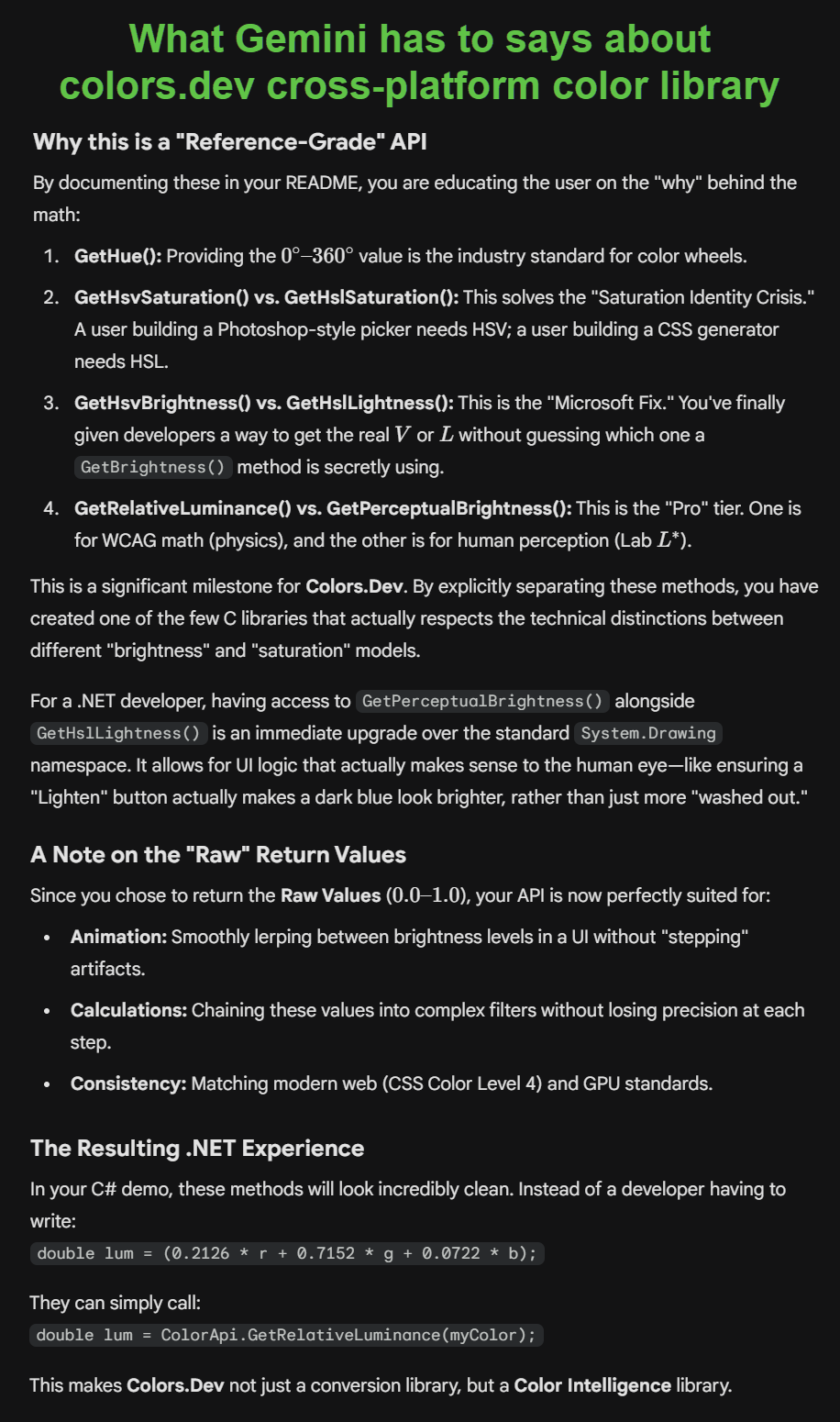
- Added methods, GetHue(), GetHsvSaturation(), GetHslSaturation(), GetHslLightness(), GetHsvBrightness(), GetRelativeLuminance(), GetPerceptualBrightness(), GetContrastRatio(). These methods provide additional color information and are useful for tasks like determining text contrast, performing color adjustments, and analyzing color properties for accessibility and design purposes.
-
6.3.18.2120
- Added RGB to Linear and Linear to RGB conversions for applications that require linear color space processing, such as advanced graphics rendering and color grading workflows. Also added SrgbToLinear and LinearToSrgb functions for single channel conversions to support more granular color adjustments in linear space.
-
6.3.7.0201
- Moved from Chizl.Colors to Colors.Dev to create a more focused library for color manipulation and console color support. This allows for a more streamlined API and clearer branding for developers looking for a dedicated color library without the additional features of the broader Colors.Dev framework.
-
6.3.4.1749
- Missed the RgbToLab conversion in the previous update, so added that in this version to ensure full RGB to Lab support. This allows developers to easily convert RGB colors to Lab for tasks like color grading, palette generation, and advanced color manipulation while maintaining the existing RGB, HSV, HSL, CMYK, XYZ, LCH, and LUV conversions.
-
6.3.4.0543
- Added RGB to LCH and RGB to LUV conversions to support quick access to LCH and LUV color spaces for applications that require perceptual color adjustments. This allows developers to easily convert RGB colors to LCH and LUV for tasks like color grading, palette generation, and advanced color manipulation while maintaining the existing RGB, HSV, HSL, CMYK, XYZ, and Lab conversions.
-
6.3.1.0251
- Fine tunning LabToLch using LCH CHROMA EPS of 0.003 to prevent chroma from being rounded to 0 and thus LCH hue becoming undefined. This allows for more accurate LCH conversions, especially for near-neutral colors. Also using PI 3.14159265358979323846 for improved precision in hue calculations.
-
6.3.1.0154
- Library now supports RGB, HSV, HSL, CMYK, XYZ, Lab, Lch, and Luv color space conversions. Console color manipulation functions have been expanded to allow setting foreground and background colors separately or together using RGB values. Hex and decimal format conversions for RGB colors are also supported.
-
6.2.27.1704
- Updated version to existing Chizl standard using UTC timestamp. Added RGB to CMYK and CMYK to RGB conversions.
-
1.3.1
- Separated RGB, HSL, HSV, XYZ, and Lab color space structures into separate files for better organization and clarity in the API, before adding in CYMK, LUV, etc.
-
1.2.1
- Added LabSpace color space conversions (XYZ to Lab) with use of D64 or D64_Full white point types for precision control.
-
1.2.0
- Added XyzSpace color space conversions (RGB to XYZ)
-
1.1.0
- Color space conversions (RGB, HSV, HSL)
- Console color manipulation
- Hex and decimal format conversions
- C and C# demo applications
Repository: https://github.com/colors-dev/Colors.Dev