This dbt package transforms data from Fivetran's Stripe connector into analytics-ready tables.
- Number of materialized models¹: 61
- Connector documentation
- dbt package documentation
- dbt Core™ supported versions
>=1.3.0, <3.0.0- Decisionlog
This package enables you to better understand your Stripe transactions, enhance balance transaction entries with useful fields, and generate metrics tables for account activity analysis. It creates enriched models with metrics focused on transaction analysis, customer insights, and revenue tracking.
Final output tables are generated in the following target schema:
<your_database>.<connector/schema_name>_stripe
By default, this package materializes the following final tables:
| Table | Description |
|---|---|
| stripe__balance_transactions | Represents each change to your Stripe balance with transaction context. Example Analytics Questions:
|
| stripe__invoice_details | Contains invoice records with associated charge, customer, and subscription data. Example Analytics Questions:
|
| stripe__invoice_line_item_details | Includes line items with charge, customer, subscription, and pricing details. Example Analytics Questions:
|
| stripe__daily_overview | Summarizes daily and rolling Stripe transaction totals by type. Example Analytics Questions:
|
| stripe__subscription_details | Contains subscription records with customer and payment metrics. Example Analytics Questions:
|
| stripe__customer_overview | Shows customer-level metrics with transaction details and associations. Example Analytics Questions:
|
| stripe__activity_itemized_2 | Lists balance transactions with invoice, fee, refund, and customer data. Example Analytics Questions:
|
| stripe__balance_change_from_activity_itemized_3 | Reconciles Stripe balance changes like a detailed bank statement. Example Analytics Questions:
|
| stripe__ending_balance_reconciliation_itemized_4 | Matches bank payouts with unsettled Stripe transactions. Example Analytics Questions:
|
| stripe__payout_itemized_3 | Details expected and actual payout amounts and statuses. Example Analytics Questions:
|
| stripe__line_item_enhanced | Provides unified reporting across billing platforms on product, customer, and revenue metrics. See the Fivetran Billing Model Streamlit App for more details. Example Analytics Questions:
|
| stripe__subscription_item_mrr_report | Shows both contracted and billed MRR (monthly recurring revenue) with discounts applied at the subscription item level. Tracks MRR changes over time, classifying each month as new, expansion, contraction, churned, reactivation, or unchanged. Example Analytics Questions:
|
¹ Each Quickstart transformation job run materializes these models if all components of this data model are enabled. This count includes all staging, intermediate, and final models materialized as view, table, or incremental.
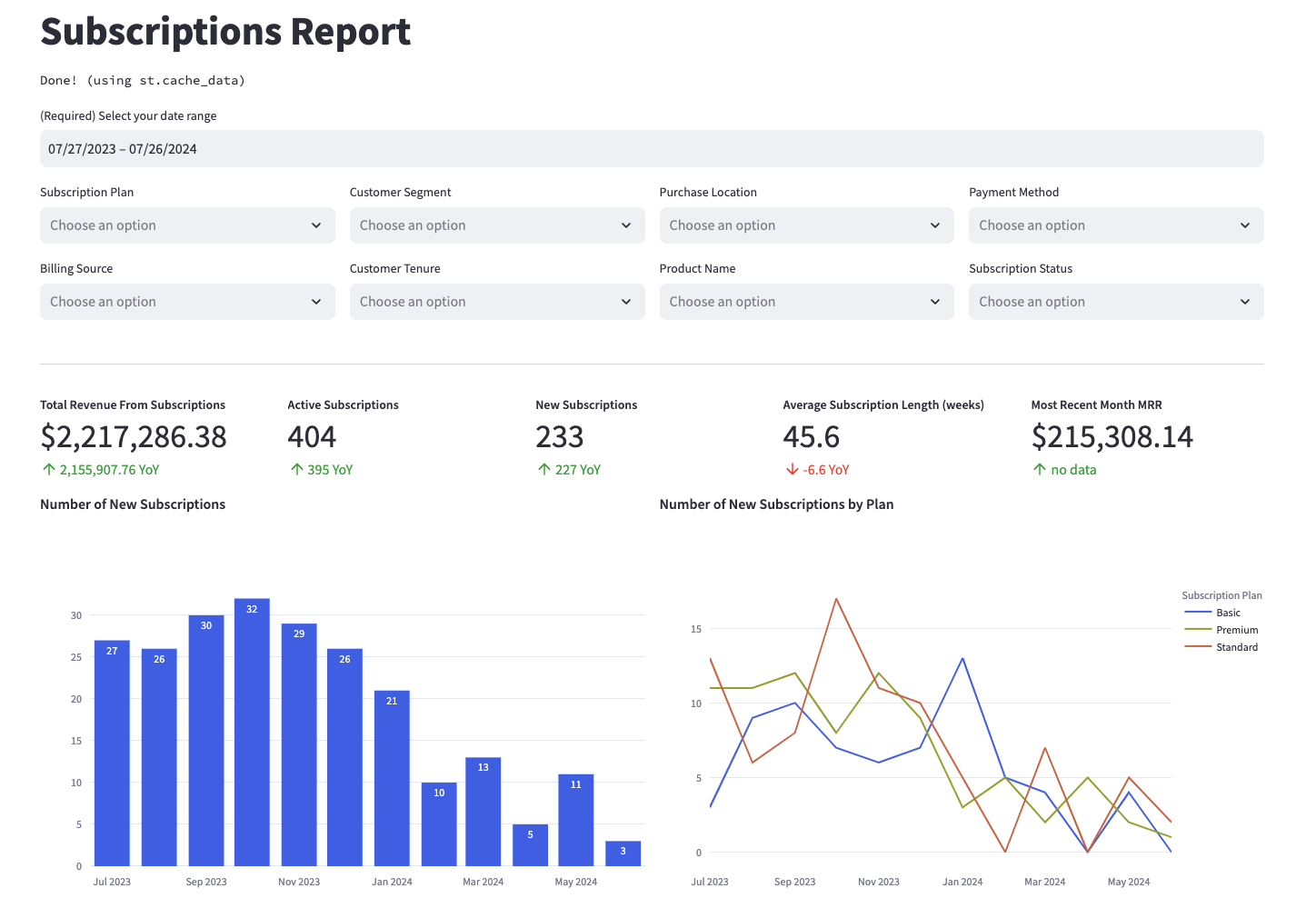
Many of the above reports are now configurable for visualization via Streamlit. Check out some sample reports here.
To use this dbt package, you must have the following:
- At least one Fivetran Stripe connection syncing data into your destination.
- A BigQuery, Snowflake, Redshift, Databricks, or PostgreSQL destination.
You can either add this dbt package in the Fivetran dashboard or import it into your dbt project:
- To add the package in the Fivetran dashboard, follow our Quickstart guide.
- To add the package to your dbt project, follow the setup instructions in the dbt package's README file to use this package.
Include the following stripe package version in your packages.yml file:
TIP: Check dbt Hub for the latest installation instructions or read the dbt docs for more information on installing packages.
packages:
  - package: fivetran/stripe
    version: [">=1.5.0", "<1.6.0"]
All required sources and staging models are now bundled into this transformation package. Do not include
fivetran/stripe_sourcein yourpackages.ymlsince this package has been deprecated.
If you are using a Databricks destination with this package you will need to add the below (or a variation of the below) dispatch configuration within your dbt_project.yml. This is required in order for the package to accurately search for macros within the dbt-labs/spark_utils then the dbt-labs/dbt_utils packages respectively.
dispatch:
  - macro_namespace: dbt_utils
search_order: ['spark_utils', 'dbt_utils']By default, this package runs using your destination and the stripe schema. If this is not where your stripe data is (for example, if your stripe schema is named stripe_fivetran), add the following configuration to your root dbt_project.yml file:
vars:
    stripe_database: your_destination_name
stripe_schema: your_schema_name This package takes into consideration that not every Stripe account utilizes the invoice, invoice_line_item, payment_method, payment_method_card, plan, price, subscription, coupon, transfer, payout, payout_balance_transaction, or credit_note features, and allows you to disable the corresponding functionality. By default, all variables' values are assumed to be true with the exception of credit_note. Add variables for only the tables you want to disable or enable respectively:
# dbt_project.yml

...
vars:
    stripe__using_invoices:        False  #Disable if you are not using the invoice and invoice_line_item tables.
    stripe__using_payment_method:  False  #Disable if you are not using the payment_method and payment_method_card tables.
    stripe__using_subscriptions:   False  #Disable if you are not using the subscription, subscription_item, and plan/price tables.
    stripe__using_coupons:         False  #Disable if you are not using coupon codes to apply discounts.
    stripe__using_credit_notes:    True   #Enable if you are using the credit note tables.
    stripe__using_transfers:       False  #Disable to turn off the transfer table temporarily.
stripe__using_payouts: False #Disable to turn off the payout or payout_balance_transaction table temporarily.Expand to view configurations
This package contains the stripe__line_item_enhanced model which constructs a comprehensive, denormalized analytical table that enables reporting on key revenue, subscription, customer, and product metrics from your billing platform. It's designed to align with the schema of the *__line_item_enhanced model found in Recurly, Recharge, Stripe, Shopify, and Zuora, offering standardized reporting across various billing platforms. To see the kinds of insights this model can generate, explore example visualizations in the Fivetran Billing Model Streamlit App. This model is enabled by default. To disable it, set the stripe__standardized_billing_model_enabled variable to false in your dbt_project.yml:
vars:
  stripe__standardized_billing_model_enabled: false # true by default.
All required sources and staging models are now bundled into this transformation package. Do not include
fivetran/stripe_sourcein yourpackages.ymlsince this package has been deprecated.
By default, this package runs using your destination and the stripe schema. If this is not where your Stripe data is (for example, if your Stripe schema is named stripe_fivetran), add the following configuration to your root dbt_project.yml file:
vars:
    stripe_database: your_destination_name
stripe_schema: your_schema_nameIf you have multiple Stripe connections in Fivetran and would like to use this package on all of them simultaneously, we have provided functionality to do so. For each source table, the package will union all of the data together and pass the unioned table into the transformations. The source_relation column in each model indicates the origin of each record.
To use this functionality, you will need to set the stripe_sources variable in your root dbt_project.yml file:
# dbt_project.yml

vars:
  stripe:
    stripe_sources:
      - database: connection_1_destination_name # Required
        schema: connection_1_schema_name # Required
        name: connection_1_source_name # Required only if following the step in the following subsection

      - database: connection_2_destination_name
        schema: connection_2_schema_name
        name: connection_2_source_name
Previous versions of this package employed two separate, mutually exclusive variables for unioning:
union_schemasandunion_databases. While these variables are still supported,stripe_sourcesis the recommended variable to configure.
If you are running the package through Fivetran Transformations for dbt Core™, the below step is necessary in order to synchronize model runs with your Stripe connections. Alternatively, you may choose to run the package through Fivetran Quickstart, which would create separate sets of models for each Stripe source rather than one set of unioned models.
By default, this package defines one single-connection source, called stripe, which will be disabled if you are unioning multiple connections. This means that your DAG will not include your Stripe sources, though the package will run successfully.
To properly incorporate all of your Stripe connections into your project's DAG:
- Define each of your sources in a
.ymlfile in your project. Utilize the following template for thesource-level configurations, and, most importantly, copy and paste the table and column-level definitions from the package'ssrc_stripe.ymlfile.
# a .yml file in your root project models folder

version: 2

sources:
  - name: <name> # ex: Should match name in stripe_sources
    schema: <schema_name>
    database: <database_name>
    loader: fivetran
    config:
      loaded_at_field: _fivetran_synced
      freshness: # feel free to adjust to your liking
        warn_after: {count: 72, period: hour}
        error_after: {count: 168, period: hour}

tables: # copy and paste from stripe/models/staging/src_stripe.yml - see https://support.atlassian.com/bitbucket-cloud/docs/yaml-anchors/ for how to use anchors to only do so once- Set the
has_defined_sourcesvariable (scoped to thestripepackage) toTruein your root project, like such:
# dbt_project.yml
vars:
  stripe:
has_defined_sources: truePlease note, If the source table is not found in any of the provided schemas/databases, union_data will return a completely empty table (ie limit 0) with just one string column (_dbt_source_relation). A compiler warning message will be output, highlighting that the expected source table was not found and its respective staging model is empty. The compiler warning can be turned off by the end user by setting the fivetran__remove_empty_table_warnings variable to True.
# dbt_project.yml
vars:
fivetran__remove_empty_table_warnings: true # false by defaultCustomers using Fivetran with the newer Stripe Price API will have a price table, and possibly a plan table if that was used previously. Therefore to accommodate two different source tables we added logic to check if there exists a price table by default. If not, it will leverage the plan table. However if you wish to use the plan table instead, you may set stripe__using_price to false in your dbt_project.yml to override the macro.
# dbt_project.yml

...
config-version: 2

vars:
stripe__using_price: false # True by default. If true, will look `price ` table. If false, will look for the `plan` table. For Stripe connections set up after February 09, 2022 the subscription table has been replaced with the new subscription_history table. By default this package will look for your subscription data within the subscription_history source table. However, if you have an older connection, then you must configure the stripe__using_subscription_history to false in order to have the package use the subscription source rather than the subscription_history table.
Please note that if you have
stripe__using_subscription_historyenabled then the package will filter for only active records.
vars:
stripe__using_subscription_history: False # True by default. Set to False if your connection syncs the `subscription` table instead. This packages leaves all timestamp columns in the UTC timezone. However, there are certain instances, such in the daily overview model, that timestamps have to be converted to dates. As a result, the timezone used for the timestamp becomes relevant. By default, this package will use the UTC timezone when converting to date, but if you want to set the timezone to the time in your Stripe reports, add the following configuration to your root dbt_project.yml:
vars:
stripe_timezone: "America/New_York" # Replace with your timezoneBy default, this package will run on non-test data (where livemode = true) from the source Stripe tables. However, you may want to include and focus on test data when testing out the package or developing your analyses. To run on only test data, add the following configuration to your root dbt_project.yml file:
vars:
    stripe:
stripe__using_livemode: false # Default = trueBy default, this package will filter out any records from the invoice_line_item source table which include the string sub_. This is due to a legacy Stripe issue where sub_ records were found to be duplicated. However, if you highly utilize these records you may wish they be included in the final output of the stg_stripe__invoice_line_item model. To do, so you may include the below variable configuration in your root dbt_project.yml:
vars:
    stripe:
stripe__using_invoice_line_sub_filter: false # Default = trueOftentimes you may have custom fields within your source tables stored as a JSON object via the metadata column that you wish to pass through to your analytics models. By leveraging the metadata variables, this package will pivot out fields into their own columns within the respective staging models and for supported variables those columns will persist in end models with prefixed column names.
This package provides the ability to pivot out these metadata fields for the account, card, coupon, charge, customer, dispute, invoice, invoice_line_item, payment_intent, payment_method, payout, plan, price, refund, subscription, subscription_item, and transfer source tables. To pivot these fields out and include them in the respective staging models, add the relevant variable(s) to your root dbt_project.yml file.
The following end models automatically include metadata fields from their respective entities with an entity prefix (eg. invoice_<metadata_field_name>) to avoid column name conflicts with the exception of the stripe__customer_overview model which retains the metafield name/alias:
| End Model | Supported Metadata Entities |
|---|---|
stripe__balance_transactions |
customer, charge, invoice, subscription |
stripe__invoice_details |
customer, charge, invoice, subscription |
stripe__subscription_details |
customer, subscription |
stripe__invoice_line_item_details |
subscription |
stripe__customer_overview |
customer |
We're open to supporting others based on customer feedback. Please open a support ticket to request metadata fields from additional staging models.
The metadata variables accept dictionaries in addition to strings. The expectation is that you will only input single-level key-value pairs from the JSON. You may alias your field if you happen to be using a reserved word as a metadata field, any otherwise incompatible name, or just wish to rename your field.
vars:
  stripe__account_metadata:
    - name: metadata_field
    - name: another_metadata_field
  stripe__charge_metadata:
    - name: campaign_id
  stripe__card_metadata:
    - name: metadata_field_10
  stripe__customer_metadata:
    - name: sales_region
      alias: customer_region  # optional: rename the field
  stripe__invoice_metadata:
    - name: invoice_type
  stripe__invoice_line_item_metadata:
    - name: metadata_field_20
  stripe__payment_intent_metadata:
    - name: incompatible.field
      alias: rename_incompatible_field
  stripe__payment_method_metadata:
    - name: field_is_reserved_word
      alias: field_is_reserved_word_xyz
  stripe__payout_metadata:
    - name: 123
      alias: one_two_three
  stripe__price_plan_metadata: ## Used for both Price and Plan sources
    - name: pricing_tier
  stripe__refund_metadata:
    - name: refund_reason_code
  stripe__subscription_metadata:
    - name: subscription_tier
  stripe__subscription_item_metadata:
    - name: item_category
For dbt Core users: Alternatively, if you only have strings in your JSON object, the metadata variable accepts the following simplified configuration:
vars:
stripe__subscription_metadata: ['subscription_tier', 'contract_length', 'renewal_date'] # Note: this is case-SENSITIVE and must match the casing of the property as it appears in the JSONAmount-based fields, such as amount and net, are typically displayed in the smallest denomination (e.g., cents for USD). By default, amount-based fields will be in this raw form. However, some currencies use major and minor units (for example, cents and dollars when using USD). In these cases, it may be useful to divide the amounts by 100, converting amounts to major units (dollars for USD). To enable the division, configure the stripe__convert_values to true in your project.yml:
vars:
    stripe__convert_values: true  # default is false
If you are working in a currency that does not differentiate between minor and major units, such as JPY or KRW, it may make more sense to keep the amount-based fields in raw form and therefore the package can be ran without configuration. As stripe__convert_values is disabled by default, these fields will not be impacted.
This package includes all source columns defined in the macros folder. You can add more columns using our pass-through column variables. These variables allow for the pass-through fields to be aliased (alias) and casted (transform_sql) if desired, but not required. Datatype casting is configured via a sql snippet within the transform_sql key. You may add the desired sql while omitting the as field_name at the end and your custom pass-though fields will be casted accordingly. Use the below format for declaring the respective pass-through variables:
# dbt_project.yml

vars:
  stripe:
    card_pass_through_columns:
      - name: "description"
      - name: "iin"
      - name: "issuer"
        alias: "card_issuer"  # optional: define an alias for the column
transform_sql: "cast(card_issuer as string)" # optional: apply transformation to column. must reference the alias if providedBy default, this package builds the stripe staging models within a schema titled (<target_schema> + _stg_stripe) in your destination. If this is not where you would like your stripe staging data to be written to, add the following configuration to your root dbt_project.yml file:
models:
    stripe:
      +schema: my_new_schema_name # Leave +schema: blank to use the default target_schema.
      staging:
+schema: my_new_schema_name # Leave +schema: blank to use the default target_schema.If an individual source table has a different name than the package expects, add the table name as it appears in your destination to the respective variable:
IMPORTANT: See this project's
dbt_project.ymlvariable declarations to see the expected names.
vars:
stripe_<default_source_table_name>_identifier: your_table_name Expand for details
Fivetran offers the ability for you to orchestrate your dbt project through Fivetran Transformations for dbt Core™. Learn how to set up your project for orchestration through Fivetran in our Transformations for dbt Core setup guides.
This dbt package is dependent on the following dbt packages. These dependencies are installed by default within this package. For more information on the following packages, refer to the dbt hub site.
IMPORTANT: If you have any of these dependent packages in your own
packages.ymlfile, we highly recommend that you remove them from your rootpackages.ymlto avoid package version conflicts.
packages:
    - package: fivetran/fivetran_utils
      version: [">=0.4.0", "<0.5.0"]

    - package: dbt-labs/dbt_utils
      version: [">=1.0.0", "<2.0.0"]

    - package: dbt-labs/spark_utils
version: [">=0.3.0", "<0.4.0"]The Fivetran team maintaining this package only maintains the latest version of the package. We highly recommend you stay consistent with the latest version of the package and refer to the CHANGELOG and release notes for more information on changes across versions.
A small team of analytics engineers at Fivetran develops these dbt packages. However, the packages are made better by community contributions.
We highly encourage and welcome contributions to this package. Learn how to contribute to a package in dbt's Contributing to an external dbt package article.
- If you have questions or want to reach out for help, see the GitHub Issue section to find the right avenue of support for you.
- If you would like to provide feedback to the dbt package team at Fivetran or would like to request a new dbt package, fill out our Feedback Form.