Open
Conversation


blimmer
commented
Sep 7, 2023
Comment on lines
+15
to
+16
| 5. Select a physical device from the dropdown at the top-center of the UI. Xcode will add this device to your account. | ||
| 6. Build the app onto your device by pressing the "Play" symbol at the top-left of the the UI. |
Contributor
Author
There was a problem hiding this comment.
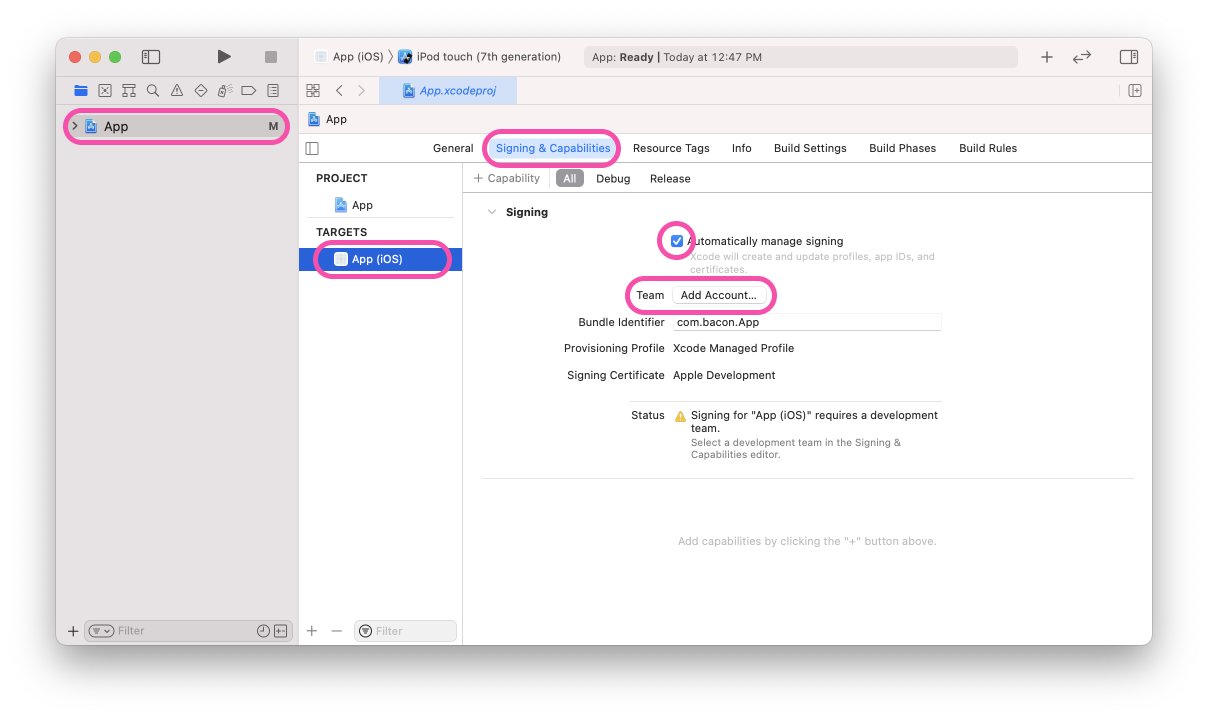
These were the two steps that confused me before. I added a screenshot for clarity.
| Learn more: [Apple docs (MaintainingCertificates)](https://developer.apple.com/library/content/documentation/IDEs/Conceptual/AppDistributionGuide/MaintainingCertificates/MaintainingCertificates.html). | ||
| 2. You may need to enable Developer Mode for your device. This is done in your iOS device in: Settings > Privacy > Developer Mode. | ||
| If the Developer Mode option doesn't appear, you might need to unplug your iOS device from your computer. | ||
| Learn more: [Apple docs (Enabling Developer Mode)](hhttps://developer.apple.com/documentation/xcode/enabling-developer-mode-on-a-device). |
Contributor
Author
There was a problem hiding this comment.
This also bit me, especially the fact that you can't see "Enable Developer Mode" when your device is plugged in (lol).
|
|
||
| > 💡 Certificates are saved to your local Keychain so you don't need to set them up often. | ||
|
|
||
|  |
Contributor
Author
There was a problem hiding this comment.
I put the images into this repo, as that appears to be the pattern used now.


|
Would be nice to get this merged. I just ran into the same bits of confusion and this PR was very helpful in figuring out what to do. |
This file contains hidden or bidirectional Unicode text that may be interpreted or compiled differently than what appears below. To review, open the file in an editor that reveals hidden Unicode characters.
Learn more about bidirectional Unicode characters
Sign up for free
to join this conversation on GitHub.
Already have an account?
Sign in to comment
2 participants


Add this suggestion to a batch that can be applied as a single commit.This suggestion is invalid because no changes were made to the code.Suggestions cannot be applied while the pull request is closed.Suggestions cannot be applied while viewing a subset of changes.Only one suggestion per line can be applied in a batch.Add this suggestion to a batch that can be applied as a single commit.Applying suggestions on deleted lines is not supported.You must change the existing code in this line in order to create a valid suggestion.Outdated suggestions cannot be applied.This suggestion has been applied or marked resolved.Suggestions cannot be applied from pending reviews.Suggestions cannot be applied on multi-line comments.Suggestions cannot be applied while the pull request is queued to merge.Suggestion cannot be applied right now. Please check back later.
This PR adds new screenshots and clearer instructions to for the Xcode signing process.