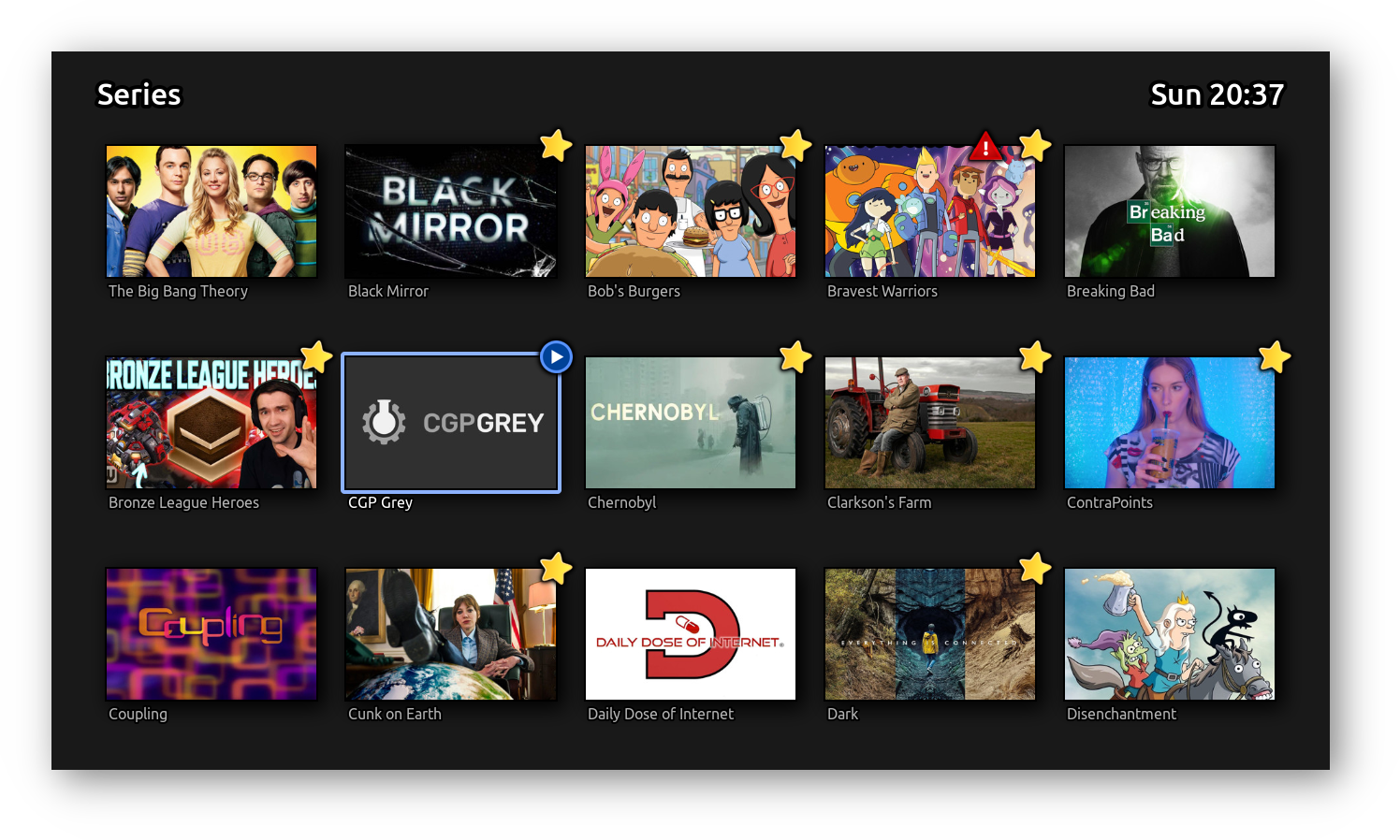

Note: Fabella is very much in the "v0.1" stage. It does the basics, for me, on my system, but it's nowhere near a finished product. That said, here it is, and here is even a preliminary readme:
Fabella is a video library browser and viewer, focusing on a minimal but elegant user interface.
It simply exposes the directory structure of the library root.
- Folders are displayed as tiles with their full name below them.
If the folder contains an image file named
.cover.jpg, it will be displayed cover image for the tile. - Files are displayed as tiles with their filename (extension stripped) below them.
If the file is an MKV file with an image attachment named
cover.jpg, that will be displayed as cover image.
Files can be in any of the states seen (no emblem), new (star emblem), or watching ("play" emblem).
Additionally, it can be tagged (red triangle emblem).
Playing a video will change it from new to watching.
Finishing the video will change it to seen.
States propagate up to folders.
For performance, directory contents, cover images, and video file states are compiled into indices in .fabella/ within each folder.
These indices are not maintained by Fabella itself, but by a separate service called Clerk.
Clerk watches the library for changes, and updates the index files accordingly.
Without Clerk, these indices are not updated, and Fabella will display stale content/state.
Fabella is designed such that Fabella and Clerk can run on separate systems, with the video library shared as a network mount.
This is in fact the intended setup, with Clerk running on a NAS / server with the storage, and one or more Fabella "clients" that use the video library via a network mount (using sshfs in my case).
Fabella requires:
- Python 3.6 or later
- glfw (version? 2.2.0 works)
- Requires system libraries:
libglfw3
- Requires system libraries:
- PyOpenGL (version? 3.42.0 works)
- pillow 6.2.0 or later
- Requires system libraries:
libjpeg-dev,zlib1g-dev
- Requires system libraries:
- pycairo (version? 1.20.1 works)
- Requires system libraries:
libcairo2-dev
- Requires system libraries:
- PyGObject (version? 3.42.0 works)
- Requires system libraries:
libgirepository1.0-dev,python3-dev,gir1.2-pango-1.0
- Requires system libraries:
python-mpv(ships with Fabella)- Requires system libraries:
libmpv1
- Requires system libraries:
Clerk requires:
- Python 3.6 or later
- watchdog (version? 2.1.5 works)
Probably something like:
virtualenv --python=python3 venv
source venv/bin/activate
pip install glfw PyOpenGL pillow pycairo PyGObject
./fabella.py /path/to/videos
For Clerk:
virtualenv --python=python3 venv
source venv/bin/activate
pip install watchdog
./clerk.py /path/to/videos
You can have a look at config.py to tweak some of Fabella's behaviour.
No documentation yet, sorry.
This is a probably incomplete list of key bindings.
Perhaps look in fabella.py for all keys.
ctrl-Qquits.Ftoggles full-screen.
In menu:
- Arrow keys, home, end, pgup/dn,
H,J,K,Lnavigate. - Backspace goes up a level.
- Space or Enter play a video.
- Tab toggles video state.
- Delete toggles video tag.
In player:
- Arrow keys, home, end, pgup/dn seek.
- Space toggles pause.
- Enter stops the video and returns to menu.
- Escape returns to menu with video still playing.
Otoggles OSD.JandKcycle subtitles.