High-throughput email delivery engine powered by Webflow's form infrastructure






Instead of relying on traditional ESPs (Mailchimp, SendGrid, etc.), the system programmatically updates form settings, publishes the site, and triggers form submissions via the Webflow Designer API — turning any Webflow site into a fully controllable email sender.
Built with a modern dark/light themed SPA dashboard for managing accounts, templates, settings, and real-time mailing analytics.
Warning
This tool is provided for educational and authorized testing purposes only. The author is not responsible for any misuse. Always comply with applicable laws and platform terms of service.
- Key Features
- Architecture
- Tech Stack
- Getting Started
- Configuration
- Project Structure
- Template Engine
- Sending Modes
- API Reference
- Screenshots
- License
Engine
- Automated Webflow form settings update → site publish → form trigger pipeline
- Per-recipient template uniquification (each email gets its own spintax resolution, HTML fingerprint, and variable substitution)
- Automatic retry with exponential backoff on 429 rate limits (15s → 30s → 60s, up to 3 attempts)
- Configurable batch delays and inter-message pauses
Multi-Account
- Unlimited Webflow account profiles with independent
session_id/xsrf_token - Per-account proxy support (SOCKS5, HTTP) with built-in connectivity test via
api.ipify.org - Per-account sender name, subject, template content, and redirect URL
Template System
- 7 production-ready templates: Depop, eBay, Poshmark, Vinted, Mercari, StockX, Inbox Warming
- Custom templates manager: create, edit, clone, duplicate, and delete templates from UI
- Per-template metadata: icon, accent color, sender name, subject, and HTML body
- Spintax processor with nested syntax support and MSO conditional protection
- 11 dynamic variables:
{email},{username},{first_name},{last_name},{order_id},{redirect},{date},{time},{random_price},{tracking_number},{item_name} - HTML uniquification layer: random comments between
</tr>tags,data-midattributes, invisible preheader blocks
Dashboard (SPA)
- Five-tab interface: Accounts, Template, Settings, Send, Analytics
- Dark / Light theme with animated circular ripple transition
- Enhanced UI motion system: page transitions, card/button/input animations, modal transitions, and count-up stats
- Auto-configuration from Webflow URL — paste a link, get Site ID, domain, and all API endpoints filled automatically
- Code / Preview editor for HTML templates with live Shadow DOM preview (inline + fullscreen)
- Custom template modal with drag-and-drop HTML import and live Code/Preview switch
- Real-time progress tracking with elapsed timer, speed, ETA, and per-email logs
- 14-day analytics chart, top accounts ranking, historical log viewer
- Drag-and-drop
.txtfile import for recipient lists - Full export / import of accounts, settings, and config as a single JSON
- Sound notifications on all UI events (toasts) and completion
- Custom cursor with magnetic hover effect, click burst particles, and trailing particles
- Accent color system with presets + advanced custom picker (HSV canvas + HEX/RGB controls) applied globally
- Accent-aware wallpaper/background, cursor particles, custom themed scrollbars, text selection colors, and collapsible UI sections
- Keyboard shortcuts:
Ctrl+S(save),Ctrl+Enter(start sending),Esc(close modals)
┌────────────────────────────────────────────────────────────┐
│                     Browser (SPA)                          │
│  index.html + script.js                                    │
│  Tabs: Accounts │ Template │ Settings │ Send │ Analytics   │
└──────────────────────┬─────────────────────────────────────┘
                       │  REST API (JSON)
                       ▼
┌──────────────────────────────────────────────────────────────┐
│                   Flask Backend (app.py)                     │
│                                                              │
│  ┌──────────────┐  ┌──────────────┐  ┌───────────────────┐   │
│  │  Accounts    │  │  Settings    │  │  Analytics        │   │
│  │  CRUD + Sync │  │  Load/Save   │  │  Record + Query   │   │
│  └──────────────┘  └──────────────┘  └───────────────────┘   │
│                                                              │
│  ┌──────────────────────────────────────────────────────┐    │
│  │  Mailing Thread (per session)                        │    │
│  │  progress_data + stop_flag + logging                 │    │
│  └───────────────────────┬──────────────────────────────┘    │
└──────────────────────────┼───────────────────────────────────┘
                           │
                           ▼
┌──────────────────────────────────────────────────────────────┐
│              WebflowMailer (webflow_mailer.py)               │
│                                                              │
│  For each recipient:                                         │
│    1. process_spintax(template)     — resolve [a|b|c]        │
│    2. uniquify_html(template)       — fingerprint HTML       │
│    3. _substitute_variables(tmpl)   — inject {email}, etc.   │
│    4. update_form_settings()        — POST form config       │
│    5. publish_site()                — POST publish           │
│    6. wait_for_publish()            — poll task status       │
│    7. trigger_form_submission()     — POST form submit       │
│    8. sleep(batch_delay)                                     │
└──────────────────────────────────────────────────────────────┘
                           │
                           ▼
                   Webflow Designer API
          (form settings, publish, form submit)
| Layer | Technology |
|---|---|
| Backend | Python 3.10+, Flask 3.x |
| HTTP Client | requests (with optional requests[socks] for SOCKS5 proxies) |
| Frontend | Vanilla JavaScript (ES6+), HTML5, CSS3 |
| Typography | Google Fonts (Inter) |
| Data Storage | JSON files (config, cookies, accounts, settings, analytics) |
| External API | Webflow Designer API (form settings, site publish, form submission) |
- Python 3.10 or higher
- A Webflow account with Designer access
- A Webflow site with a form element configured
git clone https://github.com/ew1lexa/WebFlow-Sender.git
cd WebFlow-Sender
pip install -r requirements.txt
For SOCKS5 proxy support:
pip install "requests[socks]"python app.pyOpen http://localhost:5000 in your browser.
All config files (config.json, cookies.json, settings.json, analytics.json) and data directories (accounts/, logs/) are created automatically on first launch — no manual setup required.
- Open the dashboard → Settings tab
- Paste your Webflow site URL (e.g.
https://your-site-xxxxx.webflow.io) into the Auto-configuration field - Enter your Session ID and XSRF Token from browser DevTools
- Click Распознать — Site ID, Element ID, domain, and all API endpoints are filled automatically
- Click Сохранить всё
All credentials are stored in config.json (gitignored, auto-created on first run).
| Field | Description | Where to Find |
|---|---|---|
site_id |
Webflow site identifier | Auto-detected from URL or Designer URL |
element_id |
Form element ID | Auto-detected from Webflow API |
page_id |
Page containing the form | Same as site_id for single-page sites |
session_id |
Session token | DevTools → Network → Request Headers (x-session-id) |
xsrf_token |
CSRF token | DevTools → Network → Request Headers (x-xsrf-token) |
domain |
Published site domain | e.g. your-site.webflow.io |
batch_delay |
Delay between emails (seconds) | Set in UI or config |
redirect_url |
Target URL for {redirect} variable |
Set in UI per-account |
Tokens can also be managed through the dashboard UI (Settings tab) and are synced per-account.
WebFlow-Sender/
├── app.py                        # Flask app — routes, API, mailing orchestration
├── webflow_mailer.py             # Core engine — Webflow API, spintax, uniquification
├── requirements.txt              # Python dependencies
├── LICENSE                       # MIT License
├── README.md
│
├── static/
│   ├── script.js                 # Frontend logic (accounts, templates, sending, analytics)
│   └── Nota.mp3                  # Notification sound
│
├── templates/
│   ├── index.html                # SPA dashboard (single-page app)
│   ├── template.txt              # Base email template
│   ├── template_depop.txt        # Depop order confirmation
│   ├── template_ebay.txt         # eBay order confirmation
│   ├── template_poshmark.txt     # Poshmark sale notification
│   ├── template_vinted.txt       # Vinted order confirmation
│   ├── template_mercari.txt      # Mercari sale notification
│   ├── template_stockx.txt       # StockX order confirmation
│   └── template_inbox.txt        # Inbox warming notification
│
├── accounts/                     # Account profiles (gitignored, auto-created)
│   └── account_*.json
│
├── logs/                         # Daily log files (gitignored, auto-created)
│   └── YYYY-MM-DD.log
│
└── docs/screenshots/             # README screenshots
    ├── dark/                     #   Dark theme screenshots
    └── light/                    #   Light theme screenshots
Auto-created at runtime (gitignored):
config.json— engine configuration and credentialscookies.json— Webflow designer session cookiessettings.json— user preferences (delays, order ID format)analytics.json— mailing statistics
Randomize content per email with bracket syntax:
Your [order|purchase|transaction] has been [confirmed|processed|completed].
Nested spintax is supported:
[Hello [friend|valued customer]|Hi there|Greetings]
MSO conditional blocks (<!--[if mso]>...<![endif]-->) are automatically excluded from spintax processing.
| Variable | Output Example | Description |
|---|---|---|
{email} |
john.smith@gmail.com |
Recipient email address |
{username} |
john.smith |
Local part of the email |
{first_name} |
James |
Random first name |
{last_name} |
Williams |
Random last name |
{order_id} |
48291057 |
Random order ID (format configurable) |
{redirect} |
https://... |
Redirect URL from account settings |
{date} |
Mar 18, 2026 |
Current date |
{time} |
14:30 |
Current time |
{random_price} |
$149.99 |
Random price ($12.99–$299.99) |
{tracking_number} |
1Z9400827364... |
Random tracking number |
{item_name} |
Jordan 1 Retro High OG |
Random product name |
Each email receives a unique HTML fingerprint to reduce spam filter correlation:
- Random HTML comments inserted between
</tr>tags - Unique
data-midattribute on the first<table> - Invisible preheader
<div>with randomized content after<body>
One email per recipient. Pipeline: update form → publish → submit.
Two emails per recipient: first an inbox warming template (generic notification), then the main template. The delay between the two is configurable via dual_mode_delay.
Both modes process recipients individually (not in batches) to ensure unique variable substitution per email.
All endpoints are served by the Flask backend at http://localhost:5000.
Accounts
| Method | Endpoint | Description |
|---|---|---|
| GET | /api/accounts |
List all accounts |
| GET | /api/accounts/get?filename=... |
Get single account |
| POST | /api/accounts/save |
Create or update account |
| POST | /api/accounts/delete |
Delete account |
| POST | /api/accounts/delete-all |
Delete all accounts |
| POST | /api/accounts/rename |
Rename account |
| POST | /api/accounts/update-proxy |
Update account proxy |
| POST | /api/accounts/update-field |
Update single field |
| POST | /api/accounts/sync-config |
Sync tokens to config.json |
Templates
| Method | Endpoint | Description |
|---|---|---|
| GET | /api/templates/list |
List available template files |
| GET | /api/templates/load-file?filename=... |
Load template file content |
| GET | /api/template/load?account=... |
Load account's current template |
| POST | /api/template/save |
Save template to account |
| POST | /api/template/set |
Bulk-set template (current / all accounts) |
| GET | /api/template/set-logs |
Template set operation status |
Sending
| Method | Endpoint | Description |
|---|---|---|
| POST | /api/send |
Start mailing (runs in background thread) |
| POST | /api/stop |
Stop current mailing |
| GET | /api/status |
Get mailing progress |
Settings & Config
| Method | Endpoint | Description |
|---|---|---|
| GET | /api/settings/load |
Load user settings |
| POST | /api/settings/save |
Save user settings |
| GET | /api/config/load |
Load engine config |
| POST | /api/config/save |
Save engine config |
| POST | /api/config/parse-url |
Auto-detect site config from Webflow URL |
| GET | /api/random-vars?account=... |
Generate preview variables |
| POST | /api/redirect/set |
Set redirect URL for all accounts |
| POST | /api/proxy/test |
Test proxy connectivity |
Analytics & Logs
| Method | Endpoint | Description |
|---|---|---|
| GET | /api/analytics/data |
Get all analytics records |
| GET | /api/logs/list |
List available log files |
| GET | /api/logs/view?date=... |
View log file content |
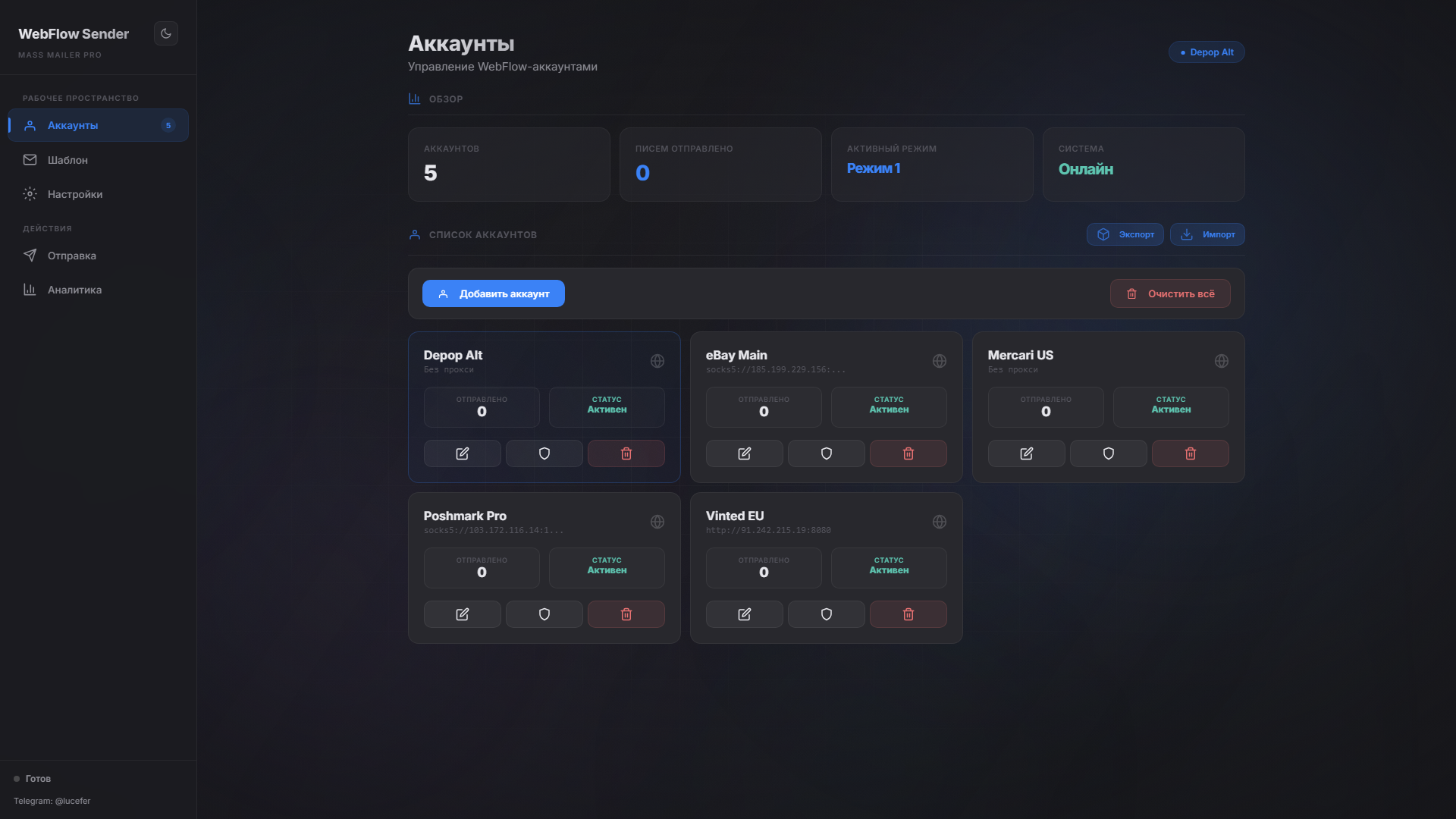
Account management — multi-account profiles with proxy settings, export/import
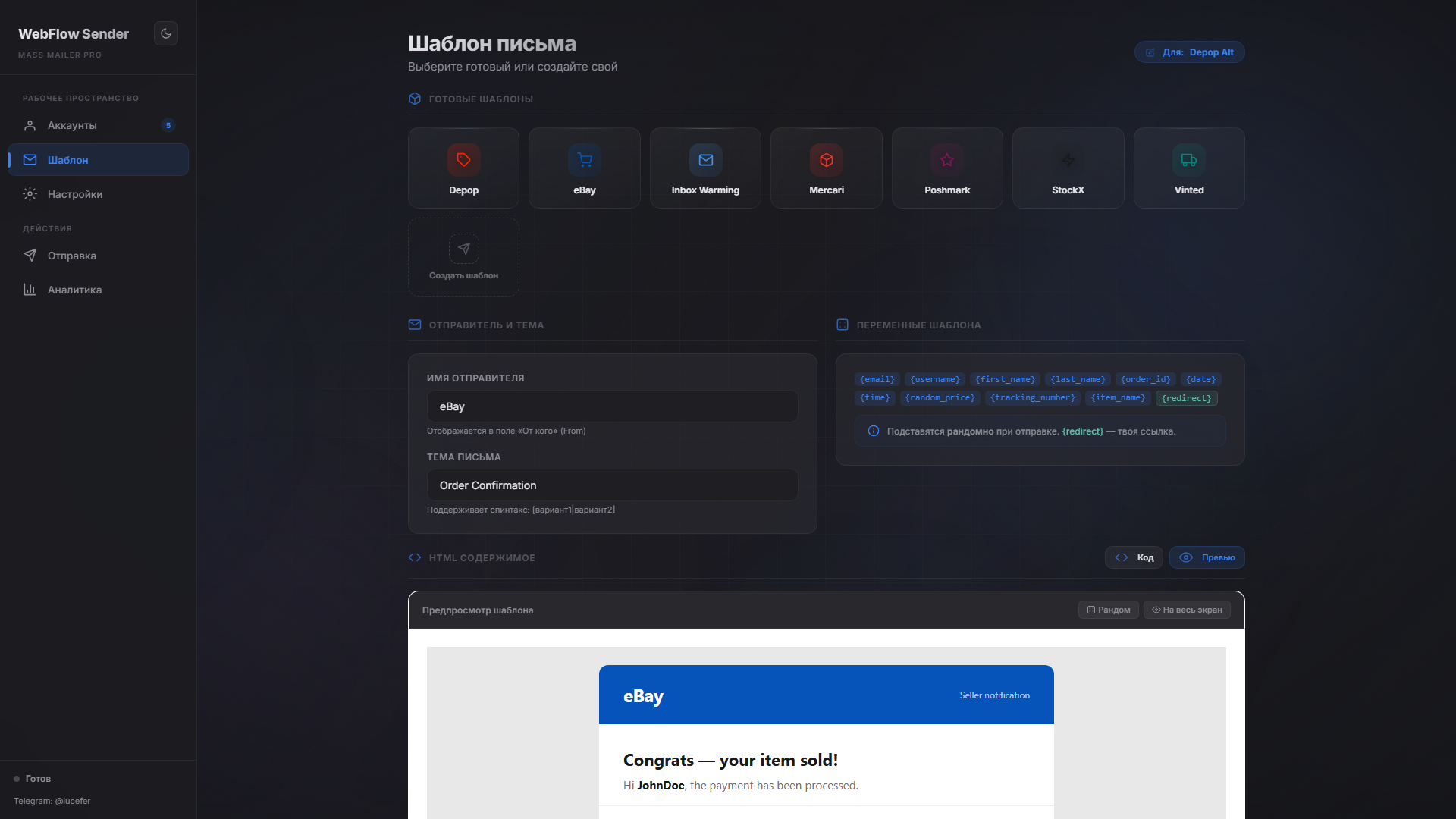
Template editor — brand templates, Code/Preview toggle with Shadow DOM, sender name
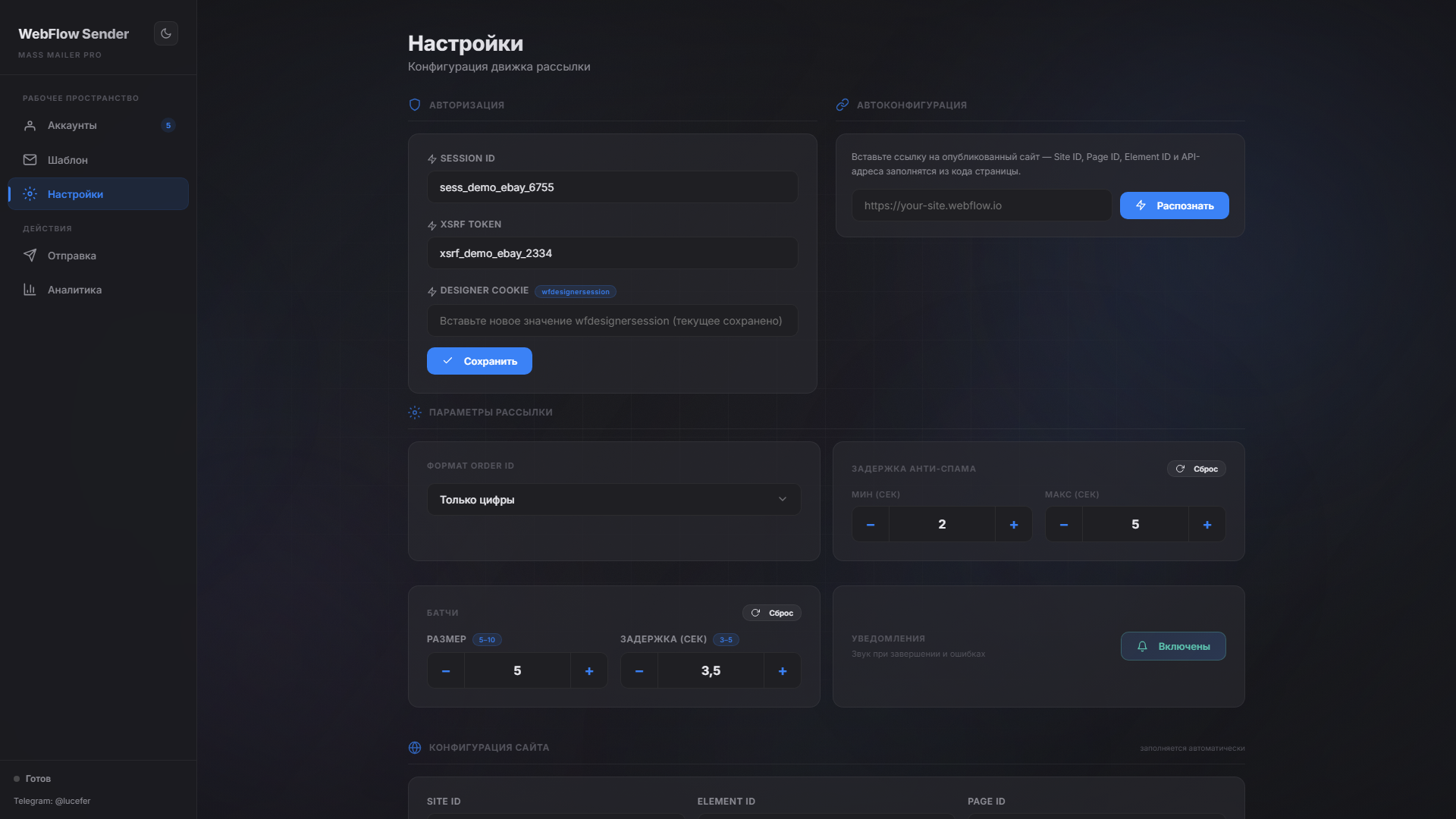
Settings — auto-config from URL, authorization tokens, batch speed, anti-spam delays
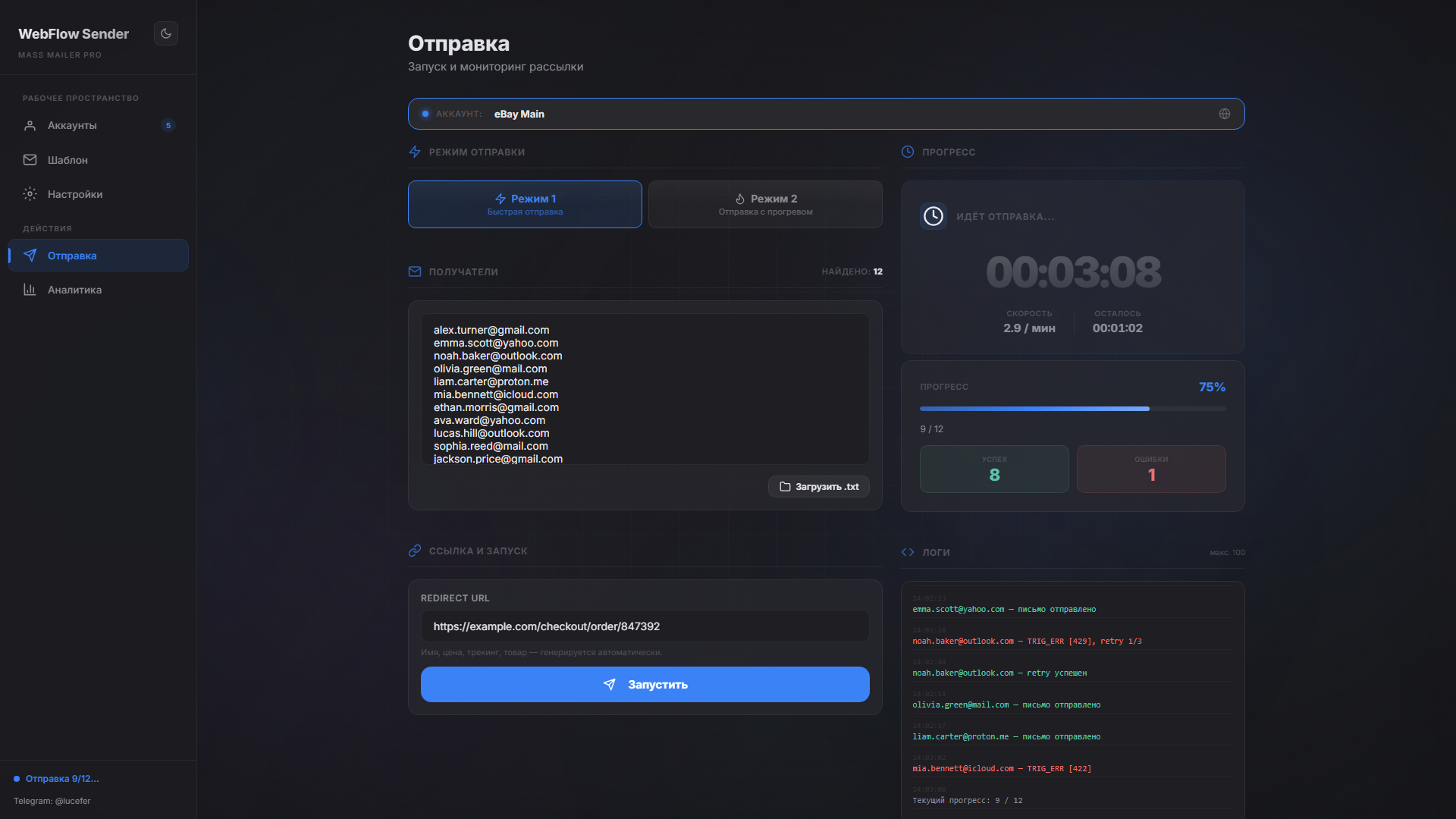
Sending — mode selection, drag-and-drop recipients, live timer with ETA, collapsible error reference
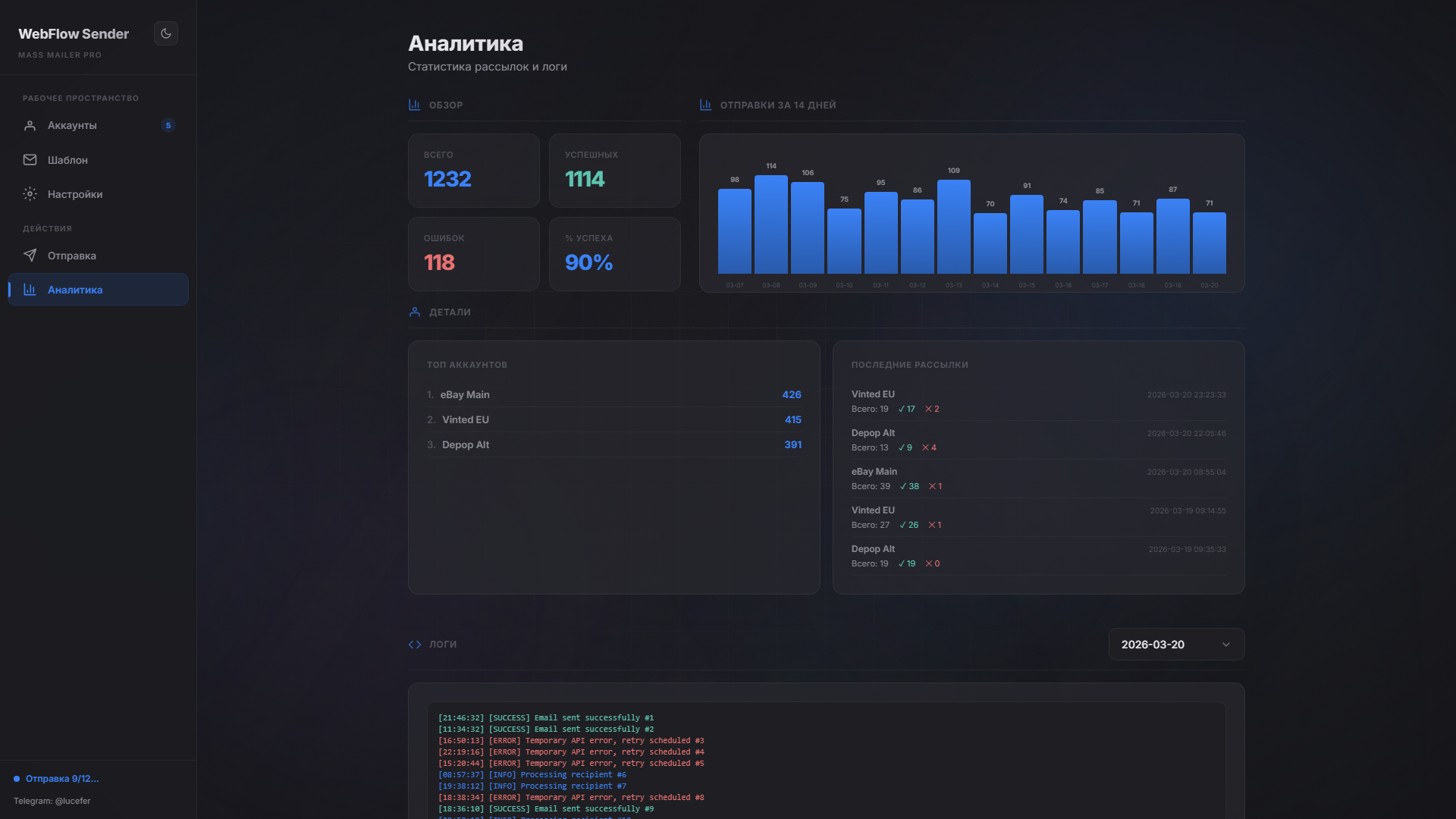
Analytics — 14-day delivery chart, top accounts, recent mailings with success/fail stats
MIT License — see LICENSE for details.
Built with Flask + Vanilla JS — no frameworks, no dependencies bloat

webflow · email-sender · bulk-mailer · flask · spintax · python · dark-theme · spa · anti-spam