nvim-hurl is a simple set of utitities to help you explore APIs using
hurl and neovim.
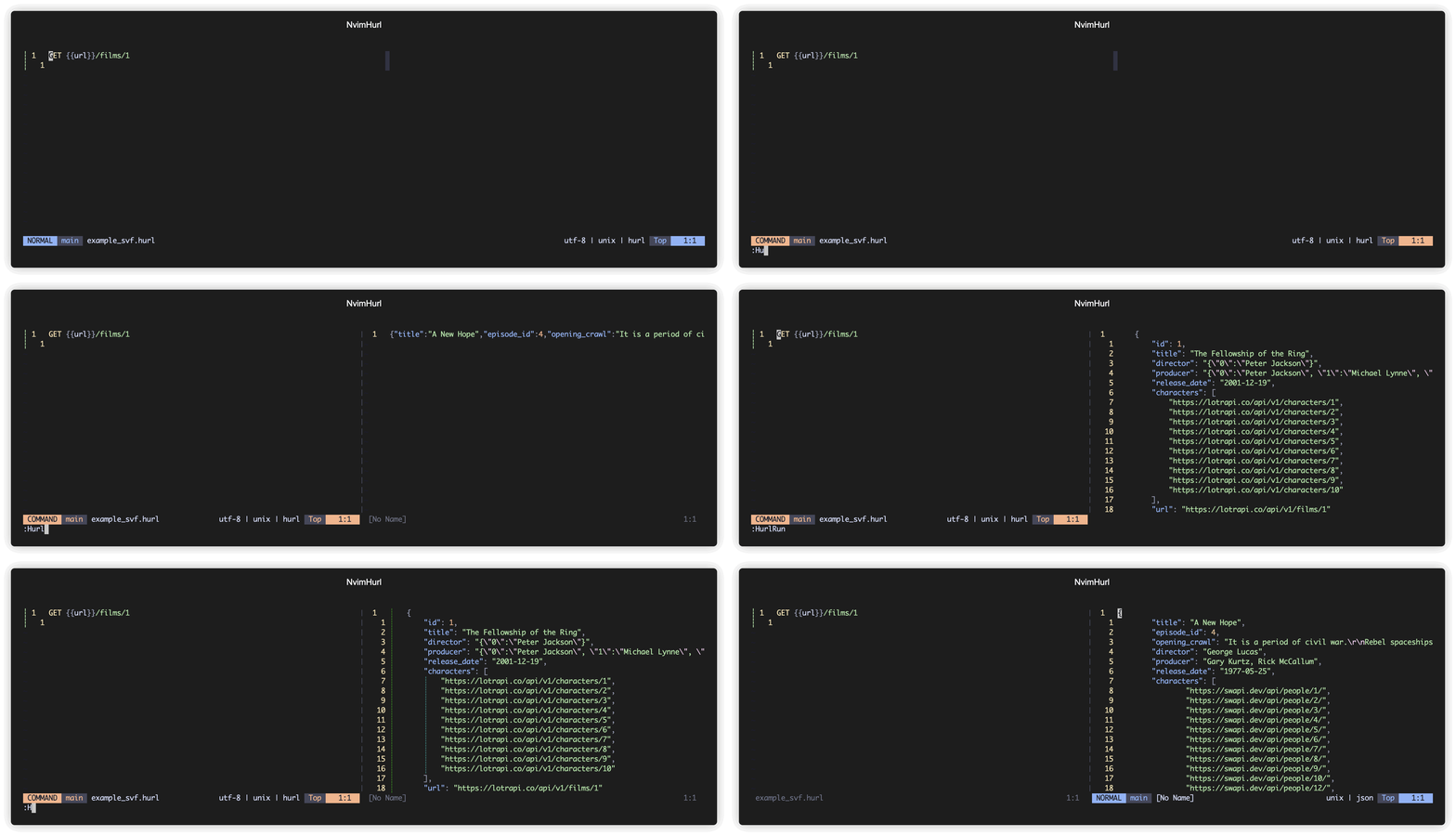
NOTE: This is an unofficial plugin, visit https://hurl.dev for more information about the project.
Also, note there is another project here: https://github.com/pfeiferj/nvim-hurl that does something very similar to this. Check it out in case it serves your needs better than this plugin.
Using packer.nvim
use 'ethancarlsson/nvim-hurl.nvim'Using lazy.nvim
-- init.lua
{
	{ 'ethancarlsson/nvim-hurl.nvim' }
}
-- plugins/hurl.lua
return {
	{ 'ethancarlsson/nvim-hurl.nvim' }
}The plugin will automatically install some commands but it's usually more comfortable to run those commands through a keymap.
vim.keymap.set('n', '<leader>hy', '<cmd>HurlYank<CR>',
    { desc = 'Run hurl file in buffer and yank contents to the register "*"' })
vim.keymap.set('n', '<leader>hr', '<cmd>HurlRun<CR>',
    { desc = 'Run hurl file in buffer and paste it\'s content into a split window' })
vim.keymap.set('n', '<leader>hv', '<cmd>HurlRunVerbose<CR>',
    { desc = 'Run hurl file and get additional meta info along with it' })
vim.keymap.set('n', '<leader>hh', '<cmd>CurlGoFromCursor<CR>',
    { desc = 'Run a curl request from the url under the cursor' })
If you want to run just the visually selected range of a hurl file, you can add the following remaps.
vim.keymap.set( "v", "<leader>hy", ":'<,'>HurlYank<CR>",
	{ desc = 'Run hurl file in buffer and yank contents to the register "*"' })
vim.keymap.set( "n", "<leader>hr", ":'<,'>HurlRun<CR>",
	{ desc = "Run hurl file in buffer and paste it's content into a split window" })
vim.keymap.set( "v", "<leader>hv", ":'<,'>HurlRunVerbose<CR>",
	{ desc = "Run hurl file and get additional meta info along with it" })
For setting variables from JSON you can use these mappings
vim.keymap.set(
	"n",
	"<leader>hy",
	[[<cmd>Hurlsvr "*<CR>]],
	{ desc = "Yank values from the register into the temp variables of the hurl file" }
)

vim.keymap.set(
	"n",
	"<leader>yh",
	[["8yy<cmd>Hurlsvr "8<CR>]], -- You can use a different register if you want "8 was arbitrarily chosen
	{ desc = "Yank line to register and then to hurl variables" }
)
This is particularly useful when you are creating some resource in JSON and need to use values, like an ID, in subsequent requests. You can quickly pull the relevant data into temporary variables and use them in your hurl file.
Run a hurl file and yank the results into the "* register.
Run a hurl file and view the results in a split window scratch file. This will set the file type of the result based on content type in the response header.
Hurl [s]et [v]ariables [f]iles. This command will set the variables file for a project.
Hurl [s]et [v]ariable. Sets a temporary variable, it is the equivelant to the
command line --variable option. It accepts exactly two arguments, the name
of the variable and the variable. :Hurlsv name value is equivelant to
--variable name=value from the command line.
NOTE: These values will not persist after your session ends.
Hurl [s]et [v]ariable from [register]. Sets a temporary variable from the register. It accepts the register as an argument and parses the contents of the register to find the key and value.
The contents must be in json format or a partial json format, for example: {"key": "value"}
will set the hurl variable to --variable key=variable. If the contents are only
partial for example "key": "value" it will add the curly braces to make it valid json.
NOTE: only scalar values are supported, so nested objects or arrays will not be parsed. If no key value pairs are found or if the JSON is not valid no values will be set.
Run a hurl file and view the result and the results of the hurl --verbose option
in two seperate scratch files.
Make a simple GET request, reusing the headers of the previous request. To
prevent reuse of previous headers, use :CurlGo {url} noreuse.
Run CurlGo running the but using the url directly under the cursor.
NOTE: Will reuse headers unless noreuse option is passed to it.
This plugin includes completions for the variables it adds in the background. Just add the following to your cmp setup.
require("cmp").setup {
	sources = {
		{ name = "nvim_hurl" },
		-- other sources
	},
}