
Open Source API Management Platform
Turn your business logic into scalable API products for humans and AI agents.
Fusio is a self-hosted backend platform that sits between your data sources and your consumers. It automates the "boring" parts of API development: routing, auth, documentation, and SDK generation, so you can focus on writing business logic.
- Database API Gateway - Instantly expose legacy SQL/NoSQL databases (MySQL, PostgreSQL, etc.) as REST APIs.
- Microservice Gateway - Securely route, orchestrate, and load-balance traffic between your distributed services.
- Custom API Logic - Build powerful backend logic using reusable actions in PHP or Javascript.
- Agent Development - Use your custom API logic as "Tools" to build and power autonomous AI agents.
- AI-Assisted Development - Generate custom backend logic and schemas using natural language prompts.
- MCP Integration - Native support for the Model Context Protocol to expose APIs to AI ecosystems.
- API Developer Portal - A self-service portal for third-party developers with docs, testing tools, and keys.
- SDK Automation - Zero-effort generation of client SDKs for all major programming languages.
- API Monetization - Turn your API into a product with subscription plans, quotas, and automated billing.
- Analytics & Monitoring - Real-time tracking of API usage, performance metrics, and error logging.
The fastest way to try Fusio locally is with Docker and docker-compose.
services:
  fusio:
    image: fusio/fusio
    restart: always
    environment:
      FUSIO_PROJECT_KEY: "42eec18ffdbffc9fda6110dcc705d6ce"
      FUSIO_CONNECTION: "pdo-mysql://fusio:61ad6c605975@mysql-fusio/fusio"
      FUSIO_BACKEND_USER: "test"
      FUSIO_BACKEND_EMAIL: "demo@fusio-project.org"
      FUSIO_BACKEND_PW: "test1234"
    links:
      - mysql-fusio
    ports:
      - "8080:80"

  mysql-fusio:
    image: mysql:8.0
    restart: always
    environment:
      MYSQL_RANDOM_ROOT_PASSWORD: "1"
      MYSQL_USER: "fusio"
      MYSQL_PASSWORD: "61ad6c605975"
      MYSQL_DATABASE: "fusio"
    volumes:
      - ./db:/var/lib/mysql
docker compose up -d
After startup
- Backend: http://localhost:8080/apps/fusio
- Login with the credentials you configured
- For the first steps, take a look at our Getting Started guide
-
Download artifact
You can either download the official release or clone the repository.
git clone https://github.com/apioo/fusio.git
-
Configure
.envConfigure fitting database credentials at the
APP_CONNECTIONvariable, all other parameters are optional.APP_CONNECTION=pdo-mysql://root:password@localhost/fusio APP_URL=http://localhost:8080
It is also recommended to provide the
APP_URLwhich contains the domain pointing to the public folder i.e.https://api.my_domain.comorhttps://my_domain.com/fusio, this is required if you host Fusio inside a sub-folder otherwise Fusio tries to detect the domain via the Host header.Supported DBs:
- MySQL:
pdo-mysql://user:pass@host/db - PostgreSQL:
pdo-pgsql://user:pass@host/db - SQLite:
pdo-sqlite:///fusio.sqlite
- MySQL:
-
Run migrations
php bin/fusio migrate
-
Create administrator user
php bin/fusio adduser
Choose Administrator as account type.
-
Install backend app
php bin/fusio marketplace:install fusio
-
Start server (dev only)
php -S 127.0.0.1:8080 -t public
This should be only used for testing, for production you need a classical Nginx/Apache setup or use Docker, take a look at our installation documentation for more details.
Instead of manual installation you can also use the web installer script located at /install.php
to complete the installation. After installation, it is recommended to delete this "install" script.
Use our Getting Started guide to build your first action and configure an operation to expose the action as API endpoint.
Fusio includes a flexible app system that lets you install various web-based apps to support different API-related use cases. These apps are typically simple JavaScript frontends that interact with Fusio's internal API.
You can browse all available apps in the Fusio Marketplace, and install them using either the CLI:
php bin/fusio marketplace:install fusioor directly through the backend interface.
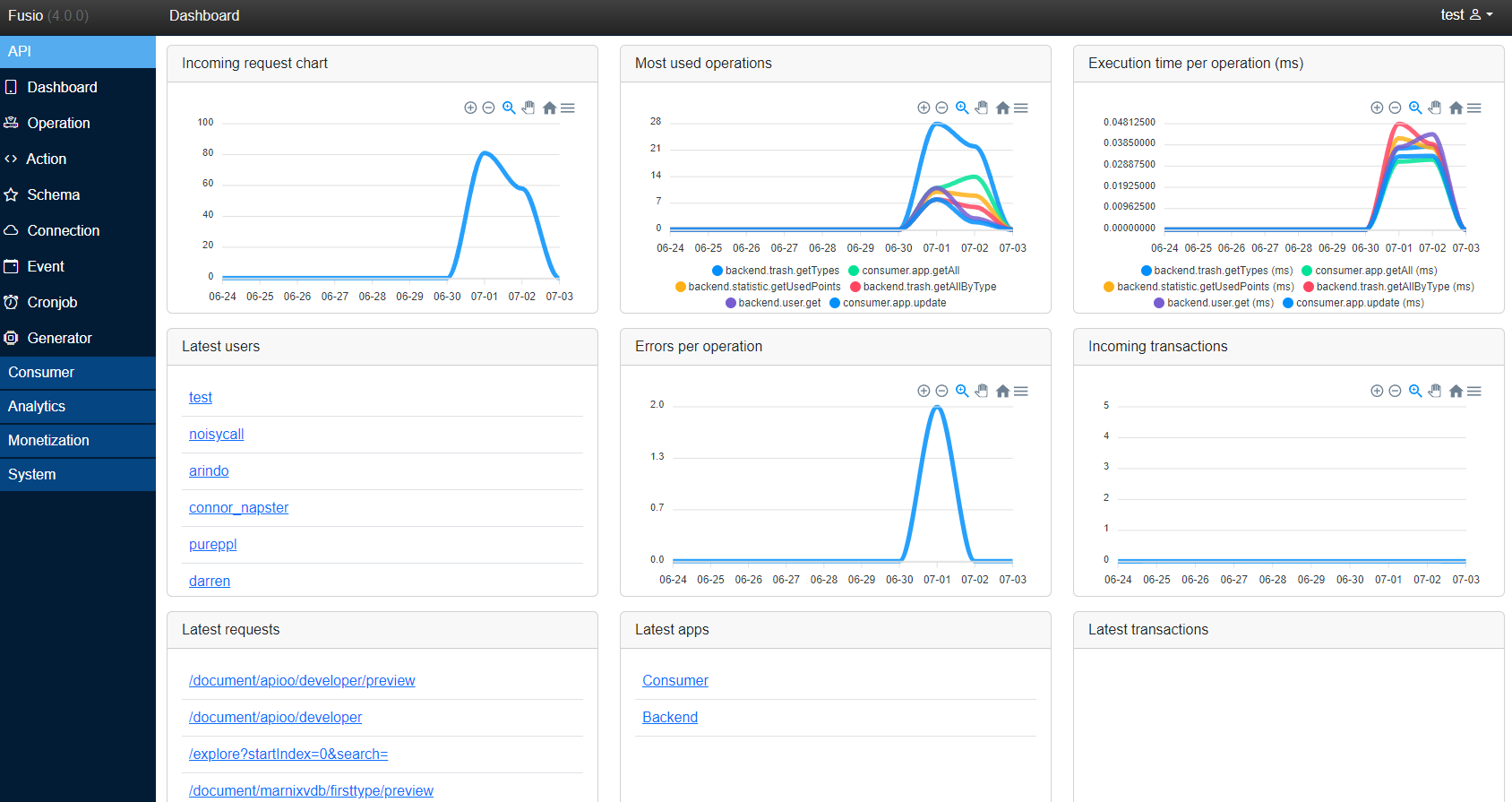
The backend app is the main app to configure and manage your API located at /apps/fusio/.
Fusio provides a VSCode extension which can be used to simplify action development.
To build and integrate applications with Fusio, you can use one of our officially supported SDKs, which simplify interaction with a Fusio instance. Alternatively, you can directly communicate with the REST API for full control and flexibility.
| Language | GitHub | Package | Example |
|---|---|---|---|
| C# | GitHub | NuGet | Example |
| Go | GitHub | Example | |
| Java | GitHub | Maven | Example |
| Javascript | GitHub | NPM | |
| PHP | GitHub | Packagist | Example |
| Python | GitHub | PyPI | Example |
| Framework | GitHub | Package | Example |
|---|---|---|---|
| Angular | GitHub | NPM | Example |
| Domain | Documentation | Specification |
|---|---|---|
| Backend | ReDoc | OpenAPI |
| Consumer | ReDoc | OpenAPI |
| System | ReDoc | OpenAPI |
Besides our core product, we offer additional services to augment the functionality of Fusio.
- Marketplace
The Fusio marketplace is the place to share apps and actions with other Fusio users, it helps to quickly build your API by using existing code from other users. You can register and configure the credentials at your local Fusio installation under System / Config s.marketplace_client_idandmarketplace_client_secretthen you can use the panel under Development / Marketplace to install apps or actions. - SDKgen
SDK as a service platform which helps you to generate client SDKs for your API in different languages likeCSharp,Go,JavaandPythonwhich helps your customers to interact with your API. Therefor you need to register at the SDKgen app and provide the credentials under System / Config s.sdkgen_client_idandsdkgen_client_secret. Then you can generate the SDK directly at the backend under Development / SDK. - TypeHub
API and data design platform, basically you can push your API specification to this platform so that users can simply discover your API. It tracks all changes of your API so that you have always a clean history how your API evolves. - APIgen
Service which generates fully working Fusio APIs based on a data model. It also includes a simple Angular frontend app to CRUD your models. It can be seen as low-code generator to quickly generate CRUD APIs but the generated code is clean and can be also used as foundation for your next app. - APImon
Simple API monitoring service which helps to monitor your Fusio installation. It is optimized for Fusio, but it can be also used for different API endpoints. APImon invokes your endpoints in specific intervals and notifies you about changes. It also includes an uptime page for your users for example s. https://api.apimon.app/status/fusio_marketplace
By default, the entire Fusio project can be hosted on a single domain. In this setup:
- Your API is served from the root path (e.g., https://acme.com/).
- Web apps like the developer portal and admin backend are accessible under the
/appsdirectory (e.g., https://acme.com/apps/developer).
This setup is quick to get started with and requires no additional configuration. For production environments, we recommend a subdomain-based structure:
- api.acme.com
Hosts only the Fusio API. In this setup, you can safely remove theapps/folder from thepublic/directory. - developer.acme.com
Hosts the Developer App, a portal where third-party developers can register, view documentation, and access their credentials. - fusio.acme.com (optional)
Hosts the Backend App, used to manage your Fusio instance. You can also host this on a separate internal domain.
Note: This is just a suggested setup. You're free to choose any domain or subdomain structure that best fits your infrastructure.
Please check out our official documentation website where we bundle all documentation resources:
https://docs.fusio-project.org/
If you have questions, found a bug, or want to share your feedback, we are active across the following channels:
- GitHub Discussions - Best for "How-to" questions, architectural feedback, and sharing feature ideas.
- Discord Community - Join our real-time chat to connect with other Fusio developers and the core maintainers.
- Issue Tracker - Report technical bugs or reproducible errors. Please check the Documentation first.
- Direct Contact - Reach out via our official website for specific inquiries or high-level feedback.
We’re grateful to our partners who support the Fusio project and share our vision of advancing open API development.
If your company is interested in becoming a partner and being listed here, consider becoming a sponsor.

