Mods Studio 2 Build Actions
Copies file(s) from one location to another
It can contains one or multiple CopyPair elements within the Paths tag.
If the "From" paths start with \ it's assumed source is relative to the mod build folder.
Otherwise, it's assumed it's relative to the Template folder.
"From" path can also be a folder or a path that contains wildcards in the file name.
In that case, "To" has to be a path to a folder.
If the search pattern is empty or *.*, the copy operation will be recursive over all
child folders. Otherwise it's contained to top directory only.
<Action xsi:type="CopyFile">
  <Paths>
    <CopyPair>
      <From>{{VehicleModel}}\vehicle\ai\truck\ms2\</From>
      <To>vehicle\ai\ms2\{{InternalName}}\</To>
    </CopyPair>
  </Paths>
</Action>
new CopyFile()
{
  Paths = new List<CopyPair>()
  {
    new CopyPair()
    {
      From = @"{{VehicleModel}}\vehicle\ai\truck\ms2\",
      To = @"vehicle\ai\ms2\{{InternalName}}\"
    },
  },
},
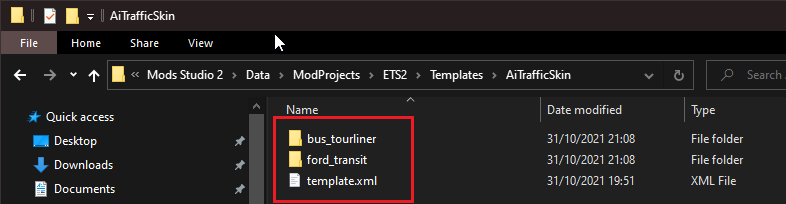
These examples are taken from our AiTrafficSkin template. This is a template that comes as default with Mods Studio 2. You can find it if you open your Mods Studio 2 installation directory, and navigate to Data\ModProjects\ETS2\Templates\AiTrafficSkin. This is the contents of the template folder:
The above example contains only one copy pair that specifies to copy all files from the "From" folder to the "To" folder.
Both From and To paths contain variables - {{VehicleModel}} and {{InternalName}}. All MS2 build actions resolve all variables in double curly brackets prior to execution. In this specific example, the VehicleModel variable will be resolved as either bus_tourliner or ford_transit, since these are the only two options we offered when we defined the VehicleModel variable. Since the From path does not start with a backslash \, it will copy files from the template directory - the one pictured above. It will take all the contents from one of the two folders (as defined in the VehicleModel variable), and copy them into the ModBuild folder. (The temporary folder in which we build the new mod.)