






Current stable release: v1.0.5. See CHANGELOG.md for the release notes.
Context Fabric is configured for official inclusion in the Model Context Protocol (MCP) Registry.
- Namespace:
io.github.VIKAS9793/context-fabric - Metadata: server.json
- Distribution: Published as an npm package with official MCP Registry metadata.
The context synchronization layer for AI coding agents. Ensure project continuity, eliminate agent memory drift, and manage token budgets automatically across any coding session.
Context Fabric is an MCP server that automatically captures project state on every git commit, detects when stored context has drifted from codebase reality, and delivers structured, token-budgeted briefings to AI agents — without requiring any developer action.
Developers using AI coding agents manually construct and maintain documentation systems, session handoff rituals, and context workflows to compensate for the absence of native project continuity tooling. These workarounds share one property: they go stale after commits, and nothing detects it.
The problem is not that AI forgets. The problem is context drift — stored context becomes incorrect after code changes, and AI agents proceed with that incorrect context confidently.
Context Fabric is the infrastructure layer that solves it at the root.
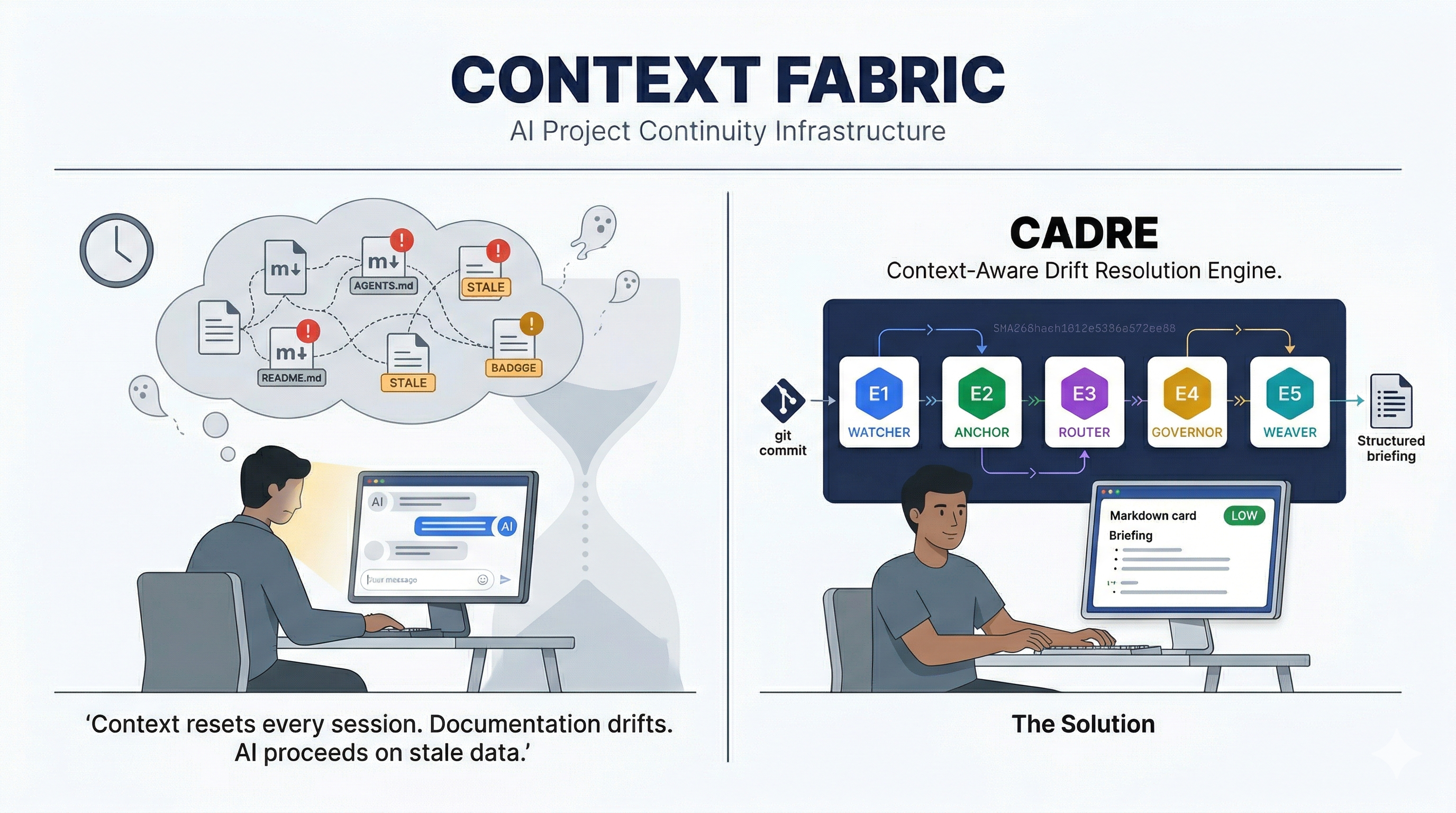
Context Fabric is powered by CADRE, a five-engine internal architecture. Every engine solves a specific, documented failure mode observed in real developer workflows.
What CADRE is. CADRE is the automated replacement for every manual context management system developers currently build themselves. It sits between the git event stream and the AI agent, deciding what context to capture, when it has drifted, which parts are relevant to the active query, what they cost in tokens, and how to deliver them structured and reliably.
Who CADRE is for. Developers building multi-session AI-assisted software projects who currently spend time on any of the following: updating markdown files after commits, creating session-end summaries, maintaining CLAUDE.md or AGENTS.md files, building RAG pipelines for project context, or manually deciding which documentation to load before each task.
E1 — WATCHER
Installs a git post-commit hook on context-fabric init. Fires automatically on every commit. Reads committed Git blobs instead of the mutable working tree, computes SHA256 fingerprints, extracts exported symbols, calculates token estimates, and upserts everything into the local SQLite store. The developer does nothing after setup.
Replaces: markdown-per-commit workflows, 5-step session rituals, and AI interview workflows used to extract structured project knowledge before sessions.
E2 — ANCHOR
On every cf_query call, compares stored SHA256 hashes against the current state of every tracked file. Returns a DriftReport with a 0–100 drift score and severity classification: LOW (under 10%), MED (10–30%), HIGH (over 30%). Stale files are identified by path and hash delta.
Replaces: manual documentation alignment reviews and the undetected staleness in AGENTS.md that ETH Zurich research (arXiv:2602.11988) demonstrated degrades AI coding performance.
E3 — ROUTER
Runs SQLite FTS5 BM25 against the stored component index using the query text from cf_query. Returns components ranked by relevance. Path matches are weighted 2x over export symbol matches, because a file path carries structural meaning about the codebase organisation. Falls back to recency sort when the query produces zero MATCH results.
Replaces: manual selection of which documentation to include per task, and the modular context selection problem that emerges when projects decompose knowledge across many files.
E4 — GOVERNOR
Applies a configurable token budget ceiling to the E3 ranked output using greedy selection on the relevance-ordered list. Default: 8% of the model context window, leaving 92% for conversation and code. Oversize components are skipped so the remaining budget can still be used by later-ranked matches. Token estimates pre-calculated by E1 mean zero additional file reads at budget selection time.
Replaces: manual token management, and the pattern of keeping sessions alive indefinitely to avoid the cost of context restoration on restart.
E5 — WEAVER
Composes a structured markdown briefing from E3 and E4 output. Sections: Project State, Architecture, Architecture Decisions, Budget Summary. When E2 severity is MED or HIGH, a Drift Warning section is prepended before all other content, so the AI is informed of context reliability before reading it.
Replaces: static AGENTS.md briefings that never update, and the manual briefing preparation that developers perform at every session start.
git commit
    |
    v
E1 WATCHER --- SHA256 fingerprint --- SQLite upsert --- FTS5 index update
                                                              |
                                                      cf_query("...")
                                                              |
                                                              v
                                        E2 ANCHOR --- drift check --- DriftReport
                                                              |
                                                              v
                                        E3 ROUTER --- FTS5 BM25 --- ranked component list
                                                              |
                                                              v
                                        E4 GOVERNOR --- greedy selection --- budget-capped set
                                                              |
                                                              v
                                        E5 WEAVER --- briefing composition --- MCP response
npx context-fabric initInitialises the SQLite store, installs the git post-commit hook, stages the stable local runtime under .context-fabric/runtime, and runs an initial capture. Connect the MCP server to your tool and context delivery is active from the next commit.
-
Initialise your project: Navigate to any git-managed repository and run:
npx context-fabric init
-
Configure your AI Environment (Cursor/VS Code/Windsurf): Add the following to your MCP configuration file.
Windows Users (Crucial):
{
  "mcpServers": {
    "context-fabric": {
      "command": "cmd",
      "args": ["/c", "npx", "context-fabric"]
    }
  }
}
Mac / Linux Users:
{
  "mcpServers": {
    "context-fabric": {
      "command": "npx",
      "args": ["-y", "context-fabric"]
    }
  }
}
Use the health commands when validating a local install or recovering from a broken hook/runtime state.
npx context-fabric doctor
npx context-fabric doctor --repair
doctor reports schema version, search index version, DB integrity, degraded mode, pending and failed captures, plus hook runtime readiness. doctor --repair refreshes the local runtime bundle, reinstalls the stable hook wrapper, validates .gitignore, and rebuilds the search index when the database is healthy.
This usually means npx is not in the system's inheritance path for the IDE.
- Fix: Use the absolute path to
nodeand thecontext-fabricbinary. - Use
where node(Windows) orwhich node(Mac/Linux) to find your path. - Example for NVM/FNM users:
"command": "/Users/name/.nvm/versions/node/v22.14.0/bin/node",
"args": ["/Users/name/.nvm/versions/node/v22.14.0/bin/context-fabric"]
If you run VS Code on Windows but your code is in WSL, you must run init inside the WSL terminal and use the WSL-absolute path to node in your config.
On Windows, spaces in your project path (e.g., C:\My Projects\app) can break the npx spawn. If the server fails, consider moving your project to a path without spaces.
If something breaks, please run:
npx context-fabric doctornpx context-fabric diag remains available as a compatibility alias.
Does Context Fabric send my code to a server? No. It is local-only and does not make outbound network calls for capture, retrieval, or drift analysis.
Does it index uncommitted changes? No. Captured state is based on committed Git objects. Uncommitted changes are detected by drift checks, but they are not indexed as the new source of truth until you commit and capture them.
Is this a replacement for AGENTS.md, CLAUDE.md, or human docs?
It reduces the need for manual session-handoff documents, but it is not a replacement for product specs, onboarding guides, or stakeholder-facing documentation.
What files does it write locally?
It writes under .context-fabric/ for the database and runtime bundle, and installs .git/hooks/post-commit to keep capture automatic.
When should I not use it? Do not use Context Fabric if you need cloud sync, cross-repo search, full semantic indexing of implementation bodies, or project-file mutation from MCP tools.
How do I recover a broken install?
Run npx context-fabric doctor first. If the hook runtime or local state needs repair, run npx context-fabric doctor --repair.
Full FAQ: docs/FAQ.md
| Tool | Engines | Purpose |
|---|---|---|
cf_capture |
E1 | Manual context capture outside of a git commit |
cf_drift |
E2 | Standalone drift check — returns severity and stale file count |
cf_query |
E2 + E3 + E4 + E5 | Full context briefing for the current task |
cf_health |
Local health | Report database, capture, hook, and search index health |
cf_log_decision |
Storage | Persist an architecture decision across sessions |
| Layer | Package | Version |
|---|---|---|
| MCP Protocol | @modelcontextprotocol/sdk |
1.27.1 |
| Storage and search | better-sqlite3 + FTS5 |
12.8.0 |
| Schema validation | zod |
^4.3.6 |
| Language | TypeScript | 5.5+ |
| Runtime | Node.js | >=22.0.0 <25.0.0 |
| Transport | stdio (Phase 1) | MCP SDK built-in |
| Access type | Scope |
|---|---|
| Filesystem reads | Project root only — path traversal rejected |
| Filesystem writes | .context-fabric/cf.db, .context-fabric/runtime/**, .context-fabric/bin/post-commit, and .git/hooks/post-commit |
| Network | None — zero outbound connections, no telemetry |
| Project file writes | None — no tool call writes to project files |
See SECURITY.md for the vulnerability disclosure process.
- Node.js
>=22.0.0and<25.0.0 - A git repository
- Any MCP-compatible AI coding tool
Read CONTRIBUTING.md before opening a pull request.
- Developer Guide
- FAQ
- Use Cases and Limitations
- Wiki Home Source
- Wiki Publishing Guide
- Security Policy
- Changelog
- VIKAS SAHANI — Product Lead / HITL / Agent Orchestrator
- Antigravity — AI Agent / Code Architect
This project is part of ongoing research into AI-native development workflows and context-aware drift resolution.
- Public Data: Snippets, logs, or metrics generated during public sessions may be used for research and verification purposes.
- Privacy: No personal data or proprietary codebase logic is stored outside of the local
.context-fabricdirectory unless explicitly shared.
MIT — see LICENSE.
Built by VIKAS SAHANI.