


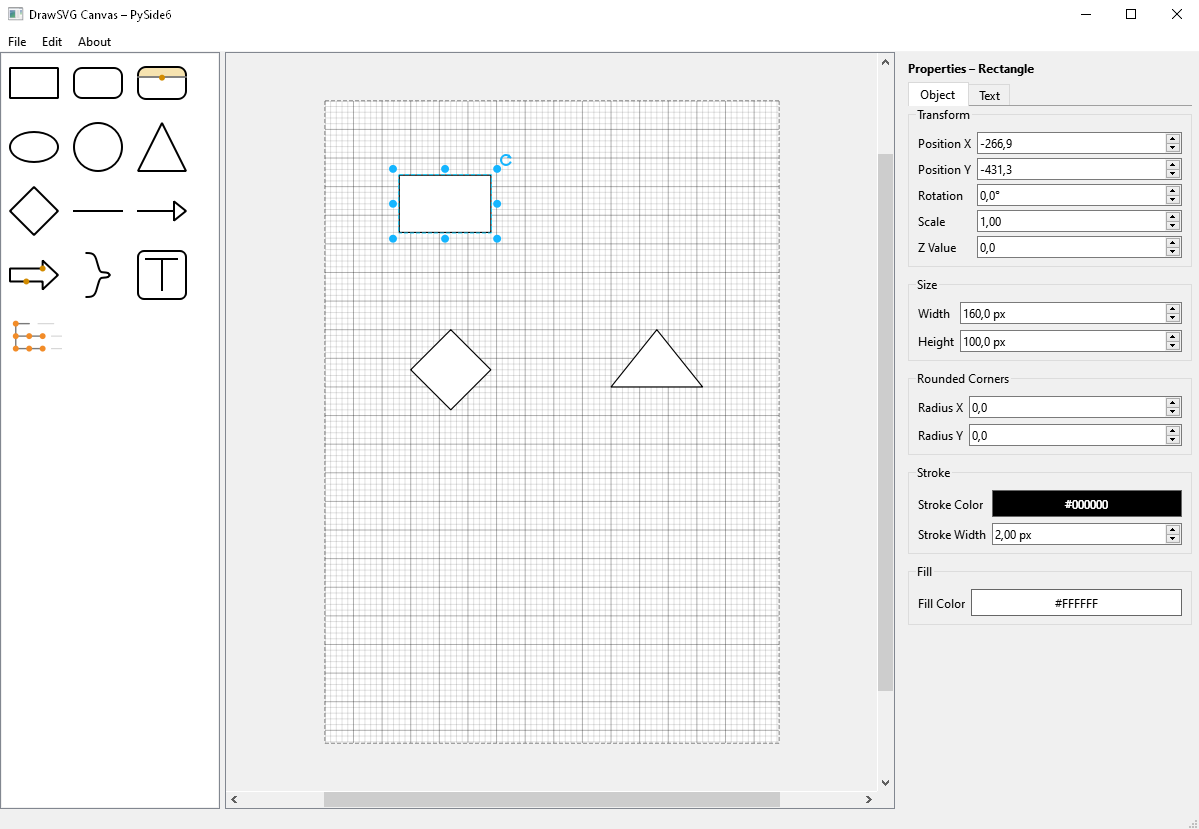
This repository provides a graphical user interface designed to make it easier to create files with the drawsvg library.
Instead of writing raw Python code by hand, you can visually place, move, and edit shapes on a canvas, then export your work as a ready-to-use drawsvg file. The UI runs on PySide6 and comes with a property inspector, snapping/grid helpers and a set of ready-made shapes.
The goal of this project is to help users quickly prototype and generate drawsvg code through an intuitive drag-and-drop UI.
The application requires Python 3.10.
Dependencies include:
- drawsvg
- PySide6
You can install the packaged app and launch it via the generated executable script:
python -m pip install --upgrade drawsvg-ui
drawsvg-ui # on Windows this is available as drawsvg-ui.exepython -m pip install -r requirements.txtAfter installing the dependencies, start the application with:
python src/main.py- A4 canvas with grid/subgrid preview; toggle visibility via
Edit → Show grid. - Snap-to-grid movement and resizing; hold
Altto place/drag/resize freely. - Automatic extra A4 pages when objects cross page borders; empty pages are cleaned up again.
- Zoom with
Ctrl/Alt+ mouse wheel; pan with middle button or right-button drag (right click on empty space resets zoom). - Rotation handle above the selection; snaps to 5° steps, hold
Altfor smooth rotation with a live angle readout.
- Drag shapes from the palette or click to drop them at the view center.
- Shapes: rectangle, rounded rectangle, split rounded rectangle (adjustable header), ellipse/circle, triangle, diamond, line, arrow, block arrow, curvy right bracket, text box, and a folder-tree placeholder.
- Rubber-band selection; add to selection with
Ctrl/Shiftclick; duplicate selection withCtrl+ drag. - Resize via handles; items snap while moving/resizing unless
Altis held. - Align multiple items (left/center/right, top/middle/bottom, snap to grid) from the context menu.
- Group/ungroup selections (
Ctrl+G/Ctrl+Shift+G) and change z-order (bring forward/back). - Delete with the
Deletekey or clear everything viaEdit → Clear canvas. Full undo/redo stack (Ctrl+Z,Ctrl+Y/Ctrl+Shift+Z).
- Context menu or properties panel to edit fill/stroke color, opacity, stroke width, and line style (solid/dashed/dotted).
- Corner radius for rectangles; adjustable divider and separate top/bottom fills for split rounded rectangles.
- Arrowheads on lines/arrows with configurable width/height; block arrow head/shaft ratios; curvy bracket hook depth.
- Built-in labels for supported shapes: edit text inline or in the properties panel, set font family/size/color, and horizontal/vertical alignment.
- Text items support multi-line content, font and padding, alignment, and left-to-right or right-to-left direction.
- Live inspector synced to the current selection: position, rotation, scale, z-value, size, stroke/fill, and shape-specific options.
- Dedicated text tab for labels/text content including font, color, padding, alignment, and direction controls.
- Load or save scenes as ready-to-run
drawsvgPython files via theFilemenu.
This project is licensed under the GNU General Public License v3.0 (GPLv3).
You may use, modify and distribute this software under the terms of the GPL. Any derivative work must also be distributed under the same license.