




Inspector, testing framework, and runtime framework for MCP servers and MCP Apps.
Demo (Hosted) ~ Demo (Video) ~ Discord ~ Documentation ~ GitHub
Manually test any MCP server in replicated ChatGPT and Claude runtimes.
sunpeak inspect --server http://localhost:8000/mcp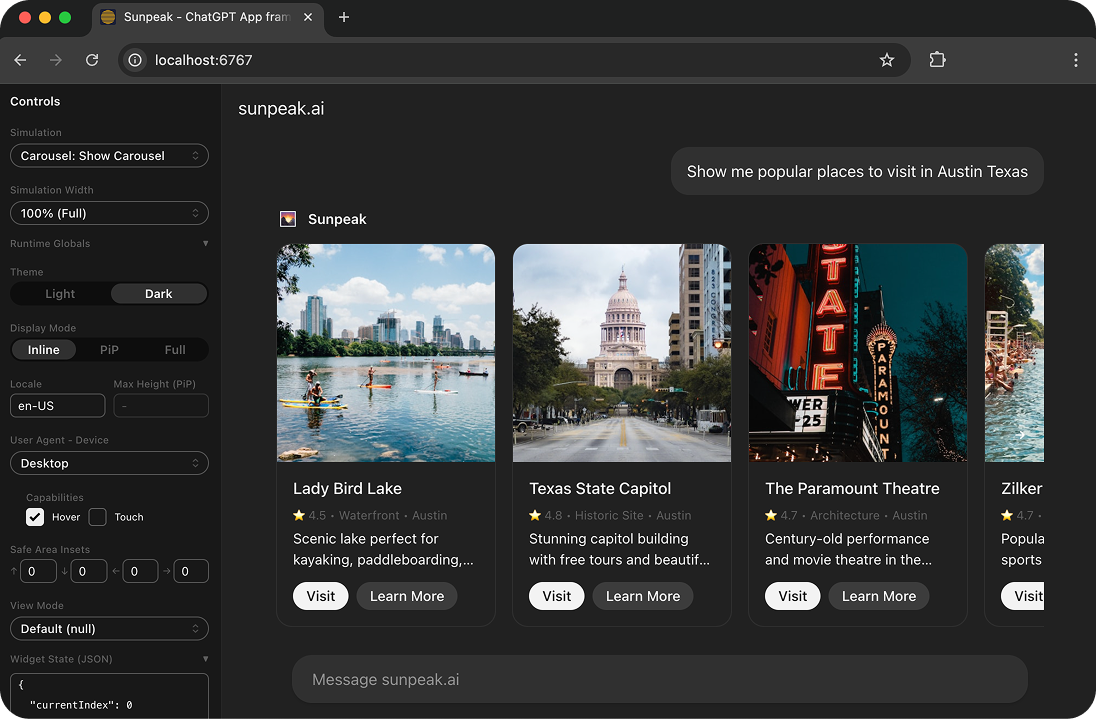
- Multi-host inspector replicating ChatGPT and Claude runtimes
- Toggle themes, display modes, device types from the sidebar or URL params
- Call real tool handlers or use simulation fixtures for mock data
Automatically test any MCP server against replicated ChatGPT and Claude runtimes.
import { test, expect } from 'sunpeak/test';

test('review tool renders title', async ({ mcp }) => {
  const result = await mcp.callTool('review-diff');
  const app = result.app();
  await expect(app.locator('h1:has-text("Refactor")')).toBeVisible();
});- Works for any MCP server:
sunpeak test initscaffolds tests for Python, Go, TS, or any language - MCP-native assertions:
toBeError(),toHaveTextContent(),toHaveStructuredContent() - Multi-host: Tests run against ChatGPT and Claude hosts automatically
- Live tests: Automated browser tests against real ChatGPT via
sunpeak/test/live - Evals: Test your tool interface design against multiple LLMs (GPT-4o, Claude, Gemini, etc.) via
sunpeak/eval
Next.js for MCP Apps. Convention-over-configuration project structure with the inspector and testing built in.
sunpeak-app/
├── src/
│   ├── resources/
│   │   └── review/
│   │       └── review.tsx            # Review UI component + resource metadata.
│   ├── tools/
│   │   ├── review-diff.ts            # Tool with handler, schema, and optional resource link.
│   │   ├── review-post.ts            # Multiple tools can share one resource.
│   │   └── review.ts                 # Backend-only tool (no resource, no UI).
│   └── server.ts                     # Optional: auth, server config.
├── tests/simulations/
│   ├── review-diff.json              # Mock state for testing (includes serverTools).
│   ├── review-post.json              # Mock state for testing (includes serverTools).
│   └── review-purchase.json          # Mock state for testing (includes serverTools).
└── package.json- Runtime APIs: Strongly typed React hooks (
useToolData,useAppState,useHostContext, etc.) - Convention over configuration: Resources, tools, and simulations are auto-discovered
- Multi-platform: Build once, deploy to ChatGPT, Claude, and future hosts
Requirements: Node (20+), pnpm (10+)
pnpm add -g sunpeak
sunpeak newTesting (works with any MCP server):
| Command | Description |
|---|---|
sunpeak inspect --server <url|cmd> |
Inspect any MCP server in the inspector |
sunpeak test |
Run unit + e2e tests |
sunpeak test --unit |
Run unit tests only (Vitest) |
sunpeak test --e2e |
Run e2e tests only (Playwright) |
sunpeak test --visual |
Run e2e tests with visual regression |
sunpeak test --visual --update |
Update visual regression baselines |
sunpeak test --live |
Run live tests against real hosts |
sunpeak test --eval |
Run evals against multiple LLM models |
sunpeak test init |
Scaffold test infrastructure into a project |
App framework (for sunpeak projects):
| Command | Description |
|---|---|
sunpeak new [name] [resources] |
Create a new project |
sunpeak dev |
Start dev server + inspector + MCP endpoint |
sunpeak build |
Build resources + tools for production |
sunpeak start |
Start production MCP server |
sunpeak upgrade |
Upgrade sunpeak to latest version |
Install the sunpeak skills to give your coding agent (Claude Code, Cursor, etc.) built-in knowledge of sunpeak patterns, hooks, and testing:
pnpm dlx skills add Sunpeak-AI/sunpeak@create-sunpeak-app Sunpeak-AI/sunpeak@test-mcp-serverIf your app doesn't render in ChatGPT or Claude:
- Check your tunnel is running and pointing to the correct port
- Restart
sunpeak devto clear stale connections - Refresh or re-add the MCP server in the host's settings (Settings > MCP Servers)
- Hard refresh the host page (
Cmd+Shift+R/Ctrl+Shift+R) - Open a new chat in the host (cached iframes persist per-conversation)
Full guide: sunpeak.ai/docs/app-framework/guides/troubleshooting