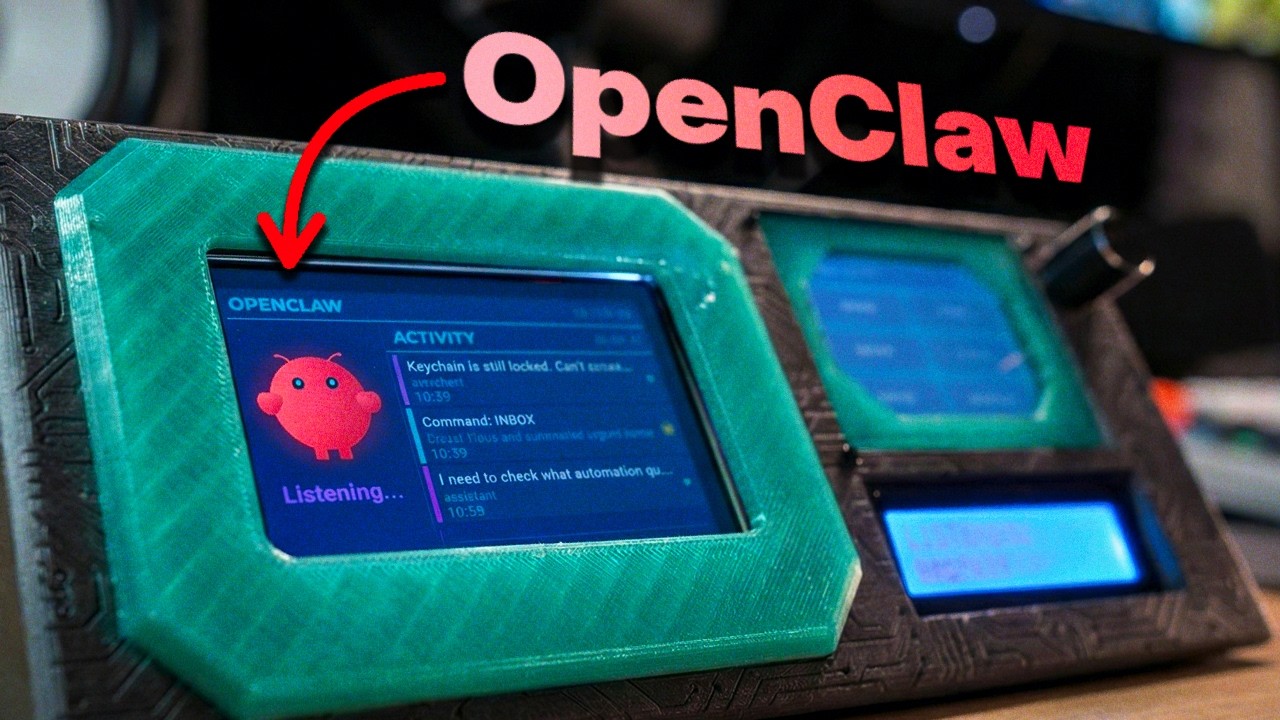
A dual SPI display command center for Raspberry Pi 4, designed as a physical dashboard for OpenClaw AI agents. Features a cyberpunk-themed UI with Molty the space lobster mascot.


Need a server for OpenClaw? Launch your own instance with Hostinger


| Part | Description | Qty |
|---|---|---|
| Raspberry Pi 4 | Any RAM variant (2GB+) | 1 |
| ILI9488 3.5" TFT | 480x320 SPI display (main conversation view) | 1 |
| ILI9341 2.4" TFT | 320x240 SPI display with XPT2046 touch (command panel) | 1 |
| KY-040 Rotary Encoder | With push button, for menu navigation | 1 |
| 1602 I2C LCD | 16x2 character display with PCF8574 backpack (I2C address 0x27) | 1 |
| Jumper wires | Female-to-female dupont wires | ~30 |
| Micro SD card | 16GB+ with Raspberry Pi OS | 1 |
| USB-C power supply | 5V 3A for Raspberry Pi 4 | 1 |
The ILI9341 modules with built-in XPT2046 touch are common on Amazon/AliExpress as a single board - look for "2.4 inch TFT SPI touch screen ILI9341 XPT2046". The touch controller shares the SPI bus with the display and has its own CS pin.
Both displays share the SPI0 bus (MOSI on GPIO 10, SCLK on GPIO 11, MISO on GPIO 9).
Large display (ILI9488) - uses CE0:
| Display Pin | Pi GPIO | Pi Physical Pin |
|---|---|---|
| VCC | 3.3V | 1 |
| GND | GND | 6 |
| CS | CE0 (GPIO 8) | 24 |
| DC | GPIO 24 | 18 |
| RST | GPIO 25 | 22 |
| MOSI | GPIO 10 | 19 |
| SCLK | GPIO 11 | 23 |
Small display (ILI9341) - uses CE1:
| Display Pin | Pi GPIO | Pi Physical Pin |
|---|---|---|
| VCC | 3.3V | 17 |
| GND | GND | 20 |
| CS | CE1 (GPIO 7) | 26 |
| DC | GPIO 22 | 15 |
| RST | GPIO 27 | 13 |
| BL | GPIO 23 | 16 |
| MOSI | GPIO 10 | 19 |
| SCLK | GPIO 11 | 23 |
The touch controller is built into the ILI9341 module. It shares the SPI0 bus but uses a separate CS pin controlled via GPIO (not a hardware CE line).
| Touch Pin | Pi GPIO | Pi Physical Pin |
|---|---|---|
| T_CS | GPIO 17 | 11 |
| T_CLK | GPIO 11 (SCLK) | 23 |
| T_DIN | GPIO 10 (MOSI) | 19 |
| T_DO | GPIO 9 (MISO) | 21 |
The T_IRQ pin on the module is not used - touch detection is done via polling (reading pressure Z value > 300).
| Encoder Pin | Pi GPIO | Pi Physical Pin |
|---|---|---|
| CLK | GPIO 5 | 29 |
| DT | GPIO 6 | 31 |
| SW | GPIO 13 | 33 |
| + | 3.3V | 1 |
| GND | GND | 34 |
| LCD Pin | Pi Pin | Pi Physical Pin |
|---|---|---|
| SDA | GPIO 2 (SDA1) | 3 |
| SCL | GPIO 3 (SCL1) | 5 |
| VCC | 5V | 2 |
| GND | GND | 9 |
Note: The LCD uses 5V for power but the Pi's I2C lines are 3.3V. The PCF8574 backpack handles level shifting - this is normal and safe.
- Enable SPI and I2C on your Pi:
sudo raspi-config→ Interface Options → enable SPI and I2C - Wire the SPI bus first (MOSI, MISO, SCLK) since all three SPI devices share it
- Double-check CS pins - the two displays use hardware CE0/CE1, but the touch controller uses a manual GPIO CS (GPIO 17). Mixing these up will cause bus conflicts
- Test incrementally - wire and test one display at a time using
python main.py --demobefore adding the next peripheral - The rotary encoder and LCD are optional - the system works without them (gracefully degrades)
git clone https://github.com/lewismenelaws/openclaw-display.git
cd openclaw-display

python3 -m venv .venv
source .venv/bin/activate
pip install -r requirements.txtCopy the example environment file and fill in your OpenClaw server details:
cp .env.example .envEdit .env with your values:
OPENCLAW_URL=wss://your-server:18789
OPENCLAW_PASSWORD=your_password
OPENCLAW_AUTO_RECONNECT=true
# Run the full display system (connects to OpenClaw)
python main.py

# Demo mode (no server connection required)
python main.py --demo| Module | Description |
|---|---|
main.py |
Entry point - coordinates displays, touch, and OpenClaw bridge |
display_main.py |
Large display renderer (conversation view with Molty) |
display_status.py |
Small display renderer (cyberpunk command panel) |
touch_handler.py |
XPT2046 touch input with calibration and debounce |
rotary_handler.py |
KY-040 rotary encoder for menu navigation |
lcd_ticker.py |
16x2 I2C LCD scrolling status ticker |
websocket_client.py |
OpenClaw WebSocket client with Ed25519 auth |
openclaw_bridge.py |
Bridge between OpenClaw events and display updates |
openclaw_config.py |
Configuration loader (.env + defaults) |
config.py |
Hardware pin definitions and display settings |
spi_lock.py |
SPI bus mutex for shared bus access |
ui/ |
UI components (activity feed, command panel, cyberpunk theme, Molty renderer) |