⚠️ This repository has been archived. BrainDrive is building a new personal AI system on top of the Personal AI Architecture — an MIT-licensed, open architecture with zero lock-in. See the architecture repo for the foundation, and visit braindrive.ai for updates.



The BrainDrive Chat Plugin is the default, modular chat experience for BrainDrive.
It combines chat, model selection, personas and conversation history into a single, extensible UI you can customize, fork, and ship on your own terms.
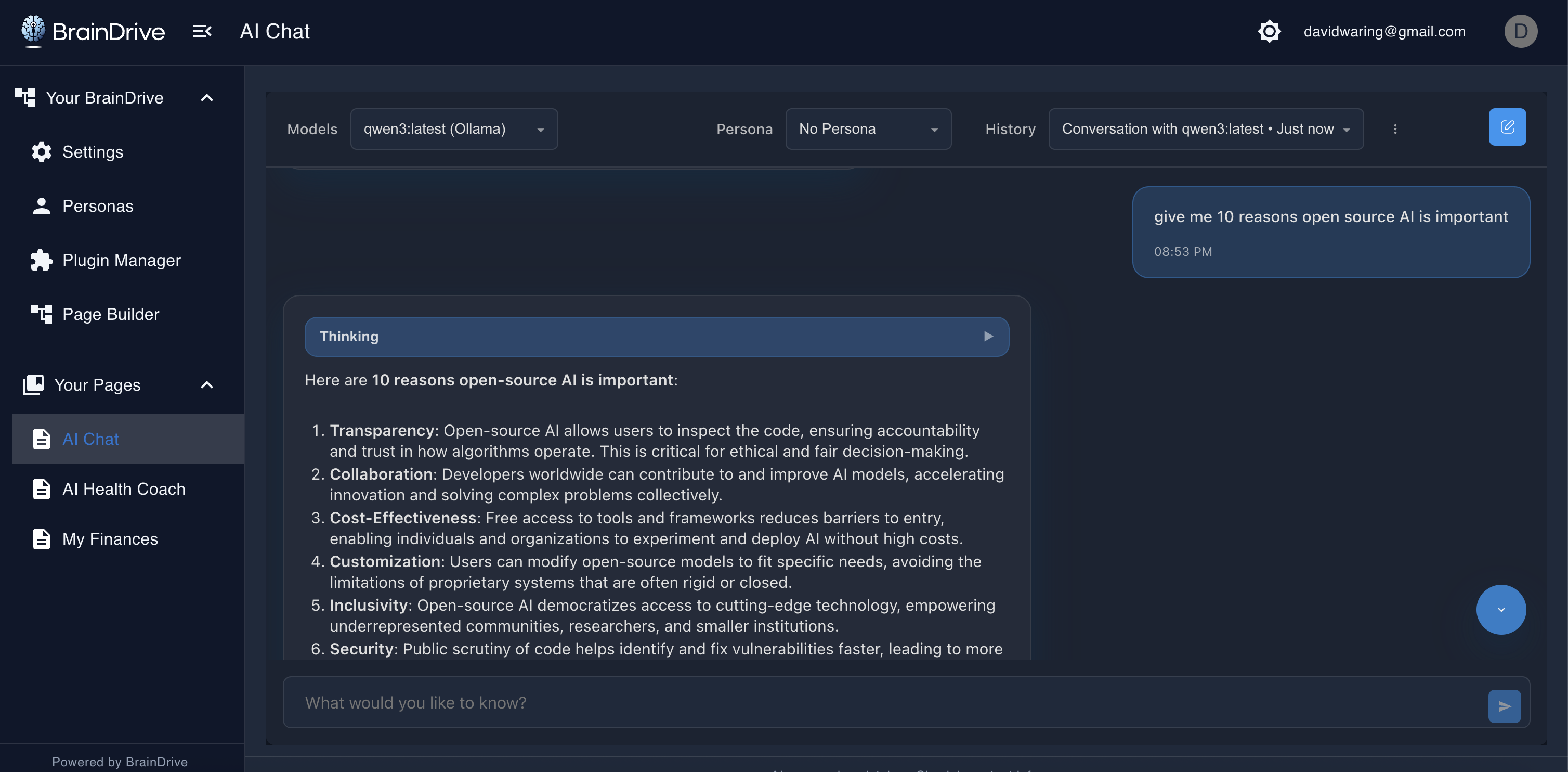
Think WordPress for AI—install BrainDrive-Core, add this plugin, and you’re chatting with local or API models in minutes.
Your AI. Your Rules.
- Unified chat experience: send prompts, stream responses, and browse conversation history in one place.
- Model selection: pick from local or API models exposed by installed provider plugins (e.g., Ollama Plugin, OpenRouter Plugin).
- Drop-in modularity: add the chat module to any page via the Page Builder UI. No code required to compose experiences.
- Decoupled services: interacts with BrainDrive through Service Bridges for forward-compatibility.
- 1-minute dev cycle: edit → build → refresh, powered by Module Federation and BrainDrive’s plugin system.
-
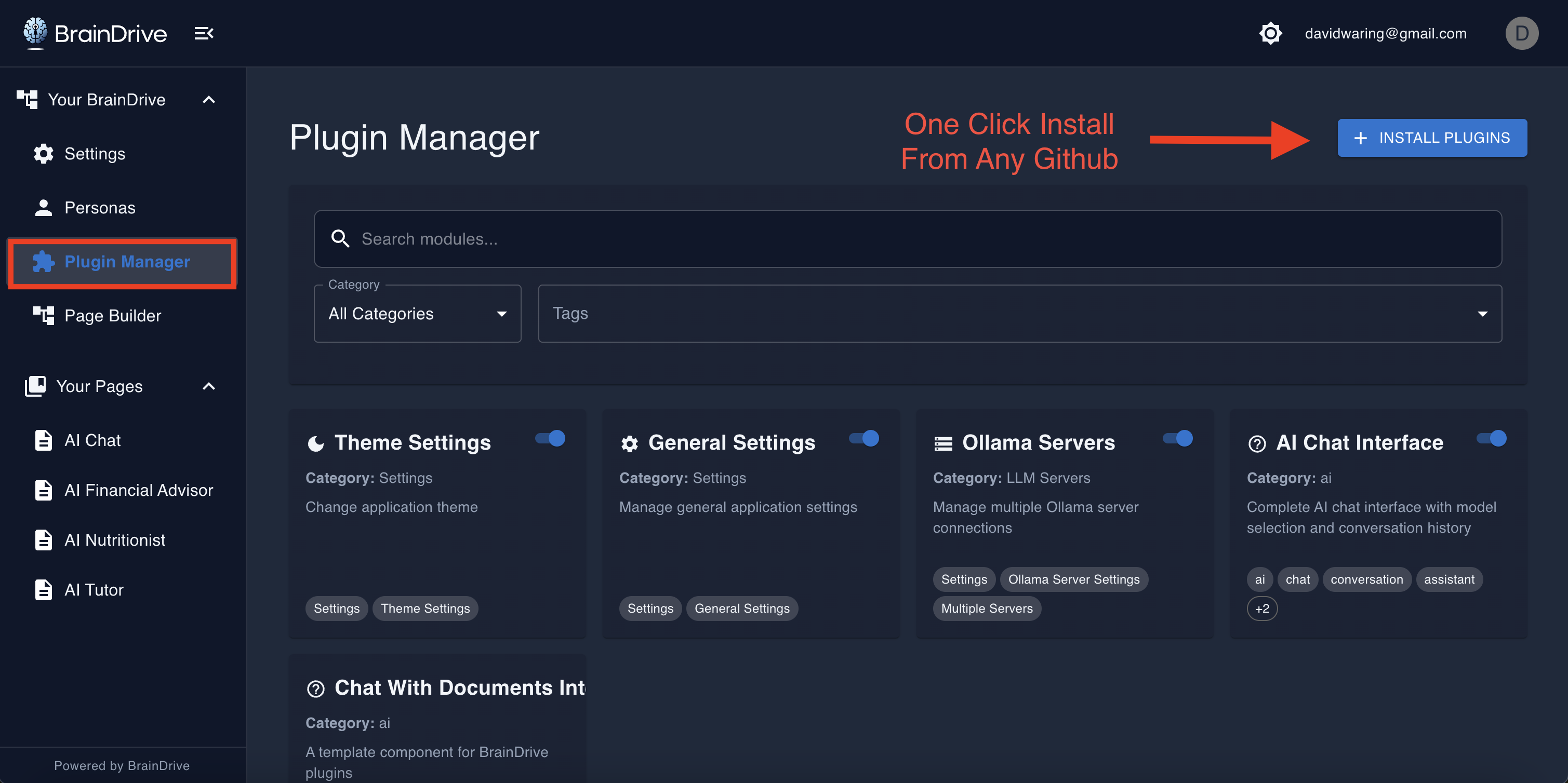
Open BrainDrive → Plugin Manager → Install Plugin.
-
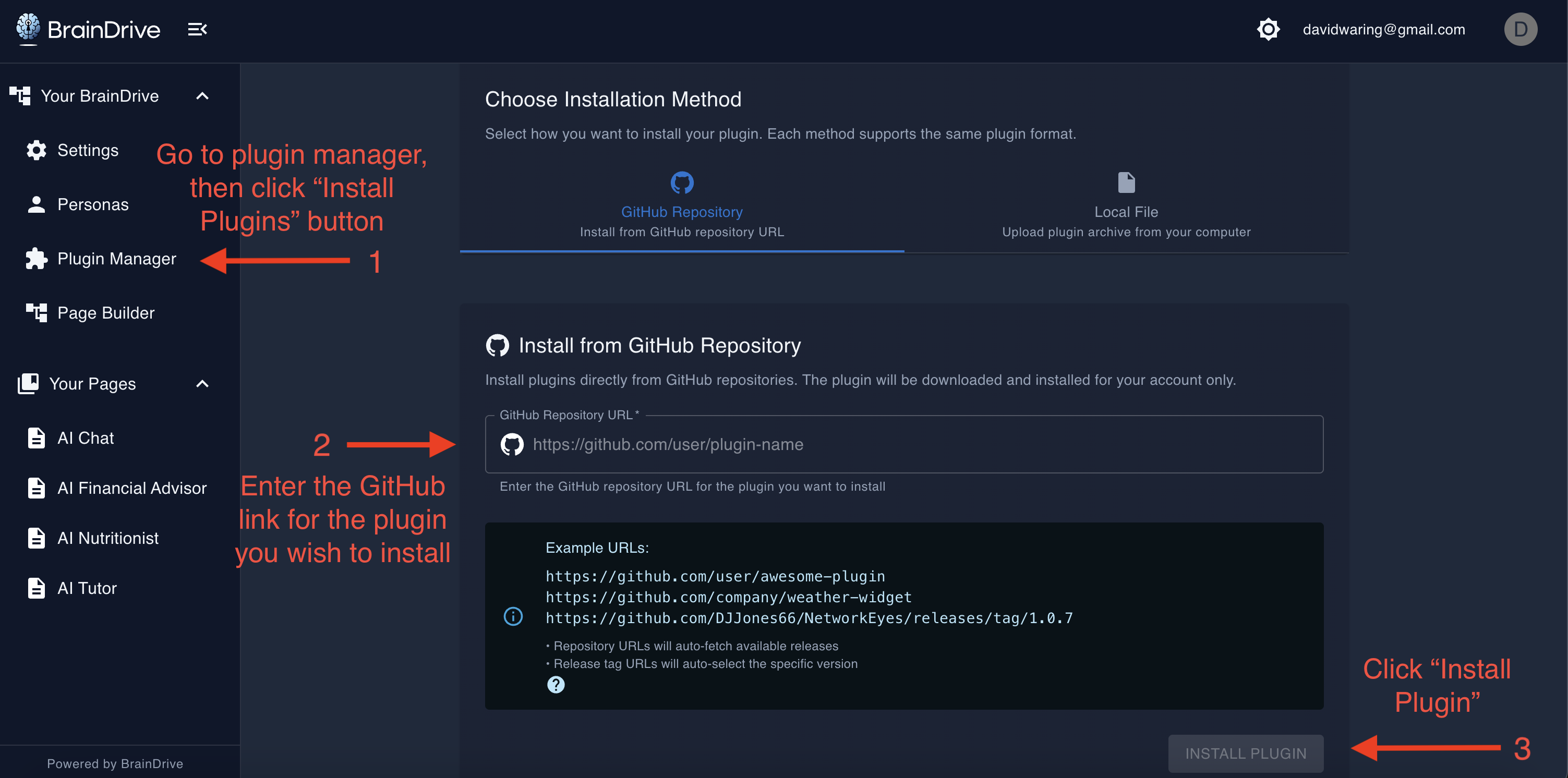
Paste this repository URL and click Install.
-
Open Page Builder, drag the BrainDriveChat component onto a page, Publish, and start chatting.
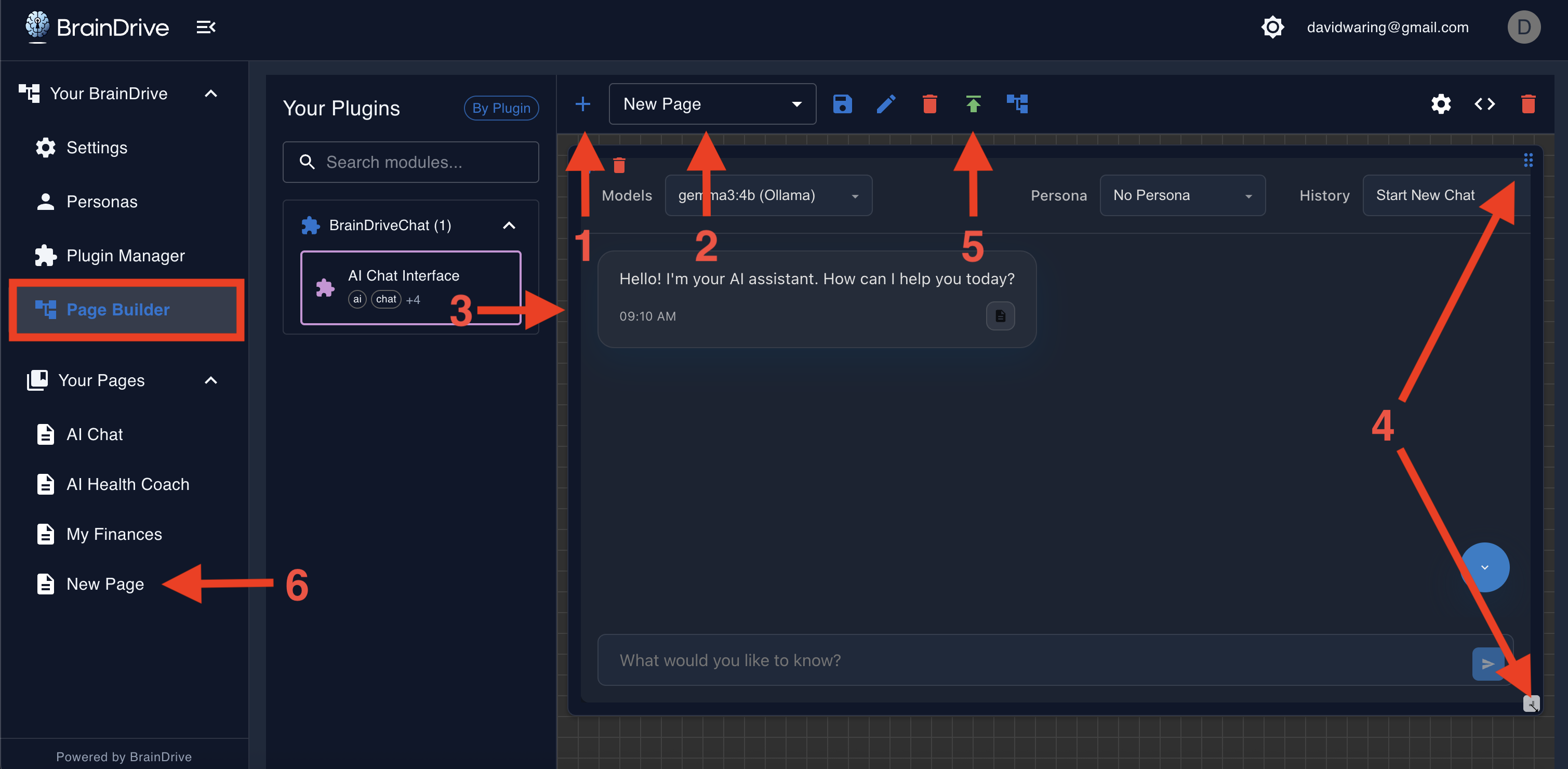
The Plugin Manager fetches and registers plugins dynamically; no app rebuild required.
Use this path if you want to modify or contribute. It gives you a rapid edit→build→refresh cycle.
-
Clone & install
git clone https://github.com/BrainDriveAI/BrainDrive-Chat-Plugin.git cd BrainDrive-Chat-Plugin npm install -
Point build output to BrainDrive (optional but fastest)
Inwebpack.config.js, setoutput.pathto your local BrainDrive plugins dir, e.g.:/path/to/BrainDrive-Core/backend/plugins/shared/BrainDriveChat/<version>/distThis lets BrainDrive load your freshly built
remoteEntry.jswithout re-installing. -
Disable browser cache in DevTools so the host app fetches the latest bundle on each refresh.
-
Build (watch)
npm run dev # or: npm run build, then refresh the BrainDrive pageEdit code → build completes → refresh the BrainDrive page → changes appear.
- Add BrainDriveChat to any page via Page Builder.
- Choose a model (local or API) from the model selector (models come from installed provider plugins).
- Chat normally; your conversation history persists with BrainDrive storage.
- Node.js 16+
- Python 3.9+ (3.11 recommended)
- Git
- BrainDrive Installed & running locally (frontend & backend)
git clone https://github.com/YourOrg/BrainDrive-Chat-Plugin.git
cd BrainDrive-Chat-Plugin
npm installnpm run dev- Keep BrainDrive running.
- Refresh your BrainDrive page to load the new bundle. The host uses Module Federation to load the plugin at runtime.
npm run build
# outputs ./dist/remoteEntry.js for Module Federation- Commit
dist/in releases if you want frictionless installs via the Plugin Manager.
- Core Frontend: React + TypeScript + MUI
- Core Backend: Python + FastAPI + SQLite
- Plugins: Separate repos loaded at runtime via Webpack Module Federation; managed by a Python Lifecycle Manager that handles install/uninstall/repair/status with a universal API.
This chat plugin is a federated frontend module that talks to BrainDrive via Service Bridges. You don’t call core internals directly; you call stable bridge contracts so updates don’t break your plugin.
- React components render the header (model selector), history, and input areas.
- Hooks manage chat messages, streaming, and side effects.
- State (UI + conversation metadata) is persisted through BrainDrive services (e.g., Plugin State, Settings).
The modular design keeps changes “surgical”: tweak the input behavior without touching model selection; swap a renderer without breaking history.
The plugin follows a modular design pattern:
- BrainDriveChat.tsx: Main component combining all functionality
- types.ts: TypeScript type definitions
- utils.ts: Utility functions and helpers
- BrainDriveChat.css: Tailwind-like CSS utilities and component styles
The plugin uses a custom CSS framework that mimics Tailwind CSS utilities while being compatible with the BrainDrive environment. It includes:
- Responsive design utilities
- Light/dark theme support
- Flexbox and grid utilities
- Spacing and typography utilities
The plugin integrates with the BrainDrive API for:
- User authentication
- Model management
- Conversation storage
- AI provider communication
- Chrome 80+
- Firefox 75+
- Safari 13+
- Edge 80+
MIT License Your AI. Your Rules
BrainDrive.ai Team
- BrainDrive Docs Site - Learn how to use, modify,and build on your BrainDrive.
- BrainDrive Community - Get support and collaborate with us in building the future of the user-owned AI movement.
- Contributing - We encourage and appreciate contributions, including improving this settings plugin and/or building your own.
We're on a mission to build a superior, user-owned alternative to Big Tech AI systems.
Thank you for joining us on this journey away from Big Tech extraction and towards individual freedom and empowerment.