Windows configuration audit and security review tool — for ethical and defensive use only.
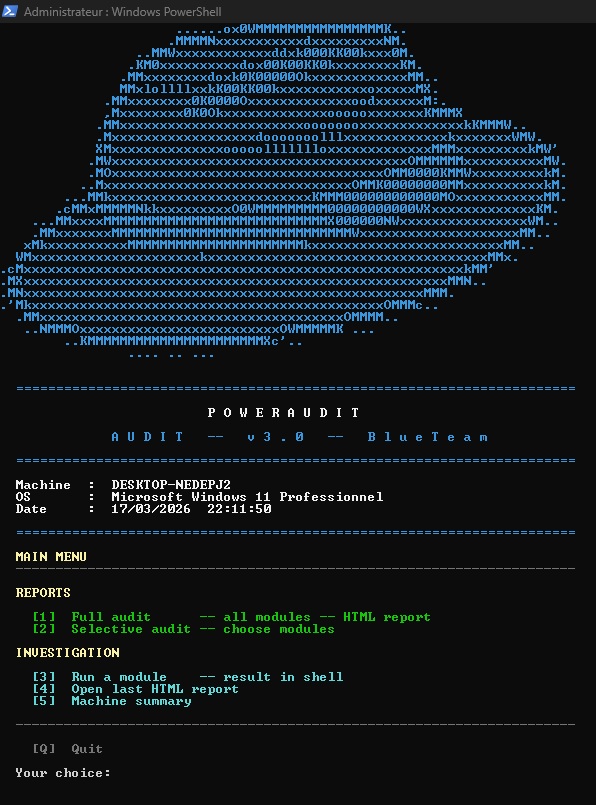
PowerAudit is a PowerShell script designed for Blue Team analysts, system administrators, and security auditors. It provides a rapid snapshot of a Windows machine's configuration, identifies deviations from security best practices, and generates an interactive HTML report ready for immediate use.
The script contains no write, modify, or exploitation commands. It relies exclusively on read-only calls (Get-*, netsh, bcdedit, wevtutil, etc.) and does not alter the audited system in any way.
The author of this script cannot be held responsible for its use. PowerAudit is designed to be used only on systems you own or for which you have explicit written authorization. Any use on a third-party system without authorization is illegal and unethical. This script contains only read commands and does not modify, exfiltrate, or alter any system data.
The script requires Administrator rights to access certain system information (security logs, local security policy, GPO, etc.).
There are two ways to run it:
Option 1 — Modify execution policy (recommended, persistent)
Open PowerShell as Administrator and run:
Set-ExecutionPolicy RemoteSigned -Scope LocalMachineThen launch the script normally:
powershell.exe -File ".\PowerAudit_3_1_EN.ps1"Option 2 — One-time bypass (no system change)
powershell.exe -ExecutionPolicy Bypass -File ".\PowerAudit_3_1_EN.ps1"In both cases, PowerShell must be launched as Administrator (right-click → Run as administrator).
- Windows 10 / Windows Server 2016 or later
- PowerShell 5.0 minimum
powershell.exe -ExecutionPolicy Bypass -File ".\PowerAudit_3_1_EN.ps1"Runs all 46 audit modules in sequence and generates a complete interactive HTML report.
The report is saved in the current directory as:
pwaudit_MACHINENAME_full_report_YYYY-MM-DD_HH-mm.html
Lets you manually choose which modules to run via an interactive checklist menu.
| Command | Action |
|---|---|
[number] |
Check / uncheck a module |
A |
Select all |
N |
Deselect all |
V |
Validate and generate report |
Q |
Back without generating |
Partial reports are saved as:
pwaudit_MACHINENAME_partial_report_YYYY-MM-DD_HH-mm.html
Runs a single module and displays the result directly in the shell, without generating an HTML report. Useful for quick checks or targeted diagnostics.
Opens the last HTML report generated during the current session in the default browser.
Displays a full machine overview in the console:
- System information (OS, build, CPU, RAM, BIOS, uptime)
- Disks with fill bar and color-coded status
- Local accounts with roles (active / inactive / admin)
- Windows license key (OEM decode + registry)
- Saved Wi-Fi network passwords
- Path and date of the last generated report
| # | ID | Description | Category |
|---|---|---|---|
| 01 | BCD |
Boot Manager | System |
| 02 | OS |
OS Information | System |
| 03 | ENV |
Environment Variables | System |
| 04 | PROC-TREE |
Process Tree | Processes |
| 05 | PROC-LIST |
Process List | Processes |
| 06 | EXEC-POL |
PowerShell Policy | Security |
| 07 | SECEDIT |
Local Security Policy | Security |
| 08 | USERS |
Local Accounts | Accounts |
| 09 | GROUPS |
Local Groups | Accounts |
| 10 | SHARES |
Network Shares (SMB) | Network |
| 11 | USB |
USB History | System |
| 12 | DISK |
Partitions / Disks | System |
| 13 | IPCONFIG |
Network Configuration | Network |
| 14 | NETSTAT |
Active Network Connections | Network |
| 15 | ROUTE |
Routing Table | Network |
| 16 | WSUS |
Update Source (WSUS) | Updates |
| 17 | HOTFIX |
Installed Updates | Updates |
| 18 | NTP |
Time Source (NTP) | Network |
| 19 | WIFI |
Wi-Fi Configuration | Network |
| 20 | DNS-CACHE |
DNS Cache | Network |
| 21 | PROXY |
Proxy Configuration | Network |
| 22 | ARP |
ARP Table | Network |
| 23 | HOSTS |
HOSTS File | Network |
| 24 | SERVICES |
Services Status | Services |
| 25 | FW-STATE |
Firewall — Status | Firewall |
| 26 | FW-IN |
Firewall — Inbound Rules | Firewall |
| 27 | FW-OUT |
Firewall — Outbound Rules | Firewall |
| 28 | AV |
Antivirus | Security |
| 29 | TASKS |
Scheduled Tasks | Persistence |
| 30 | APPS |
Installed Software | System |
| 31 | EVT-SYS |
System Log (last 50) | Logs |
| 32 | EVT-APP |
Application Log (last 50) | Logs |
| 33 | GPO |
GPO / GPResult | Security |
| 34 | STARTUP |
Startup Programs | Persistence |
| 35 | IPv6 |
IPv6 — Addresses and Privacy | Network |
| 36 | BITLOCKER |
BitLocker — Disk Encryption | Encryption |
| 37 | CERTS |
Certificates — System Store | Encryption |
| 38 | EVT-SEC |
Security Log (last 50) | Forensics |
| 39 | RECENT-FILES |
Recently Modified Files (72h) | Forensics |
| 40 | RDP-HIST |
Recent RDP Connections | Forensics |
| 41 | PS-HIST |
PowerShell Activity (history) | Forensics |
| 42 | UAC |
UAC Rights and Privileges | Vulnerabilities |
| 43 | APPLOCKER |
AppLocker / SRP | Vulnerabilities |
| 44 | LSAPROT |
Credential Guard / LSA Protection | Vulnerabilities |
| 45 | NET-GEO |
Established Connections — GeoIP | Vulnerabilities |
| 46 | PS-MODULES |
Loaded PowerShell Modules | Vulnerabilities |
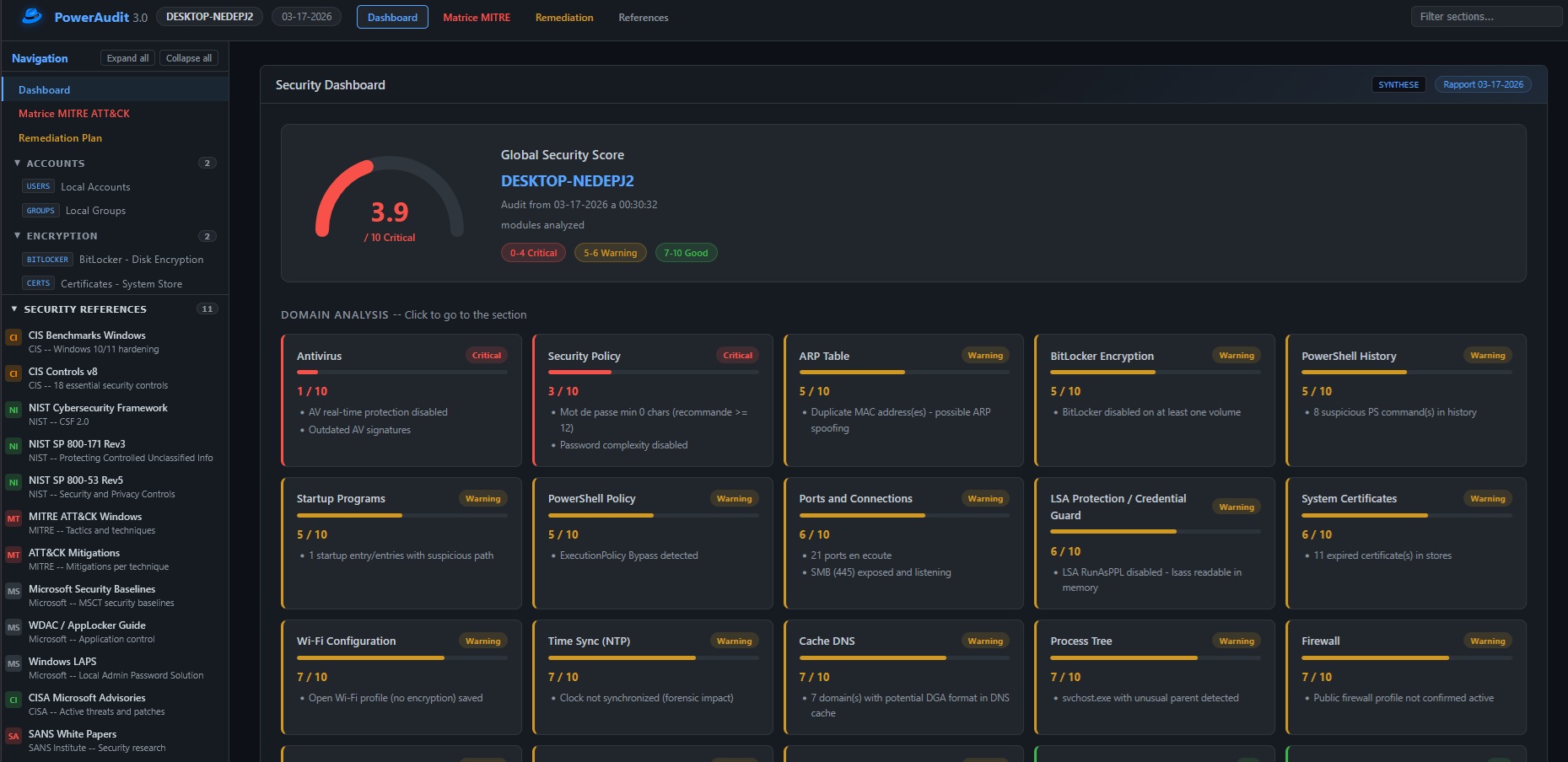
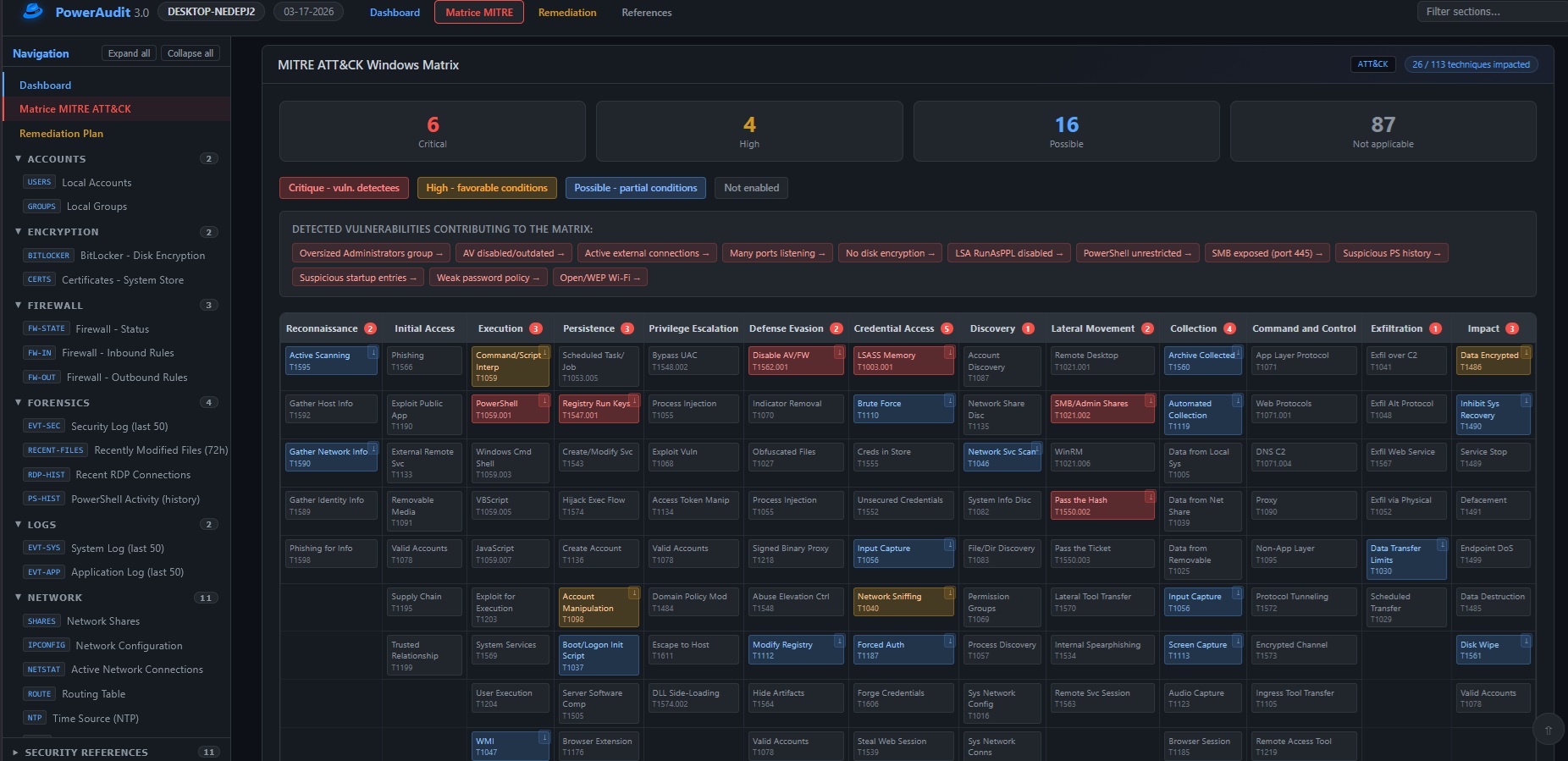
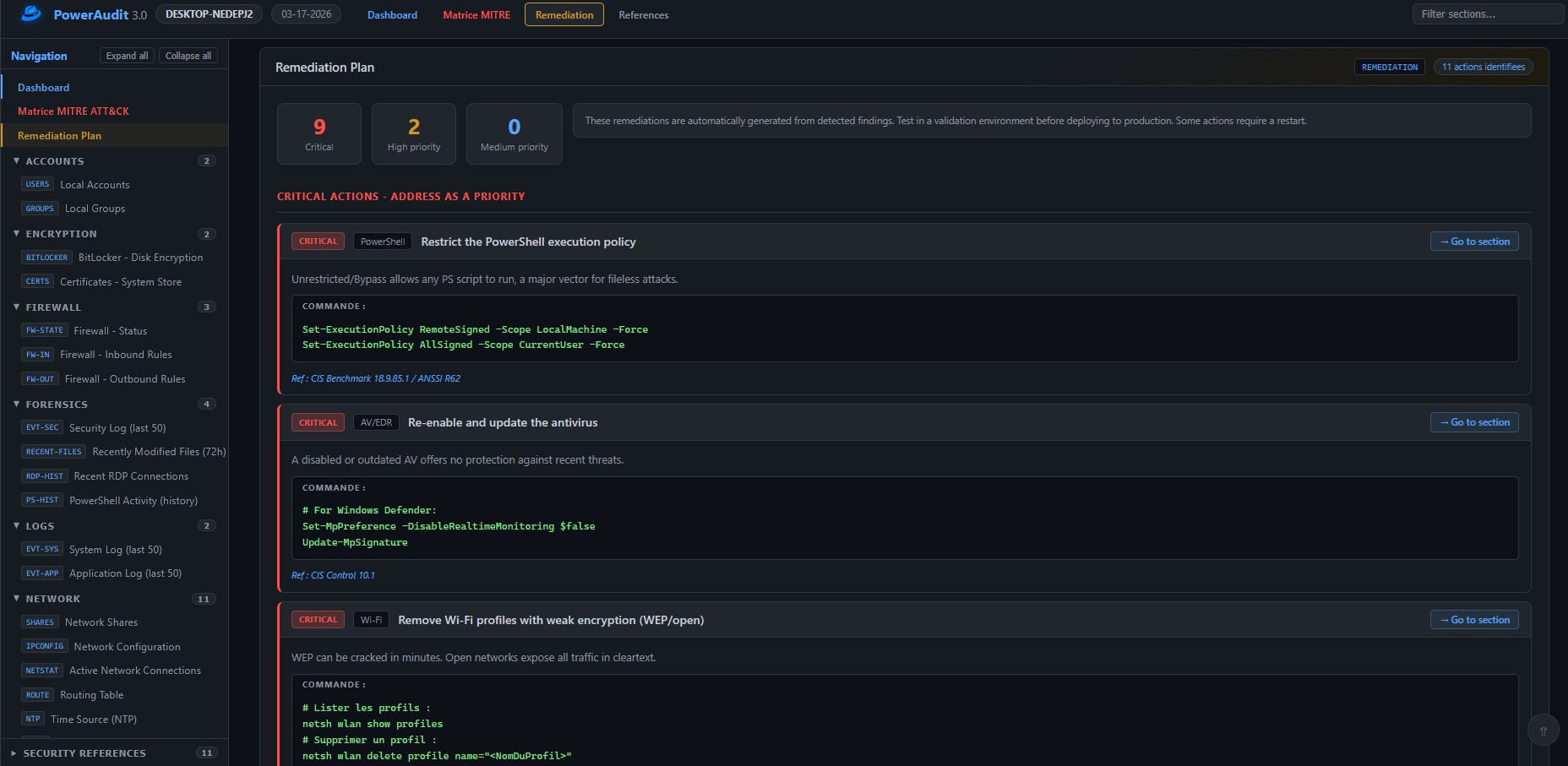
The generated report is a self-contained HTML file (no external dependencies) containing:
- Dashboard with global security score, per-domain gauges, and key indicators
- MITRE ATT&CK Matrix — detected techniques are highlighted with their risk level; clicking a technique opens the official page on attack.mitre.org
- Remediation Plan prioritized by criticality level
- Detail of each module with raw output and security recommendations
- Sidebar navigation with search and filters
- Security references (ANSSI, MITRE, CIS, etc.)
The score is not a simple average. It is calculated using a formula inspired by CVSS:
Risk(domain) = Impact x Exploitability
  Impact        = domain_weight / 4        (normalized 0.25 -> 1.0)
  Exploitability = (10 - domain_score) / 10

Raw score = 10 - (average_risk x 10)
Punitive ceilings — certain critical domains in failure lock the global score regardless of other modules:
| Condition | Ceiling | Meaning |
|---|---|---|
| Critical domain (weight >= 4) at <= 2/10 | 3.9 | E.g. Antivirus disabled -> Critical certain |
| Critical domain (weight >= 4) at <= 4/10 | 4.9 | Severe failure on vital domain |
| Critical domain (weight >= 4) at <= 6/10 | 6.4 | Partial failure on vital domain |
| Important domain (weight >= 3) at <= 2/10 | 4.9 | Major failure |
| Important domain (weight >= 3) at <= 4/10 | 5.9 | Significant failure |
Critical domains (weight 4): Antivirus, Firewall, Updates, Security Log, LSA Protection.
Coverage penalty — a partial audit (few modules analyzed) pulls the score toward 5/10 to reflect uncertainty.
Display thresholds:
| Score | Label | Color |
|---|---|---|
| 0 – 4.9 | Critical | Red |
| 5 – 6.9 | Warning | Yellow |
| 7 – 10 | Good | Green |
Apache 2.0 — see LICENSE file.
Anadema