Releases: AdguardTeam/AdGuardVPNForWindows
2.9

Disclaimer: AdGuard VPN for Windows is not an open-source project. We use Github as an open bug tracker for users to see what developers are working on.
In this update, we have further expanded the accessibility features of AdGuard VPN for Windows to make it more user-friendly. Our journey towards making the app as inclusive as possible began in v2.8, and now it continues in v2.9.
Accessibility support for more sections
In this version, we’ve added accessibility support for the Settings, App settings, DNS servers, and Support sections. Now visually impaired users can rely on screen readers to understand the available options and get helpful information. This is another step in our ongoing efforts to make AdGuard VPN comfortable for all users.
Let’s take a quick look at how exactly this could help users.
Support section
The Support section now works correctly with assistive technologies. Interface elements include voice descriptions and can be fully navigated without using a mouse.
This means that now users with visual impairment can navigate the section without relying on visual cues to find helpful information and contact support.
Settings → App settings
Settings are one of the most important sections when using a VPN. Now users with visual or motor impairments can clearly understand which settings they’re changing, control how the app behaves on their own, and customize their VPN experience without outside assistance.
DNS servers
DNS servers can be used to improve security and overall Internet experience. And now, this section is fully accessible to users who previously couldn’t use it properly due to interface limitations.
Changelog
Fixes
- WhatsApp can’t connect to servers when added to Exclusions in Selective mode #1036
VPN client (AdGuard VPN protocol implementation)
- VPN client updated to v0.19.35 #1051
Sciter (UI engine)
- Sciter updated to v1.0.991 #1059
2.9 beta 2

Disclaimer: AdGuard VPN for Windows is not an open-source project. We use Github as an open bug tracker for users to see what developers are working on.
In this update, we have further expanded the accessibility features of AdGuard VPN for Windows to make it more user-friendly.
Accessibility support for more sections
Our journey towards making AdGuard VPN as inclusive as possible continues. In this version, we’ve added accessibility support for the Settings, App settings, DNS servers, and Support sections. Now visually impaired users can rely on screen readers to understand the available options and get helpful information. This is another step in our ongoing efforts to make AdGuard VPN comfortable for all users.
Changelog
Fixes
- WhatsApp can’t connect to servers when added to Exclusions in Selective mode #1036
VPN client (AdGuard VPN protocol implementation)
- VPN client updated to v0.19.32 #1045
AdGuard VPN for Windows direct download link:
2.9 beta 1
Disclaimer: AdGuard VPN for Windows is not an open-source project. We use Github as an open bug tracker for users to see what developers are working on.
Here’s an additional technical update following the previous one. In it, we’ve fixed bugs and kept working on the app stability.
AdGuard VPN for Windows direct download link:
2.8.2
Disclaimer: AdGuard VPN for Windows is not an open-source project. We use Github as an open bug tracker for users to see what developers are working on.
What do AdGuard VPN and horoscopes have in common? Promised compatibility doesn’t always work. This hotfix resolves an issue with AdGuard VPN not cooperating with other software.
AdGuard VPN for Windows direct download link:
2.8.1
Disclaimer: AdGuard VPN for Windows is not an open-source project. We use Github as an open bug tracker for users to see what developers are working on.
Online privacy is cool and all, but have you ever updated to a new version after the previous one just crashed with no explanation? Well, you have a chance to experience that.
Changelog
Fixes
- Error when connecting to location on Win 10x86 after update to v2.8 and higher #1017
AdGuard VPN for Windows direct download link:
2.8
Disclaimer: AdGuard VPN for Windows is not an open-source project. We use Github as an open bug tracker for users to see what developers are working on.
This update brings several meaningful improvements to AdGuard VPN for Windows. We’ve introduced accessibility features so more people can use the app comfortably.
Accessibility support
We’ve taken another step toward making AdGuard VPN more inclusive. In this version, we’ve added accessibility support for the home, authorization, and onboarding screens: you can now rely on screen readers for clear descriptions of icons, buttons, and dynamic elements. These improvements are just the beginning, we will continue to make AdGuard VPN even more comfortable for all users.
Changelog
Fixes
- Discord losing connection in voice chats #801
- AdGuard VPN leaks DNS server requests #938
- Errors when fast-switching between locations #969
- Unable to establish connection with any VPN server #970
VPN client (AdGuard VPN protocol implementation)
- VPN Client updated to v0.19.23 #1005
AdGuard VPN for Windows direct download link:
2.8 beta 2
Disclaimer: AdGuard VPN for Windows is not an open-source project. We use Github as an open bug tracker for users to see what developers are working on.
This beta version is the final touch before the official release of AdGuard VPN for Windows v2.8. We’ve updated the VPN client and fixed some minor issues, making the app more stable.
Changelog
Fixes
- Unable to establish connection with any VPN server #970
VPN client (AdGuard VPN protocol implementation)
- Updated VPN client to v0.19.10 #982
AdGuard VPN for Windows direct download link:
2.8 beta 1
Disclaimer: AdGuard VPN for Windows is not an open-source project. We use Github as an open bug tracker for users to see what developers are working on.
If you haven't tried the full AdGuard privacy setup yet, now's a great time. We've added an option in the VPN settings that takes you to our website, where you can download AdGuard Ad Blocker. It blocks ads and trackers, keeping your browsing fast and distraction-free.

Already using our ad blocker? Then take this as a reminder that together, AdGuard VPN and AdGuard offer more complete protection: VPN for privacy, Ad Blocker for a clean and safe browsing experience.
We’ve also updated the VPN client, making the app more stable and reliable overall.
Changelog
Improvements
- Blocking inbound connection for the Wintun driver #892
Fixes
- AdGuard VPN leaks DNS server requests #938
VPN client (AdGuard VPN protocol implementation)
- Updated VPN client to v0.18.33 #953
AdGuard VPN for Windows direct download link:
2.7

Disclaimer: AdGuard VPN for Windows is not an open-source project. We use Github as an open bug tracker for users to see what developers are working on.
AdGuard VPN for Windows now has dynamic VPN protocol selection — a feature that automatically picks the fastest and most stable protocol (HTTP2/TLS or HTTP3/QUIC) for your connection. This improves VPN speed and stability, which is particularly helpful in regions where VPN usage is restricted or unreliable.
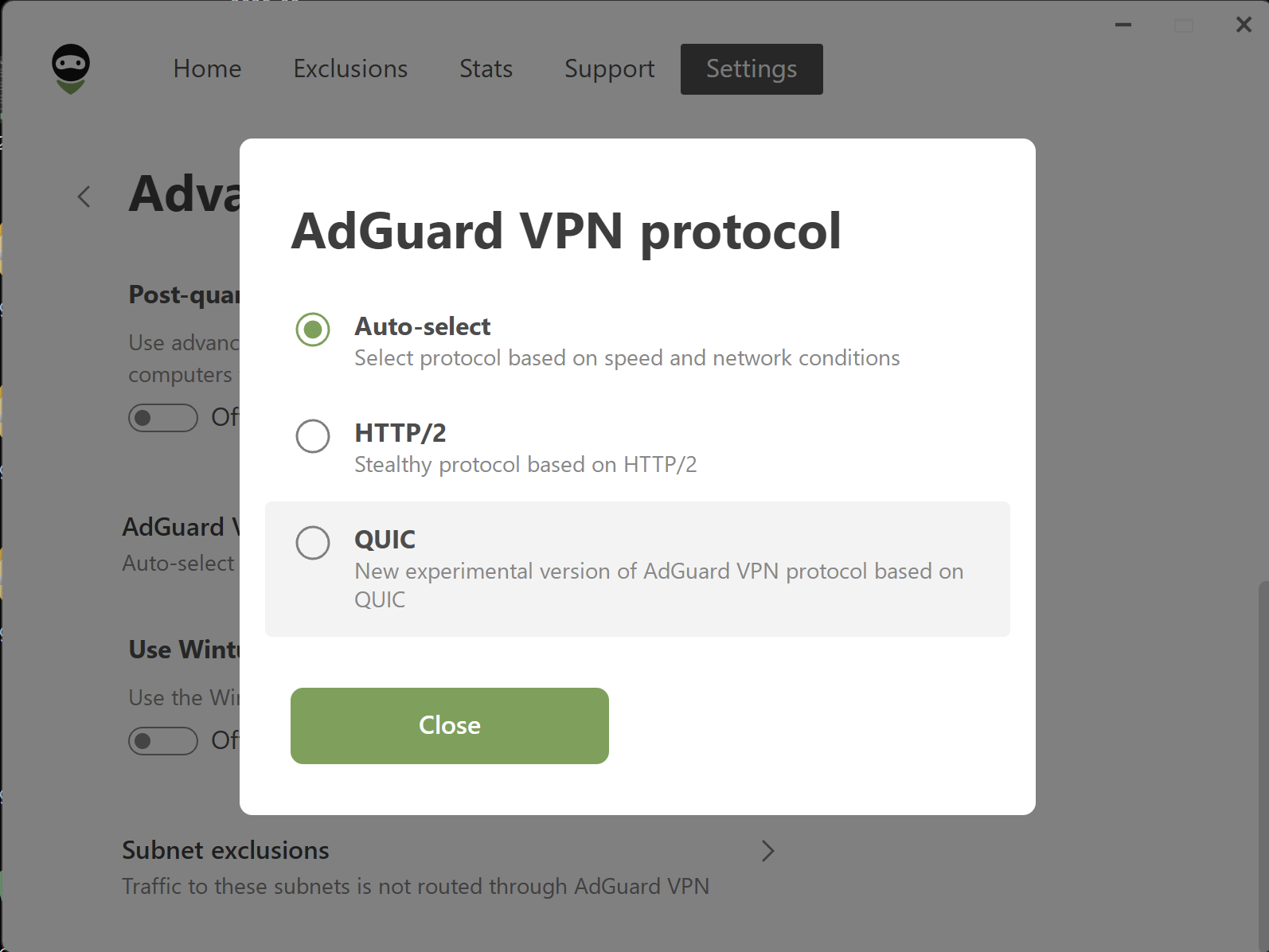
This option is enabled by default. To change it, open Settings → App settings → Advanced settings → Miscellaneous → AdGuard VPN protocol and select your preferred protocol instead of Auto-select.
We’ve also updated the VPN client, making the app more stable and reliable overall.
Changelog
Fixes
- The AdGuard VPN minimised preview icon is missing when hovering over it in the taskbar #921
VPN client (AdGuard VPN protocol implementation)
- Updated VPN client to v0.17.4 #446
AdGuard VPN for Windows direct download link:
2.7 RC
Disclaimer: AdGuard VPN for Windows is not an open-source project. We use Github as an open bug tracker for users to see what developers are working on.
This is a technical release featuring minor tweaks behind the scenes. We're rolling it out primarily to enhance app stability and update the VPN client.
Changelog
Fixes
- AdGuard VPN minimized preview Icon is missing when hovering over in taskbar #921
AdGuard VPN for Windows direct download link: