
Share files like picking up a package — no registration required, just enter the passcode








简体中文 | Live Demo | Documentation | FAQ
# 🚀 Quick Deploy
docker run -d -p 12345:12345 -v /opt/FileCodeBox:/app/data --name filecodebox lanol/filecodebox:latest
# China Mirror (if slow): docker.cnb.cool/aixk/filecodebox- Introduction
- Features
- Screenshots
- Quick Start
- Usage Guide
- Development
- FAQ
- Contributing
- Statistics
- Disclaimer
FileCodeBox is a lightweight file sharing tool built with FastAPI + Vue3. Users can anonymously share text and files, and recipients only need to enter a passcode to retrieve the content — just like picking up a package from a locker.
| Scenario | Description |
|---|---|
| 📁 Temporary File Sharing | Quick file sharing without registration |
| 📝 Code Snippet Sharing | Share code, config files, and text content |
| 🕶️ Anonymous Transfer | Privacy-protected peer-to-peer transfer |
| 🔄 Cross-Device Transfer | Quickly sync files between devices |
| 💾 Temporary Storage | Cloud storage with custom expiration |
| 🌐 Private Service | Build your own enterprise or personal sharing service |
|
|
|
|
|
Frontend repositories: 2024 Theme | 2023 Theme
🎨 New Interface (2024)
 |
 |
 |
 |
 |
 |
📦 Classic Interface (2023)
 |
 |
 |
 |
Option 1: Docker CLI
# Docker Hub (Recommended)
docker run -d --restart always -p 12345:12345 -v /opt/FileCodeBox:/app/data --name filecodebox lanol/filecodebox:latest

# China Mirror (if Docker Hub is slow)
docker run -d --restart always -p 12345:12345 -v /opt/FileCodeBox:/app/data --name filecodebox docker.cnb.cool/aixk/filecodebox
Option 2: Docker Compose
services:
  filecodebox:
    image: lanol/filecodebox:latest
    container_name: filecodebox
    restart: unless-stopped
    ports:
      - "12345:12345"
    volumes:
      - ./data:/app/data
    environment:
      - WORKERS=4
      - LOG_LEVEL=info
docker compose up -dEnvironment Variables
| Variable | Default | Description |
|---|---|---|
HOST |
:: |
Listen address (supports IPv4/IPv6 dual-stack) |
PORT |
12345 |
Service port |
WORKERS |
4 |
Worker processes (recommended: CPU cores) |
LOG_LEVEL |
info |
Log level: debug / info / warning / error |
When using Nginx, add the following configuration to properly obtain client IP:
location / {
    proxy_pass http://127.0.0.1:12345;
    proxy_set_header Host $host;
    proxy_set_header X-Real-IP $remote_addr;
    proxy_set_header X-Forwarded-For $proxy_add_x_forwarded_for;
    proxy_set_header X-Forwarded-Proto $scheme;
    client_max_body_size 100m;  # Adjust upload size limit as needed
}# 1. Clone the repository
git clone https://github.com/vastsa/FileCodeBox.git
cd FileCodeBox
# 2. Install dependencies
pip install -r requirements.txt
# 3. Start the service
python main.py| Operation | Steps |
|---|---|
| Share File | Open website → Select/drag files → Set expiration → Get passcode |
| Retrieve File | Open website → Enter passcode → Download file or view text |
| Admin Panel | Visit /#/admin → Enter password FileCodeBox2023 |
Click to expand curl examples
Upload File
# Basic upload (default 1 day expiration)
curl -X POST "http://localhost:12345/share/file/" \
  -F "file=@/path/to/file.txt"

# Set 1 hour expiration
curl -X POST "http://localhost:12345/share/file/" \
  -F "file=@/path/to/file.txt" \
  -F "expire_value=1" \
  -F "expire_style=hour"

# Set expiration after 10 downloads
curl -X POST "http://localhost:12345/share/file/" \
  -F "file=@/path/to/file.txt" \
  -F "expire_value=10" \
  -F "expire_style=count"
Share Text
curl -X POST "http://localhost:12345/share/text/" \
  -F "text=Text content to share"
Download File
curl -L "http://localhost:12345/share/select/?code=PASSCODE" -o filenameExpiration Parameters
expire_style |
Description |
|---|---|
day |
Days |
hour |
Hours |
minute |
Minutes |
count |
Download count |
forever |
Never expire |
Response Example
{
  "code": 200,
  "msg": "success",
  "detail": {
    "code": "abcd1234",
    "name": "file.txt"
  }
}
When Authentication Required (after admin disables guest upload)
# 1. Get token
curl -X POST "http://localhost:12345/admin/login" \
  -H "Content-Type: application/json" \
  -d '{"password": "FileCodeBox2023"}'

# 2. Upload with token
curl -X POST "http://localhost:12345/share/file/" \
  -H "Authorization: Bearer <token>" \
-F "file=@/path/to/file.txt"FileCodeBox/
├── apps/ # Application modules
│ ├── admin/ # Admin backend
│ └── base/ # Base functionality
├── core/ # Core modules
├── data/ # Data directory (generated at runtime)
├── docs/ # Documentation
└── main.py # Entry point
Backend
pip install -r requirements.txt
python main.py
Frontend
# Frontend repo: https://github.com/vastsa/FileCodeBoxFronted
cd fcb-fronted
npm install
npm run dev| Category | Technology |
|---|---|
| Backend Framework | FastAPI 0.128+ / Uvicorn |
| Database | SQLite + Tortoise ORM |
| Data Validation | Pydantic 2.x |
| Async Support | aiofiles / aiohttp / aioboto3 |
| Object Storage | S3 Protocol / OneDrive / OpenDAL |
| Frontend Framework | Vue 3 + Element Plus + Vite |
| Runtime | Python 3.8+ / Node.js 18+ |
| Containerization | Docker / Docker Compose |
How to modify upload size limit?
Modify the uploadSize configuration in the admin panel. If using Nginx reverse proxy, also modify client_max_body_size.
How to configure storage engine?
Select the storage engine type and configure parameters in the admin panel. Supports local storage, S3, OneDrive, OpenDAL, etc.
How to backup data?
Backup the data directory, which contains the database and uploaded files.
How to change admin password?
After logging into the admin panel, modify the adminPassword configuration in system settings.
For more questions, visit Wiki
Issues and Pull Requests are welcome!
# 1. Fork and clone
git clone https://github.com/your-username/FileCodeBox.git

# 2. Create branch
git checkout -b feature/your-feature

# 3. Commit changes
git commit -m "feat: add your feature"

# 4. Push and create PR
git push origin feature/your-feature
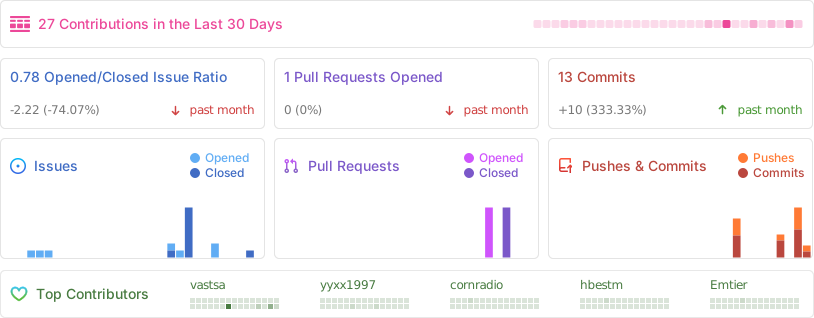
- 2025 New Theme
- File Collection Feature
This project is open-source for learning and communication purposes only. It should not be used for any illegal purposes. The author is not responsible for any consequences. Please retain the project address and copyright information when using it.
If you find this project helpful, please give it a ⭐ Star!
Made with ❤️ by vastsa