Components allow to split the UI into independent, reusable pieces and think about each piece in isolation. Think about this example:
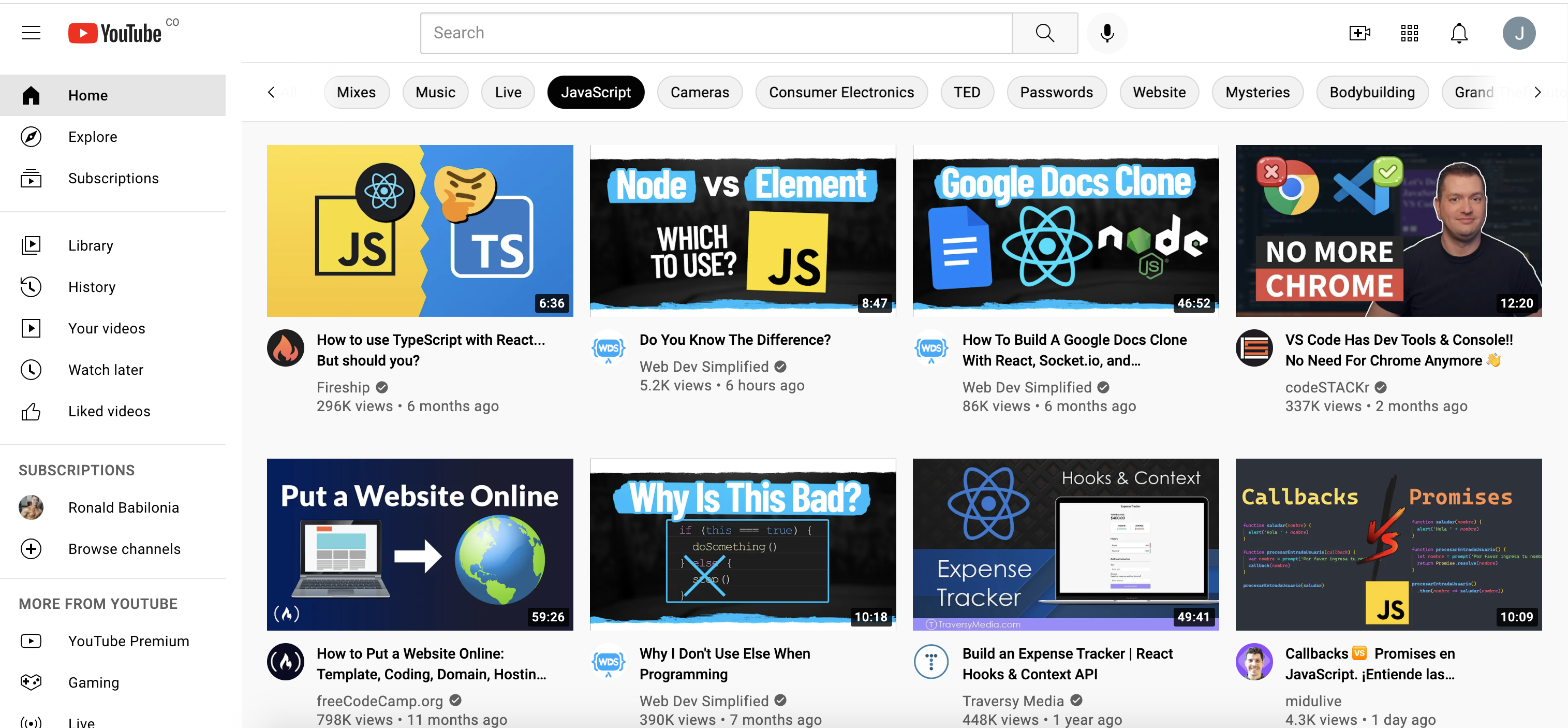
Youtube website is using a video component that keeps its structure. It only changes its content, and the following elements are reused in each video preview:
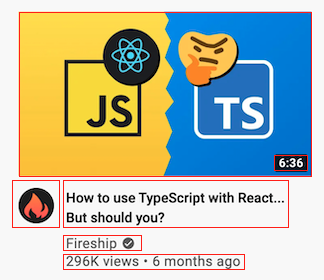
- Image cover
- Video duration
- Title
- Channel
- Views
- How long ago was it uploaded
React lets us define components as classes or functions. So, basically with Functional Components, a function will return a Component. Let's look at an example:
   function Greeting({children}) {
      return <div className="greeting">Hello {children}</div>
    }

    const containerElement = (
      <div className="container">
        {React.createElement(Greeting, {children: 'JuanG'})}
        {React.createElement(Greeting, {children: 'PushDev'})}
      </div>
    )

    ReactDOM.render(containerElement, document.getElementById('root'));
Greeting is a Functional Component. It uses JSX to render the 'div' element.
We can spread the greeting Component properties like this:
    function Greeting(props) {
      return <div {...props} />
    }

    const children = 'Push';
    const className = 'greeting';
    const props = { children, className };

    ReactDOM.render(Greeting(props), document.getElementById('root'));
We can also create Components using arrow functions d d :
    const Pet = ({name}) => <h1>{name} 🐶</h1>
ReactDOM.render(Pet({name: 'Coco'}), document.getElementById('root'));Now that you know how to create Components, you can use them like this:
    function Pet({name}) {
      return <h1>{name} 🐶</h1>
    }

    ReactDOM.render(<Pet name='Coco'/>, document.getElementById('root'));
Note: Components names must begin with Capital Letters
<pet />compiles to React.createElement('pet') (html tag)<Pet />compiles to React.createElement(Pet)
In order to do type checking, you can use React PropTypes. It will help you check the type of your props within your Components.
    function Pet({name}) {
      return <h1>{name} 🐶</h1>
    }

    Pet.propTypes = {
      name: PropTypes.string.isRequired
    };

    ReactDOM.render(<Pet name='Coco'/>, document.getElementById('root'));
Note: you will need to use PropTypes or you can add the following script:
<script src="https://unpkg.com/prop-types@15.7.2/prop-types.js"></script>
- If you provide a different type it will throw an error.
- Let's take a look at the different validators provided by PropTypes.
function Header({ title }){
      return (
        <header>
          <h1>{title} ⭐️</h1>
        </header>
      );
    }

    Header.propTypes = {
      title: PropTypes.string.isRequired
    };

    function Footer({ description }){
      return (
        <footer>
          <p>{description} 👋🏻</p>
        </footer>
      );
    }

    Footer.propTypes = {
      description: PropTypes.string.isRequired,
    };

    function Content({ imageSource, description }){
      return (
        <main>
          <figure>
            <img src={imageSource} alt={description} width='300'/>
          </figure>
          <figcaption>
            {description}
          </figcaption>
        </main>
      )
    }

    Content.propTypes = {
      imageSource: PropTypes.string.isRequired,
      description: PropTypes.string
    };

    function Website(){
      return (
        <>
          <Header title='PusDev'/>
          <Content
            imageSource='https://upload.wikimedia.org/wikipedia/commons/thumb/4/47/React.svg/1200px-React.svg.png'
            description='React tutorial'
          />
          <Footer description='Made with Love 💙'/>
        </>
      );
    }

ReactDOM.render(<Website/>, document.getElementById('root'));- In your forked
react-tutorialrepo, create a new branch namedfeature/4-functional-components. - Create an
index.htmlfile within the4-functional-componentsfolder. - Create a Video Functional Component, that must have the Youtube video properties described in the first section What is a Component?.
- You can split the Video component into different components.
- You should use PropTypes.
- Create various elements using the Video Component, sending the data through the props.
- Push your changes and create the Pull Request.