The Document Object Model represents the data of the content object within a website. It compromises the structure and the content of the appliaction, and it could be modified through the JavaScript API.
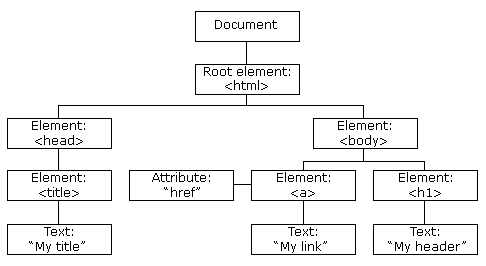
//Basic hmtl
<html>
	<head>
		<title>My title</title>
	</head>
	<body>
		<a href=''>My link</a>
		<h1>My header</h1>
	</body>
</html>
DOM for the html file:
- Shadow DOM is a DOM feature that helps you to build components. You can think of shadow DOM as a scoped subtree inside your element.
- Shadow DOM allows hidden DOM trees to be attached to elements in the regular DOM tree.
- This shadow DOM tree starts with a shadow root, underneath which can be attached to any elements you want, in the same way as the normal DOM. Shadow DOM DeveloperMozilla

Shadow host: The regular DOM node that the shadow DOM is attached to.Shadow tree: The DOM tree inside the shadow DOM.Shadow root: The root node of the shadow tree.
- With the open mode you can access the Shadow DOM via the shadowRoot property of the HTML element.
- With the closed mode you cannot. shadowRoot will return null.
See the example Shadow DOM
- Styling and shadow DOM.
- Event handling and shadow DOM.
- Multiple shadow roots.
<custom-element></custom-element>

<script>
customElements.define("custom-element", class extends HTMLElement {
  constructor() {
    super();
    this.attachShadow({ mode: "open" });
  }

  connectedCallback() {
    this.shadowRoot.innerHTML = `
      <style>
        div {
          background: blue;
          padding: 4px;
          color: white;
        }
      </style>
      <div>
        <p>Custom Element</p>
      </div>
    `;
  }
});
</script>
Shadow DOM allows you to provide better and easier encapsulation, by creating another clone of the DOM or part of it. (vs iframe for example).
- Create a Custom Accordion Component using Custom Elements and Shadow DOM. It should have its own styles.
- What is Shadow Dom.