Environment:
Windows 10
Google Chrome 83.0.4103.106
Pre-conditions:
- Go to https://naturechoice.azurewebsites.net
- Choose one of the categories (e.g. 'Women')
- Click on any type of clothing (e.g. 'All categories')
Steps to reproduce:
Scenario 1
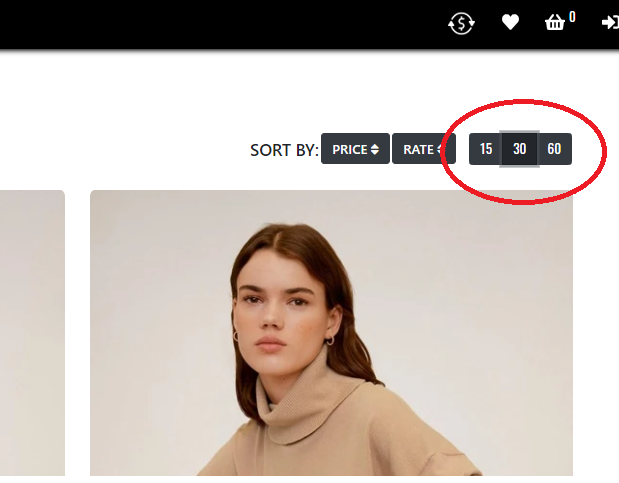
4. Pay attention to button '15' at the right side of PLP (amount of items)
Steps to reproduce:
Scenario 2
5. Click button '30'
6. Select another page at the bottom
Actual results:
Button '15' is not highlighted by default. Buttons '15', '30', '60' when clicking on it and selecting another page are not highlighted.
Expected result:
Button '15' is highlighted by default. Buttons '15', '30', '60' when clicking on it and selecting another page are highlighted.
(Improvement:
Buttons '15', '30', '60' can have visible clicked state also as the number of pages at the bottom, so the user could easily see what type of display items he chose. When the user switches number of pages, clicked state of the selected button is stored.)
.

Environment:
Windows 10
Google Chrome 83.0.4103.106
Pre-conditions:
Steps to reproduce:
Scenario 1
4. Pay attention to button '15' at the right side of PLP (amount of items)
Steps to reproduce:
Scenario 2
5. Click button '30'
6. Select another page at the bottom
Actual results:
Button '15' is not highlighted by default. Buttons '15', '30', '60' when clicking on it and selecting another page are not highlighted.
Expected result:
Button '15' is highlighted by default. Buttons '15', '30', '60' when clicking on it and selecting another page are highlighted.
(Improvement:
Buttons '15', '30', '60' can have visible clicked state also as the number of pages at the bottom, so the user could easily see what type of display items he chose. When the user switches number of pages, clicked state of the selected button is stored.)
.