When contributing to this repository, please first discuss the change you wish to make via issue, email, or any other method with the owners of this repository before making a change.
Please note we have a code of conduct, please follow it in all your interactions with the project.
-
If you are new to Git and GitHub, it is advisable that you go through GitHub For Beginners before moving to Step 2.
-
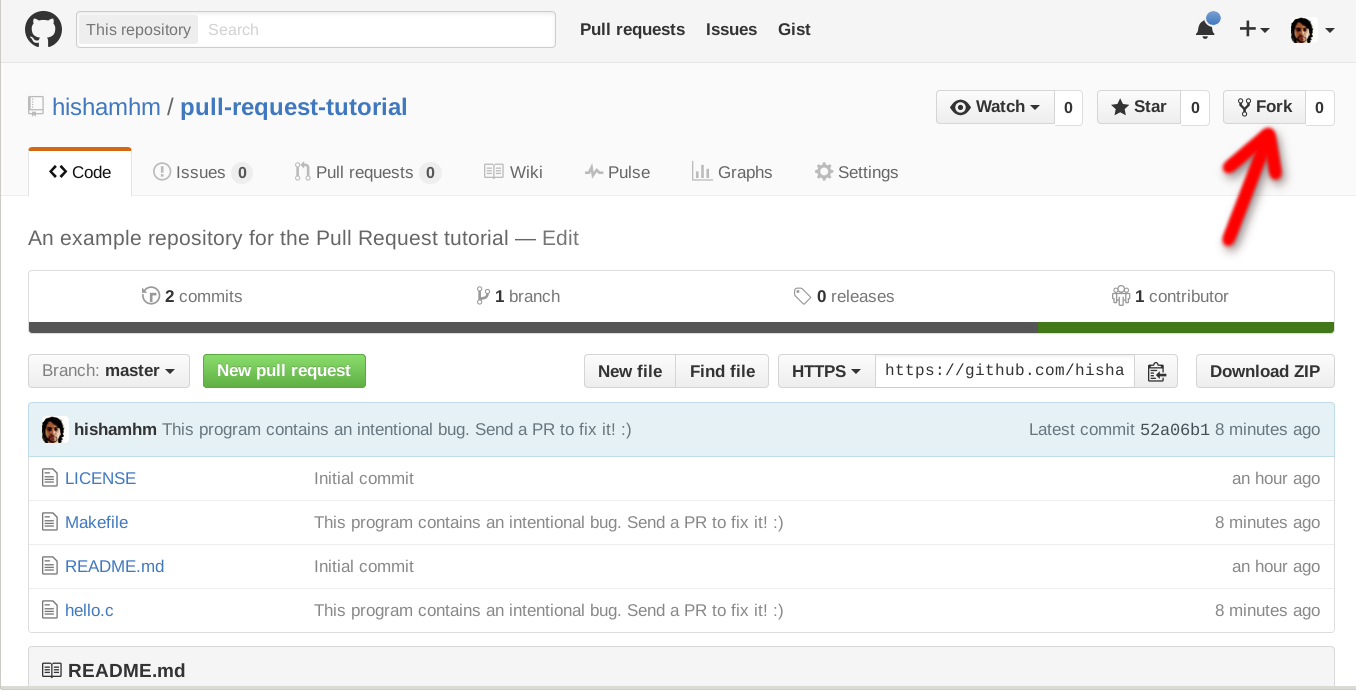
Fork the project on GitHub. Help Guide to Fork a Repository.
-
Clone the project. Help Guide to Clone a Repository
-
Create a branch specific to the issue you are working on.
git checkout -b update-readme-file
For clarity, name your branch
update-xxxorfix-xxx. Thexxxis a short description of the changes you're making. Examples includeupdate-readmeorfix-typo-on-contribution-md. -
Open up the project in your favorite text editor, select the file you want to contribute to, and make your changes.
If you are making changes to the
README.mdfile, you would need to have Markdown knowledge. Visit here to read about GitHub Markdown and here to practice.- If you are adding a new project/organisation to the README, make sure it's listed in alphabetical order.
- If you are adding a new organisation, make sure you add an organisation label to the organisation name. This would help distinguish projects from organisation projects.
-
Add your modified files to git, How to Add, Commit, Push, and Go.
git add path/to/filename.ext
You can also add all unstaged files using:
git add .Note: using a
git add .will automatically add all files. You can do agit statusto see your changes, but do it beforegit add. -
Commit your changes using a descriptive commit message.
git commit -m "Brief Description of Commit" -
Push your commits to your GitHub Fork:
git push -u origin branch-name
-
Submit a pull request.
Within GitHub, visit this main repository and you should see a banner suggesting to make a pull request. While you're writing up the pull request, you can add
Closes #XXXin the message body where#XXXis the issue you're fixing. So an example would beCloses #42would close issue#42.
If you decide to fix an issue, it's advisable to check the comment thread to see if there's somebody already working on a fix. If no one is working on it, kindly leave a comment stating that you intend to work on it. That way other people don't accidentally duplicate your effort.
In a situation whereby somebody decides to fix an issue but doesn't follow up for a particular period of time, say 2-3 weeks, it's acceptable to still pick up the issue but make sure to leave a comment.
Note: Every open-source project has a CONTRIBUTING.md file, please make sure to read this before you open up a pull request, otherwise it may be rejected. However, if you do not see any CONTRIBUTING.md file, you can send a pull request but do it in a descriptive manner.
The
main README.md file
contains a list of useful resources for beginners who want to contribute to
open source.
You can contribute to this page by adding a Markdown formatted link.
It should look similar to this below.
- [Title of the page](www.websitename.com/slug-name-here) - Add description of why I should look at this site
When in doubt, take a look at the current list items to get an idea of how you should format your contribution.
When adding your contribution to the list, please add your link to the most appropriate section. If you are unsure, feel free to ask in your pull requst or comment in an issue asking for guidance.
- Ensure any install or build dependencies are removed before the end of the layer when doing a build.
- Update the README.md with details of changes to the interface, this includes new environment variables, exposed ports, useful file locations and container parameters.
- Increase the version numbers in any examples files and the README.md to the new version that this Pull Request would represent. The versioning scheme we use is SemVer.
- You may merge the Pull Request in once you have the sign-off of two other developers, or if you do not have permission to do that, you may request the second reviewer to merge it for you.
In the interest of fostering an open and welcoming environment, we as contributors and maintainers pledge to making participation in our project and our community a harassment-free experience for everyone, regardless of age, body size, disability, ethnicity, gender identity and expression, level of experience, nationality, personal appearance, race, religion, or sexual identity and orientation.
Examples of behavior that contributes to creating a positive environment include:
- Using welcoming and inclusive language
- Being respectful of differing viewpoints and experiences
- Gracefully accepting constructive criticism
- Focusing on what is best for the community
- Showing empathy towards other community members
Examples of unacceptable behavior by participants include:
- The use of sexualized language or imagery and unwelcome sexual attention or advances
- Trolling, insulting/derogatory comments, and personal or political attacks
- Public or private harassment
- Publishing others' private information, such as a physical or electronic address, without explicit permission
- Other conduct which could reasonably be considered inappropriate in a professional setting
Project maintainers are responsible for clarifying the standards of acceptable behavior and are expected to take appropriate and fair corrective action in response to any instances of unacceptable behavior.
Project maintainers have the right and responsibility to remove, edit, or reject comments, commits, code, wiki edits, issues, and other contributions that are not aligned to this Code of Conduct, or to ban temporarily or permanently any contributor for other behaviors that they deem inappropriate, threatening, offensive, or harmful.
This Code of Conduct applies both within project spaces and in public spaces when an individual is representing the project or its community. Examples of representing a project or community include using an official project e-mail address, posting via an official social media account, or acting as an appointed representative at an online or offline event. Representation of a project may be further defined and clarified by project maintainers.
Instances of abusive, harassing, or otherwise unacceptable behavior may be reported by contacting the project team at [INSERT EMAIL ADDRESS]. All complaints will be reviewed and investigated and will result in a response that is deemed necessary and appropriate to the circumstances. The project team is obligated to maintain confidentiality with regard to the reporter of an incident. Further details of specific enforcement policies may be posted separately.
Project maintainers who do not follow or enforce the Code of Conduct in good faith may face temporary or permanent repercussions as determined by other members of the project's leadership.
This Code of Conduct is adapted from the Contributor Covenant, version 1.4, available at http://contributor-covenant.org/version/1/4