Api - JavaScript client for api
Welcome to DealMaker’s Web API v1! This API is RESTful, easy to integrate with, and offers support in 2 different languages. This is the technical documentation for our API. There are tutorials and examples of integrations with our API available on our knowledge centre as well.
- Javascript
- Ruby
To authenticate, add an Authorization header to your API request that contains an access token. Before you generate an access token your must first create an application on your portal and retrieve the your client ID and secret
DealMaker’s Web API v1 supports the use of OAuth applications. Applications can be generated in your account.
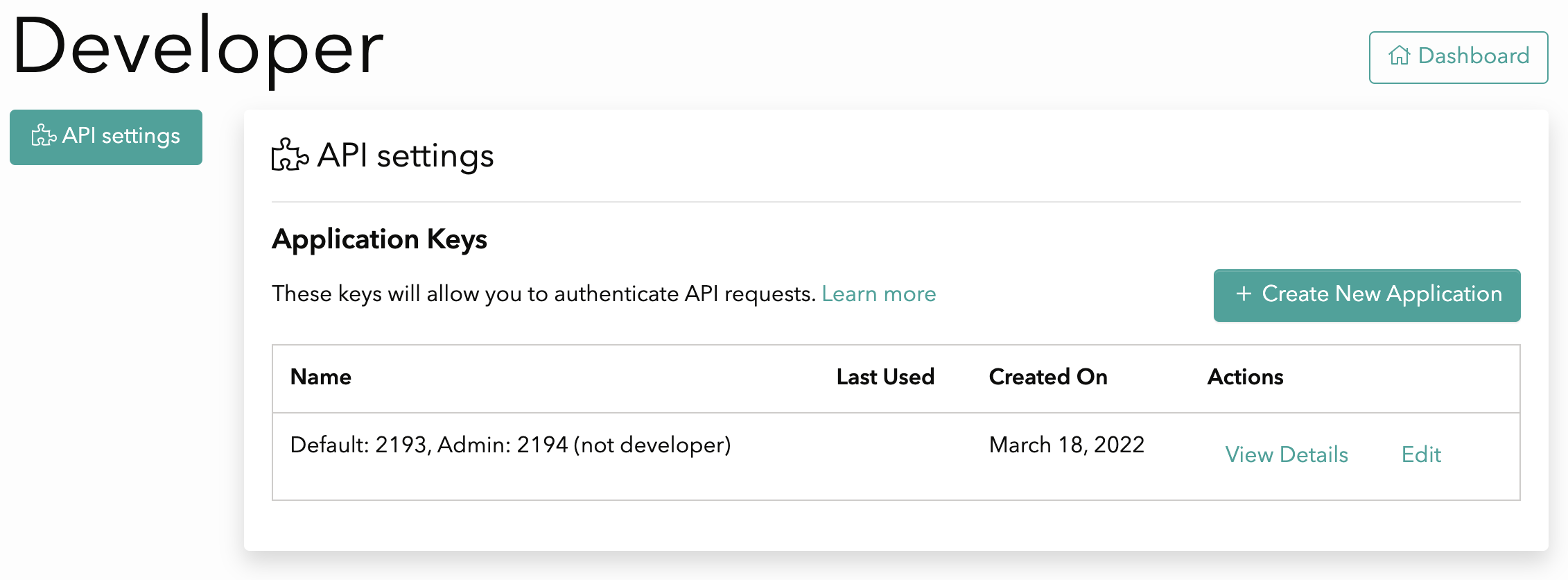
To create an API Application, click on your user name in the top right corner to open a dropdown menu, and select "Integrations". Under the API settings tab, click the Create New Application button
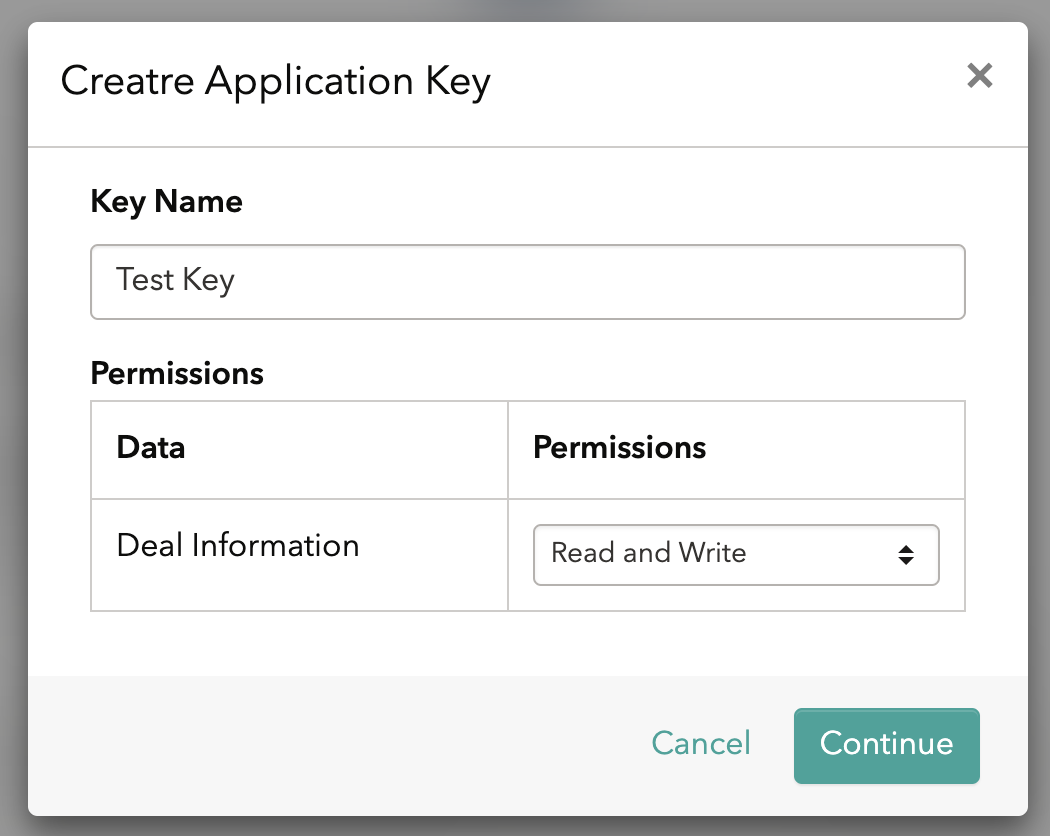
Name your application and assign the level of permissions for this application
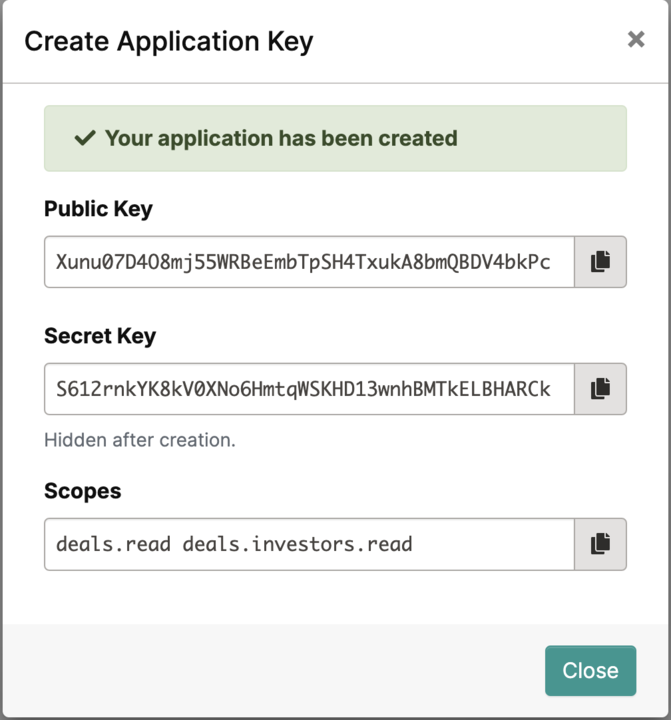
Once your application is created, save in a secure space your client ID and secret.
WARNING: The secret key will not be visible after you click the close button
From the developer tab, you will be able to view and manage all the available applications
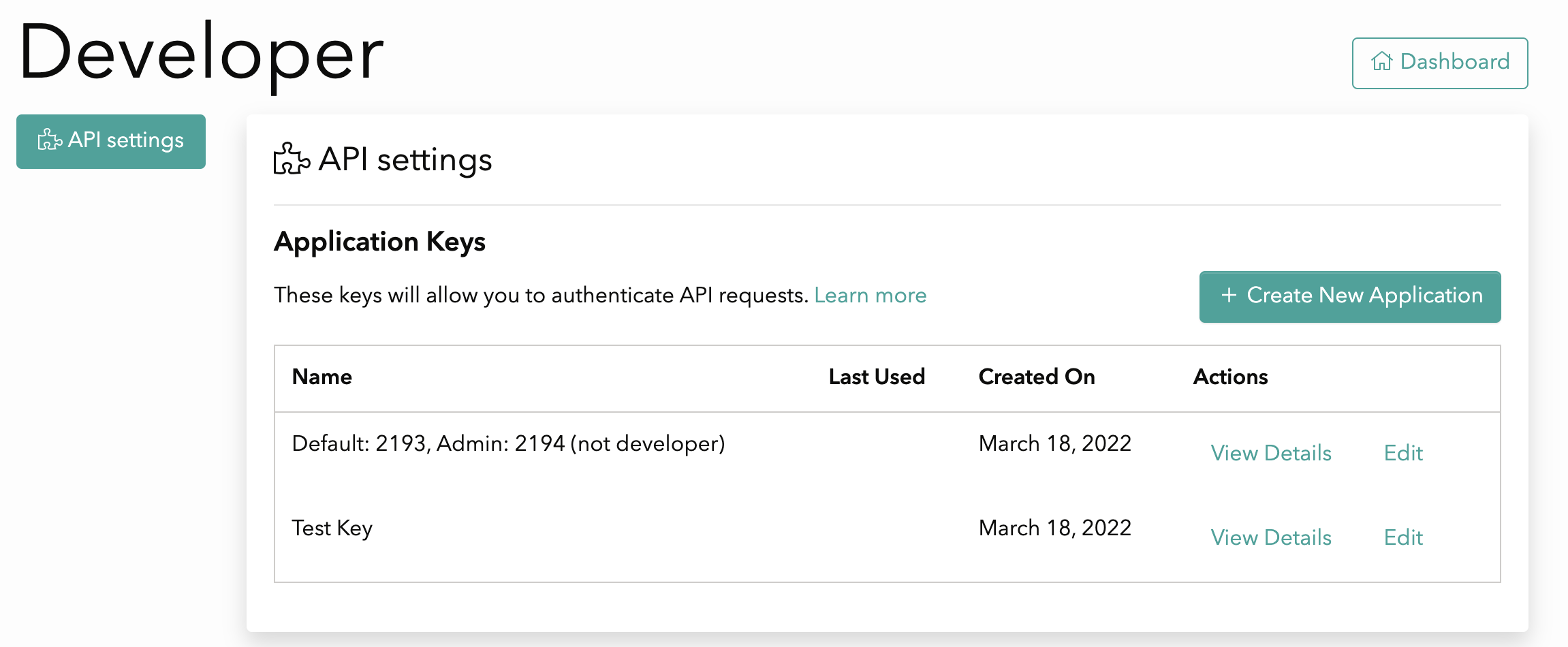
Each Application consists of a client id, secret and set of scopes. The scopes define what resources you want to have access to. The client ID and secret are used to generate an access token. You will need to create an application to use API endpoints.
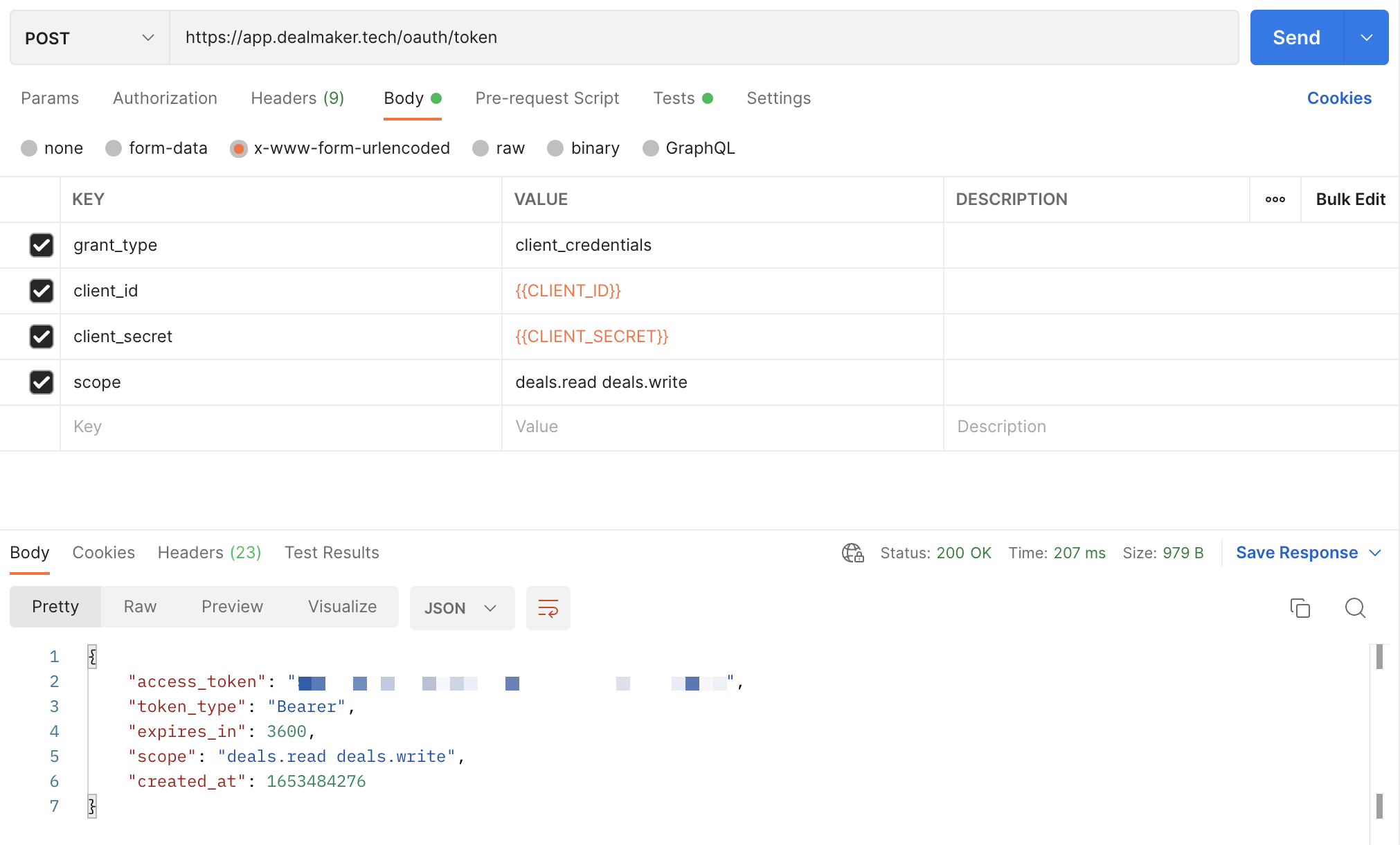
After creating an application, you must make a call to obtain a bearer token using the Generate an OAuth token operation. This operation requires the following parameters:
token endpoint - https://app.dealmaker.tech/oauth/token
grant_type - must be set to client_credentials
client_id - the Client ID displayed when you created the OAuth application in the previous step
client_secret - the Client Secret displayed when you created the OAuth application in the previous step
scope - the scope is established when you created the OAuth application in the previous step
Note: The Generate an OAuth token response specifies how long the bearer token is valid for. You should reuse the bearer token until it is expired. When the token is expired, call Generate an OAuth token again to generate a new one.
To use the access token, you must set a plain text header named Authorization with the contents of the header being “Bearer XXX” where XXX is your generated access token.
Here's an example on how to generate the access token with Postman, where {{CLIENT_ID}} and {{CLIENT_SECRET}} are the values generated after following the steps on Create an Application
All responses are returned in JSON format. We specify this by sending the Content-Type header.
Below is a table containing descriptions of the various status codes we currently support against various resources.
Sometimes your API call will generate an error. Here you will find additional information about what to expect if you don’t format your request properly, or we fail to properly process your request.
| Status Code | Description |
|---|---|
200 |
Success |
403 |
Forbidden |
404 |
Not found |
Pagination is used to divide large responses is smaller portions (pages). By default, all endpoints return a maximum of 25 records per page. You can change the number of records on a per request basis by passing a per_page parameter in the request header parameters. The largest supported per_page parameter is 100.
When the response exceeds the per_page parameter, you can paginate through the records by increasing the offset parameter. Example: offset=25 will return 25 records starting from 26th record. You may also paginate using the page parameter to indicate the page number you would like to show on the response.
Please review the table below for the input parameters
| Parameter | Description |
|---|---|
per_page |
Amount of records included on each page (Default is 25) |
page |
Page number |
offset |
Amount of records offset on the API request where 0 represents the first record |
| Response Header | Description |
|---|---|
X-Total |
Total number of records of response |
X-Total-Pages |
Total number of pages of response |
X-Per-Page |
Total number of records per page of response |
X-Page |
Number of current page |
X-Next-Page |
Number of next page |
X-Prev-Page |
Number of previous page |
X-Offset |
Total number of records offset |
The q optional parameter accepts a string as input and allows you to filter the request based on that string. Please note that search strings must be encoded according to ASCII. For example, "john+investor@dealmaker.tech" should be passed as “john%2Binvestor%40dealmaker.tech”. There are two main ways to filter with it.
Some keywords allow you to filter investors based on a specific “scope” of the investors, for example using the string “Invited” will filter all investors with the status invited, and the keyword “Has attachments” will filter investors with attachments.
Here’s a list of possible keywords and the “scope” each one of the keywords filters by:
| Keywords | Scope | Decoded Example | Encoded Example |
|---|---|---|---|
| Signed on \(date range\) | Investors who signed in the provided date range | Signed on (date range) [2020-07-01:2020-07-31] | Signed%20on%20%28date%20range%29%20%5B2020-07-01%3A2020-07-31%5D |
| Enabled for countersignature on \(date range\) | Investors who were enabled for counter signature in the provided date range | Enabled for countersignature on (date range) [2022-05-24:2022-05-25] | Enabled%20for%20countersignature%20on%20(date%20range)%20%5B2022-05-24%3A2022-05-25%5D |
| Accepted on \(date range\) | Investors accepted in the provided date rage | Accepted on (date range) [2022-05-24:2022-05-25] | Accepted%20on%20(date%20range)%20%5B2022-05-24%3A2022-05-25%5D |
| Offline | Investors added to the deal offline | Offline | Offline |
| Online | Investors added to the deal online | Online | Online |
| Signed | Investors who signed their agreement | Signed | Signed |
| Waiting for countersignature | Investors who have signed and are waiting for counter signature | Waiting for countersignature | Waiting%20for%20countersignature |
| Invited | Investors on the Invited Status | Invited | Invited |
| Accepted | Investors in the Accepted Status | Accepted | Accepted |
| Questionnaire in progress | All Investors who have not finished completing the questionnaire | Questionnaire in progress | Questionnaire%20in%20progress |
| Has attachments | All Investors with attachments | Has attachments | Has%20attachments |
| Has notes | All Investors with notes | Has notes | Has%20notes |
| Waiting for co-signature | Investors who have signed and are waiting for co-signature | Waiting for co-signature | Waiting%20for%20co-signature |
| Background Check Approved | Investors with approved background check | Background Check Approved | Background%20Check%20Approved |
| Document Review Pending | Investors with pending review | Document Review Pending | Document%20Review%20Pending |
| Document Upload Pending | Investors with pending documents to upload | Document Upload Pending | Document%20Upload%20Pending |
| Required adjudicator review | Investors who are required to be review by the adjudicator | Required adjudicator review | Required%20adjudicator%20review |
NOTE
Filtering keywords are case sensitive and need to be encoded
Any value for the parameter which does not match one of the keywords listed above, will use fields like first name, last name, email, tags to search for the investor.
For example, if you search “Robert”, because this does not match one of the keywords listed above, it will then return any investors who have the string “Robert” in their name, email, or tags fields.
The latest version is v1.
The version can be updated on the Accept header, just set the version as stated on the following example:
Accept:application/vnd.dealmaker-v1+json
| Version | Accept Header |
|---|---|
v1 |
application/vnd.dealmaker-v1+json |
For instruction on installing SDKs, please view the following links
Our webhooks functionality allows clients to automatically receive updates on a deal's investor data.
Some of the data that the webhooks include:
- Investor Name
- Date created
- Phone
- Allocation
- Attachments
- Accredited investor status
- Accredited investor category
- State (Draft, Invited, Signed, Accepted, Waiting, Inactive)
Via webhooks clients can subscribe to the following events as they happen on Dealmaker:
- Investor is created
- Investor details are updated (any of the investor details above change or are updated)
- Investor has signed their agreement
- Invertor fully funded their investment
- Investor has been accepted
- Investor is deleted
A URL supplied by the client will receive all the events with the information as part of the payload. Clients are able to add and update the URL within DealMaker.
For a comprehensive guide on how to configure Webhooks please visit our support article: Configuring Webhooks on DealMaker – DealMaker Support.
As a developer user on DealMaker, you are able to configure webhooks by following the steps below:
- Sign into Dealmaker
- Go to “Your profile” in the top right corner
- Access an “Integrations” configuration via the left menu
- The developer configures webhooks by including:
- The HTTPS URL where the request will be sent
- Optionally, a security token that we would use to build a SHA1 hash that would be included in the request headers. The name of the header is
X-DealMaker-Signature. If the secret is not specified, the hash won’t be included in the headers. - The Deal(s) to include in the webhook subscription
- An email address that will be used to notify about errors.
- The developers can disable webhooks temporarily if needed
The initial set of events will be related to the investor. The events are:
-
investor.created- Triggers every time a new investor is added to a deal
-
investor.updated- Triggers on updates to any of the following fields:
- Status
- Name
- Email - (this is a user field so we trigger event for all investors with webhook subscription)
- Allocated Amount
- Investment Amount
- Accredited investor fields
- Adding or removing attachments
- Tags
- When the investor status is signed, the payload also includes a link to the signed document; the link expires after 30 minutes
- Triggers on updates to any of the following fields:
-
investor.signed- Triggers when the investor signs their subscription agreement (terms and conditions)
- When this happens the investor.state becomes
signed
- When this happens the investor.state becomes
- This event includes the same fields as the
investor.updatedevent
- Triggers when the investor signs their subscription agreement (terms and conditions)
-
investor.funded- Triggers when the investor becomes fully funded
- This happens when the investor.funded_state becomes
funded
- This happens when the investor.funded_state becomes
- This event includes the same fields as the
investor.updatedevent
- Triggers when the investor becomes fully funded
-
investor.accepted- Triggers when the investor is countersigned
- When this happens the investor.state becomes
accepted
- When this happens the investor.state becomes
- This event includes the same fields as the
investor.updatedevent
- Triggers when the investor is countersigned
-
investor.deleted
- Triggers when the investor is removed from the deal
- The investor key of the payload only includes investor ID
- The deal is not included in the payload. Due to our implementation it’s impossible to retrieve the deal the investor was part of
- The request is a
POST - The payload’s
content-typeisapplication/json - Only
2XXresponses are considered successful. In the event of a different response, we consider it failed and queue the event for retry - We retry the request five times, after the initial attempt. Doubling the waiting time between intervals with each try. The first retry happens after 30 seconds, then 60 seconds, 2 mins, 4 minutes, and 8 minutes. This timing scheme gives the receiver about 1 hour if all the requests fail
- If an event fails all the attempts to be delivered, we send an email to the address that the user configured
There will be some properties that are common to all the events on the system.
| Key | Type | Description |
|---|---|---|
| event | String | The event that triggered the call |
| event_id | String | A unique identifier for the event |
| deal\* | Object | The deal in which the event occurred. please see below for an example on the deal object\\ |
\*This field is not included when deleting a resource
\\ Sample Deal Object in the webhook payload
\"deal\": {
        \"id\": 0,
        \"title\": \"string\",
        \"created_at\": \"2022-12-06T18:14:44.000Z\",
        \"updated_at\": \"2022-12-08T12:46:48.000Z\",
        \"state\": \"string\",
        \"currency\": \"string\",
        \"security_type\": \"string\",
        \"price_per_security\": 0.00,
        \"deal_type\": \"string\",
        \"minimum_investment\": 0,
        \"maximum_investment\": 0,
        \"issuer\": {
            \"id\": 0,
            \"name\": \"string\"
        },
        \"enterprise\": {
            \"id\": 0,
            \"name\": \"string\"
        }
}By design, we have incorporated on the webhooks payload the same investor-related fields included in the Investor model, for reference on the included fields, their types and values please click here. This will allow you to get all the necessary information you need about a particular investor without having to call the Get Investor by ID endpoint. |
Here is a brief description of each investor state:
- Draft: the investor is added to the platform but hasn't been invited yet and cannot access the portal
- Invited: the investor was added to the platform but hasn’t completed the questionnaire
- Signed: the investor signed the document (needs approval from Lawyer or Reviewer before countersignature)
- Waiting: the investor was approved for countersignature by any of the Lawyers or Reviewers in the deal
- Accepted: the investor's agreement was countersigned by the Signatory
- Inactive the investor is no longer eligible to participate in the offering. This may be because their warrant expired, they requested a refund, or they opted out of the offering
Given the high number of updates our platform performs on any investor, we’ve added a cool down period on update events that allows us to “group” updates and trigger only one every minute. In consequence, update events will be delivered 1 minute after the initial request was made and will include the latest version of the investor data at delivery time.
This SDK is automatically generated by the OpenAPI Generator project:
- API version: 1.75.0
- Package version: 0.107.5
- Generator version: 7.8.0-SNAPSHOT
- Build package: org.openapitools.codegen.languages.JavascriptClientCodegen
For Node.js
To publish the library as a npm, please follow the procedure in "Publishing npm packages".
Then install it via:
npm install api --saveFinally, you need to build the module:
npm run buildTo use the library locally without publishing to a remote npm registry, first install the dependencies by changing into the directory containing package.json (and this README). Let's call this JAVASCRIPT_CLIENT_DIR. Then run:
npm installNext, link it globally in npm with the following, also from JAVASCRIPT_CLIENT_DIR:
npm linkTo use the link you just defined in your project, switch to the directory you want to use your api from, and run:
npm link /path/to/<JAVASCRIPT_CLIENT_DIR>Finally, you need to build the module:
npm run buildIf the library is hosted at a git repository, e.g.https://github.com/GIT_USER_ID/GIT_REPO_ID then install it via:
npm install GIT_USER_ID/GIT_REPO_ID --saveThe library also works in the browser environment via npm and browserify. After following
the above steps with Node.js and installing browserify with npm install -g browserify,
perform the following (assuming main.js is your entry file):
browserify main.js > bundle.jsThen include bundle.js in the HTML pages.
Using Webpack you may encounter the following error: "Module not found: Error: Cannot resolve module", most certainly you should disable AMD loader. Add/merge the following section to your webpack config:
module: {
  rules: [
    {
      parser: {
        amd: false
      }
    }
  ]
}Please follow the installation instruction and execute the following JS code:
var Api = require('api');

var defaultClient = Api.ApiClient.instance;

var api = new Api.CampaignApi()
var id = 56; // {Number}
var callback = function(error, data, response) {
  if (error) {
    console.error(error);
  } else {
    console.log('API called successfully. Returned data: ' + data);
  }
};
api.getTtwCampaign(id, callback);All URIs are relative to http://api.dealmaker.tech
| Class | Method | HTTP request | Description |
|---|---|---|---|
| Api.CampaignApi | getTtwCampaign | GET /ttw/campaigns/{id} | Gets a TTW campaign for a given company |
| Api.CampaignApi | getTtwCampaigns | GET /ttw/companies/{company_id}/campaigns | Gets a list TTW campaigns for a given company |
| Api.CampaignApi | getUserTtwReservation | GET /ttw/campaign/{id}/reservation/{reservation_uuid} | Gets User ID for a TTW reservation |
| Api.CompanyApi | createBulkUpload | POST /companies/{id}/documents/bulk_uploads | Create bulk upload record |
| Api.CompanyApi | createBulkUploadDetail | POST /companies/{company_id}/documents/bulk_uploads/{bulk_upload_id}/details | Create a BulkUploadDetail class record |
| Api.CompanyApi | createCompany | POST /companies | Create new company |
| Api.CompanyApi | createEmailTemplate | POST /companies/{id}/news_releases/email_templates | Creates an email template |
| Api.CompanyApi | createMembersBulkUpload | POST /companies/{id}/members/bulk_uploads | Create bulk upload record |
| Api.CompanyApi | createShareholderAction | POST /companies/{company_id}/shareholders/{shareholder_id}/actions | Create a shareholder action |
| Api.CompanyApi | deleteEmailTemplate | DELETE /companies/{id}/news_releases/email_templates/{template_id} | Deletes an email template |
| Api.CompanyApi | getBulkUpload | GET /companies/{id}/documents/bulk_uploads/{bulk_upload_id} | Return a given bulk upload by id |
| Api.CompanyApi | getBulkUploadDetailsErrors | GET /companies/{company_id}/documents/bulk_uploads/{bulk_upload_id}/details/errors | Returns a full list of details with errors of the given bulk upload ordered by status desc and id asc |
| Api.CompanyApi | getBulkUploads | GET /companies/{id}/documents/bulk_uploads | Return bulk uploads |
| Api.CompanyApi | getCompanies | GET /companies | Get list of Companies |
| Api.CompanyApi | getCompany | GET /companies/{id} | Get a Company |
| Api.CompanyApi | getDetailsErrorsGrouped | GET /companies/{company_id}/documents/bulk_uploads/{bulk_upload_id}/details/grouped_errors | Return bulk upload details grouped by status |
| Api.CompanyApi | getDividends | GET /companies/{company_id}/portal/dividends | Return dividends |
| Api.CompanyApi | getEmailEvents | GET /companies/{company_communication_id}/email_events | Get a list of email events for a company communication |
| Api.CompanyApi | getEmailTemplate | GET /companies/{id}/news_releases/email_templates/{template_id} | Get an email template |
| Api.CompanyApi | getEmailTemplates | GET /companies/{id}/news_releases/email_templates | Get list of email template |
| Api.CompanyApi | getMembersBulkUpload | GET /companies/{id}/members/bulk_uploads/{id_members_bulk_upload} | Get bulk upload record |
| Api.CompanyApi | getMembersBulkUploads | GET /companies/{id}/members/bulk_uploads | Get bulk uploads records |
| Api.CompanyApi | getShareholderLedger | GET /companies/{id}/shareholder_ledger | Get shareholder ledger by company |
| Api.CompanyApi | getUserAccessibleCompanies | GET /users/accessible_companies | Get list of all Companies accessible by the user |
| Api.CompanyApi | sendPortalInvite | POST /companies/{id}/shareholders/{shareholder_id}/send_portal_invite | Send portal invite to shareholder |
| Api.CompanyApi | testDocumentUploadEmail | POST /companies/{id}/documents/test_upload_email | Send document upload test email to given user |
| Api.CountryApi | getCountryStates | GET /country/states | Returns a list of all valid countries and it states |
| Api.CustomEmailsApi | getAccessToken | POST /custom_emails/get_access_token | Generate authorization token information for initializing Beefree editor |
| Api.DealApi | achBankAccountSetupIntent | GET /deals/{id}/investor/{investor_id}/subscription/{subscription_id}/payments/ach/bank_account_setup_intent | Prepares an investor for payment |
| Api.DealApi | acssBankAccountSetupIntent | GET /deals/{id}/investor/{investor_id}/subscription/{subscription_id}/payments/acss/bank_account_setup_intent | Prepares an investor for payment |
| Api.DealApi | createDealSetup | POST /deal_setups | Create deal setup |
| Api.DealApi | getDeal | GET /deals/{id} | Get deal by Deal ID |
| Api.DealApi | getDealIncentivePlan | GET /deals/{id}/incentive_plan | Get incentive plan by deal id |
| Api.DealApi | getPlatformEmailPage | GET /deals/{id}/platform_emails/{kind}/page | Get the Page for a given Platform Email |
| Api.DealApi | listDeals | GET /deals | List available deals |
| Api.DealApi | listPlatformEmails | GET /deals/{id}/platform_emails | Get a list of platform emails for the deal |
| Api.DealApi | patchPlatformEmail | PATCH /deals/{id}/platform_emails/{kind}/update | Patch platform email by kind and deal. |
| Api.DealApi | patchPlatformEmailPage | PATCH /deals/{id}/platform_emails/{kind}/page | Create and associate a page with a platform email or update the existing page |
| Api.DealsApi | postDealsIdEmailCampaignEmailCampaignIdSendEmail | POST /deals/{id}/email_campaign/{email_campaign_id}/send_email | Send emails to all the investors invited to the material change campaign |
| Api.DealsApi | putDealsIdScriptTagEnvironment | PUT /deals/{id}/script_tag_environment | Update script tag environment for the deal. |
| Api.DefaultApi | getDealsDealIdPaymentOnboardingQuestionnaireDigitalPaymentsConnectionData | GET /deals/{deal_id}/payment_onboarding/questionnaire/digital_payments_connection/data | Load data for the digital payments connection stage |
| Api.DefaultApi | getDealsDealIdPaymentOnboardingQuestionnairePayoutAccountDetailsData | GET /deals/{deal_id}/payment_onboarding/questionnaire/payout_account_details/data | Get payout account data |
| Api.DefaultApi | getDealsIdInvestorsInvestorIdPaymentsExpressWireInstructions | GET /deals/{id}/investors/{investor_id}/payments/express_wire/instructions | Displays the express wire instructions for an investor on a deal |
| Api.DefaultApi | getDealsIdInvestorsPaymentsExpressWireInstructions | GET /deals/{id}/investors/payments/express_wire/instructions | Displays the express wire instructions for all the investors on a deal |
| Api.DefaultApi | getDealsIdPlatformEmailsDomain | GET /deals/{id}/platform_emails/domain | Get the email domain settings for the deal |
| Api.DefaultApi | getDealsIdProgressPage | GET /deals/{id}/progress_page | Get deal progress |
| Api.DefaultApi | getDealsIdProgressPageSummary | GET /deals/{id}/progress_page/summary | Get the deal progress summary |
| Api.DefaultApi | getDealsIdSummary | GET /deals/{id}/summary | Get Deal Overview |
| Api.DefaultApi | getDealsPaymentOnboardingQuestionnaireInitialQuestions | GET /deals/payment_onboarding/questionnaire/initial_questions | Get initial questions |
| Api.DefaultApi | getWebhooks | GET /webhooks | Returns a list of webhook subscription which is associated to the user |
| Api.DefaultApi | getWebhooksDealId | GET /webhooks/deal/{id} | Finds a deal using the id |
| Api.DefaultApi | getWebhooksDealsSearch | GET /webhooks/deals/search | Searches for deals for a given user |
| Api.DefaultApi | getWebhooksSecurityToken | GET /webhooks/security_token | Creates a new security token for webhook subscription |
| Api.DefaultApi | patchDealsIdPlatformEmailsDomain | PATCH /deals/{id}/platform_emails/domain | Update the email domain settings for the deal |
| Api.DefaultApi | postDealsDealIdPaymentOnboardingQuestionnairePayoutAccountDetailsSubmit | POST /deals/{deal_id}/payment_onboarding/questionnaire/payout_account_details/submit | Submit a payout account details form |
| Api.DefaultApi | postDealsDealIdPaymentOnboardingQuestionnaireQualificationQuestionnaireResponseSubmit | POST /deals/{deal_id}/payment_onboarding/questionnaire/qualification_questionnaire/response/submit | Submit a qualification questionnaire response |
| Api.DefaultApi | postDealsDealIdPaymentOnboardingQuestionnaireQualificationQuestionnaireSubmit | POST /deals/{deal_id}/payment_onboarding/questionnaire/qualification_questionnaire/submit | Submit a qualification questionnaire form |
| Api.DefaultApi | postInvestorsInvestorIdDeleteInvestmentProcess | POST /investors/{investor_id}/delete_investment/process | Delete investment |
| Api.DefaultApi | postInvestorsInvestorIdTransactionsRequestRefundProcess | POST /investors/{investor_id}/transactions/request_refund/process | Request refund for investor transactions |
| Api.DefaultApi | postWebhooks | POST /webhooks | Creates a webhook subscription which is associated to the user |
| Api.DefaultApi | putWebhooksId | PUT /webhooks/{id} | Updates webhook subscription and webhooks subcription deals |
| Api.IncentivePlanApi | getDealIncentivePlansTime | GET /deals/{id}/incentive_plans/time | Get incentive plans by deal id |
| Api.IncentivePlanApi | patchDealIncentivePlan | PATCH /deals/{id}/incentive_plans/{incentive_plan_id} | Updates incentive plan by deal id |
| Api.IncentivePlanApi | postDealIncentivePlan | POST /deals/{id}/incentive_plans | Creates incentive plan by deal id |
| Api.InvestorApi | add506cDocument | POST /deals/{id}/investors/{investor_id}/add_506c_document | Add 506c document for deal investor |
| Api.InvestorApi | addDocument | POST /deals/{id}/investors/{investor_id}/add_document | Add document for deal investor |
| Api.InvestorApi | bulkUploadInvestors | POST /deals/{id}/investors/bulk_upload | Bulk upload investors for deal investor |
| Api.InvestorApi | createInvestor | POST /deals/{id}/investors | Create a deal investor |
| Api.InvestorApi | deleteDocument | DELETE /deals/{id}/investors/{investor_id}/delete_document/{document_id} | Delete document for deal investor |
| Api.InvestorApi | deleteInvestorProfile | DELETE /investor_profiles/{type}/{id} | Delete investor profile. |
| Api.InvestorApi | editInvestorTags | POST /deals/{id}/investors/{investor_id}/edit_tags | Append or replace tag(s) for a specific investor |
| Api.InvestorApi | getDealInvestorSearchEntities | GET /deals/{id}/investors/{investor_id}/search_entities | Get the search entities attached to the investor |
| Api.InvestorApi | getEnforcements | GET /deals/{id}/investors/{investor_id}/background_checks/{search_entity_id}/enforcements | Get enforcements for a background search |
| Api.InvestorApi | getIncentivePlan | GET /deals/{id}/investors/{investor_id}/incentive_plan | Get investor incentive plan by investor id |
| Api.InvestorApi | getInvestor | GET /deals/{id}/investors/{investor_id} | Get a deal investor by id |
| Api.InvestorApi | getInvestorOtpLink | GET /deals/{id}/investors/{investor_id}/otp_access_link | Get OTP access link for deal investor |
| Api.InvestorApi | listInvestors | GET /deals/{id}/investors | List deal investors |
| Api.InvestorApi | patchInvestor | PATCH /deals/{id}/investors/{investor_id} | Patch a deal investor |
| Api.InvestorApi | requestNewDocument | POST /deals/{id}/investors/{investor_id}/background_checks/{search_entity_id}/send_review | Request new document for a specific entity |
| Api.InvestorApi | runBackgroundSearch | POST /deals/{id}/investors/{investor_id}/background_checks/run | Run Alloy background search for the investor |
| Api.InvestorApi | updateInvestor | PUT /deals/{id}/investors/{investor_id} | Update a deal investor |
| Api.InvestorProfileApi | createCorporationProfile | POST /investor_profiles/corporations | Create new corporation investor profile. |
| Api.InvestorProfileApi | createIndividualProfile | POST /investor_profiles/individuals | Create new individual investor profile |
| Api.InvestorProfileApi | createJointProfile | POST /investor_profiles/joints | Create new joint investor profile |
| Api.InvestorProfileApi | createManagedProfile | POST /investor_profiles/managed | Create new managed investor profile. |
| Api.InvestorProfileApi | createTrustProfile | POST /investor_profiles/trusts | Create new trust investor profile. |
| Api.InvestorProfileApi | getDealInvestorProfiles | GET /investor_profiles/{deal_id} | Get list of InvestorProfiles for a specific deal |
| Api.InvestorProfileApi | getInvestorProfile | GET /investor_profiles/profile/{id} | Get an investor profile by id |
| Api.InvestorProfileApi | getInvestorProfiles | GET /investor_profiles | Get list of InvestorProfiles |
| Api.InvestorProfileApi | patchCorporationProfile | PATCH /investor_profiles/corporations/{investor_profile_id} | Patch a corporation investor profile |
| Api.InvestorProfileApi | patchIndividualProfile | PATCH /investor_profiles/individuals/{investor_profile_id} | Patch an individual investor profile. |
| Api.InvestorProfileApi | patchJointProfile | PATCH /investor_profiles/joints/{investor_profile_id} | Patch a joint investor profile |
| Api.InvestorProfileApi | patchManagedProfile | PATCH /investor_profiles/managed/{investor_profile_id} | Patch managed investor profile. |
| Api.InvestorProfileApi | patchTrustProfile | PATCH /investor_profiles/trusts/{investor_profile_id} | Patch a trust investor profile |
| Api.PaymentsApi | postDealInvestorPaymentsIra | POST /deals/{id}/investors/{investor_id}/payments/ira | Creates a payment intent for express wire and mail its instructions. |
| Api.ReservationApi | createReservation | POST /ttw/reservations | Create a new reservation |
| Api.ReservationApi | getTtwReservation | GET /ttw/reservations/{id} | Gets a TTW reservation |
| Api.ShareholderApi | getShareholders | GET /companies/{id}/shareholders | Get a company shareholders list |
| Api.ShareholderApi | getShareholdersTags | GET /companies/{id}/shareholders/tags | Get a company shareholders list grouped by tags |
| Api.ShwApi | getShwPage | GET /shw/{id}/page | Get self hosted website page |
| Api.ShwApi | publishShwPage | PATCH /shw/{id}/page/publish | Publish self hosted website page |
| Api.TtwCampaignsApi | getTtwCampaignPage | GET /ttw/campaigns/{id}/page | Get ttw campaign page |
| Api.TtwCampaignsApi | publishTtwCampaignPage | PATCH /ttw/campaigns/{id}/page/publish | Publish ttw campaign page |
| Api.UploadApi | generateUrl | POST /uploads/generate_url | Create a presigned URL for Amazon S3 |
| Api.UserApi | createFactor | POST /users/{id}/create_factor | Creates an API endpoint for creating a new TOTP factor |
| Api.UserApi | deleteChannel | DELETE /users/{id}/two_factor_channels/delete/{channel} | Creates an API endpoint to delete a specific two factor channel" |
| Api.UserApi | disableMfa | DELETE /users/{id}/disable_mfa | Disable all the multi-factor authentication integrations for a user |
| Api.UserApi | getTwoFactorChannels | GET /users/{id}/two_factor_channels | Creates an API endpoint to return a list of existing TOTP factor |
| Api.UserApi | getUser | GET /users/{id} | Get user by User ID |
| Api.UserApi | getVerificationResources | GET /users/verification/resources | Gets the verification process resources |
| Api.UserApi | sendVerificationCode | POST /users/verification/send_code | Sends the verification code to the user |
| Api.UserApi | setupSmsVerification | POST /users/{id}/setup_sms_verification | Start a setup for a SMS Verification by creating a two factor channel of sms type |
| Api.UserApi | updateUserPassword | PUT /users/{id}/update_password | Update user password |
| Api.UserApi | verifyFactor | PUT /users/{id}/verify_factor | Creates an API endpoint to verify an existing TOTP factor |
| Api.UserApi | verifySmsVerification | POST /users/{id}/verify_sms_verification | Verify a SMS Verification by creating a two factor channel of sms type |
| Api.UsersApi | getUsersIdContexts | GET /users/{id}/contexts | Get contexts for a user |
| Api.UsersApi | getUsersInvestments | GET /users/investments | Gets the investments for a specific user. |
- Api.Add506cDocumentRequest
- Api.AddDocumentRequest
- Api.BulkUploadInvestorsRequest
- Api.CreateBulkUploadDetailRequest
- Api.CreateBulkUploadRequest
- Api.CreateCompanyRequest
- Api.CreateDealSetupRequest
- Api.CreateEmailTemplateRequest
- Api.CreateMembersBulkUploadRequest
- Api.CreateReservationRequest
- Api.CreateShareholderActionRequest
- Api.EditInvestorTagsRequest
- Api.GenerateUrlRequest
- Api.GetAccessTokenRequest
- Api.PatchDealIncentivePlanRequest
- Api.PatchDealsIdPlatformEmailsDomainRequest
- Api.PatchInvestorProfilesCorporations
- Api.PatchInvestorProfilesCorporationsBeneficialOwnersInner
- Api.PatchInvestorProfilesIndividuals
- Api.PatchInvestorProfilesJoints
- Api.PatchInvestorProfilesManaged
- Api.PatchInvestorProfilesTrusts
- Api.PatchInvestorProfilesTrustsTrusteesInner
- Api.PatchInvestorRequest
- Api.PatchPlatformEmailPageRequest
- Api.PatchPlatformEmailRequest
- Api.PostDealIncentivePlanRequest
- Api.PostDealsIdInvestors
- Api.PostInvestorProfilesCorporations
- Api.PostInvestorProfilesCorporationsBeneficialOwnersInner
- Api.PostInvestorProfilesIndividuals
- Api.PostInvestorProfilesJoints
- Api.PostInvestorProfilesManaged
- Api.PostInvestorProfilesTrusts
- Api.PostInvestorProfilesTrustsTrusteesInner
- Api.PostWebhooksRequest
- Api.PutDealsIdInvestors
- Api.PutDealsIdScriptTagEnvironmentRequest
- Api.PutWebhooksIdRequest
- Api.RequestNewDocumentRequest
- Api.RunBackgroundSearchRequest
- Api.SendPortalInviteRequest
- Api.SendVerificationCodeRequest
- Api.SetupSmsVerificationRequest
- Api.TestDocumentUploadEmailRequest
- Api.UpdateUserPasswordRequest
- Api.V1EntitiesAddress
- Api.V1EntitiesAddresses
- Api.V1EntitiesAttachment
- Api.V1EntitiesBackgroundCheckSearch
- Api.V1EntitiesBeefreeAccessToken
- Api.V1EntitiesBulkUpload
- Api.V1EntitiesBulkUploadDetail
- Api.V1EntitiesBulkUploadDetails
- Api.V1EntitiesBulkUploads
- Api.V1EntitiesCompany
- Api.V1EntitiesCompanyDeal
- Api.V1EntitiesCompanyDeals
- Api.V1EntitiesCountries
- Api.V1EntitiesCountry
- Api.V1EntitiesDeal
- Api.V1EntitiesDealEnterprise
- Api.V1EntitiesDealFundingMetrics
- Api.V1EntitiesDealInvestorMetrics
- Api.V1EntitiesDealIssuer
- Api.V1EntitiesDealSetup
- Api.V1EntitiesDealSetupUser
- Api.V1EntitiesDeals
- Api.V1EntitiesDealsIncentivePlan
- Api.V1EntitiesDealsIncentivePlansIncentiveTier
- Api.V1EntitiesDealsInvestorsPaymentAchBankAccountSetupIntent
- Api.V1EntitiesDealsInvestorsPaymentAcssBankAccountSetupIntent
- Api.V1EntitiesDealsPlatformEmail
- Api.V1EntitiesDealsPlatformEmails
- Api.V1EntitiesDealsPlatformEmailsDomainSettings
- Api.V1EntitiesDealsPriceDetails
- Api.V1EntitiesDealsProgress
- Api.V1EntitiesDealsProgressColumn
- Api.V1EntitiesDealsProgressKinds
- Api.V1EntitiesDealsProgressPageSummary
- Api.V1EntitiesDealsProgressPageSummaryItem
- Api.V1EntitiesDeleteResult
- Api.V1EntitiesDividend
- Api.V1EntitiesDividends
- Api.V1EntitiesEmailEvent
- Api.V1EntitiesEmailEvents
- Api.V1EntitiesEmailTemplate
- Api.V1EntitiesExpressWireInstruction
- Api.V1EntitiesExpressWireInstructions
- Api.V1EntitiesGenericResponse
- Api.V1EntitiesInvestor
- Api.V1EntitiesInvestorOtpAccessLink
- Api.V1EntitiesInvestorProfileAddress
- Api.V1EntitiesInvestorProfileCorporation
- Api.V1EntitiesInvestorProfileFieldsAccountHolder
- Api.V1EntitiesInvestorProfileFieldsBeneficialOwner
- Api.V1EntitiesInvestorProfileFieldsBeneficiary
- Api.V1EntitiesInvestorProfileFieldsCorporation
- Api.V1EntitiesInvestorProfileFieldsPrimaryHolder
- Api.V1EntitiesInvestorProfileFieldsProvider
- Api.V1EntitiesInvestorProfileFieldsSigningOfficer
- Api.V1EntitiesInvestorProfileFieldsTrust
- Api.V1EntitiesInvestorProfileFieldsTrustee
- Api.V1EntitiesInvestorProfileId
- Api.V1EntitiesInvestorProfileIndividual
- Api.V1EntitiesInvestorProfileItem
- Api.V1EntitiesInvestorProfileJoint
- Api.V1EntitiesInvestorProfileManaged
- Api.V1EntitiesInvestorProfileOwner
- Api.V1EntitiesInvestorProfileTrust
- Api.V1EntitiesInvestorProfiles
- Api.V1EntitiesInvestorSearchEntities
- Api.V1EntitiesInvestorSearchEntitiesRequiredFields
- Api.V1EntitiesInvestorUser
- Api.V1EntitiesInvestors
- Api.V1EntitiesMembersBulkUpload
- Api.V1EntitiesMembersBulkUploads
- Api.V1EntitiesMoneyEntity
- Api.V1EntitiesPage
- Api.V1EntitiesPaymentsSelfServeOnboardingDigitalPaymentsConnectionData
- Api.V1EntitiesPaymentsSelfServeOnboardingPayoutAccountDetailsData
- Api.V1EntitiesPaymentsSelfServeOnboardingPayoutAccountDetailsResult
- Api.V1EntitiesPaymentsSelfServeOnboardingQualificationQuestionnaireResult
- Api.V1EntitiesPresignedUrlResult
- Api.V1EntitiesShareholder
- Api.V1EntitiesShareholderLedger
- Api.V1EntitiesShareholders
- Api.V1EntitiesShareholdersTags
- Api.V1EntitiesState
- Api.V1EntitiesSubscriptionAgreement
- Api.V1EntitiesTtwCampaignList
- Api.V1EntitiesTtwCampaignResponse
- Api.V1EntitiesTtwReservationCreate
- Api.V1EntitiesTtwReservationGetResponse
- Api.V1EntitiesTtwReservationResponse
- Api.V1EntitiesUser
- Api.V1EntitiesUsersBinding
- Api.V1EntitiesUsersContext
- Api.V1EntitiesUsersContexts
- Api.V1EntitiesUsersFactor
- Api.V1EntitiesUsersTwoFactorChannel
- Api.V1EntitiesUsersTwoFactorChannels
- Api.V1EntitiesUsersVerificationResources
- Api.V1EntitiesWebhooksDeal
- Api.V1EntitiesWebhooksSecurityToken
- Api.V1EntitiesWebhooksSubscription
- Api.V1EntitiesWebhooksSubscriptionDeal
- Api.V1EntitiesWebhooksSubscriptionDeals
- Api.VerifyFactorRequest
- Api.VerifySmsVerificationRequest
Endpoints do not require authorization.